
Introduction
A data center can have a well-designed asset naming convention and still be difficult to operate if engineers cannot quickly match digital records with the equipment physically installed in the rack.
Imagine receiving a ticket that says:
Check the core switch installed in Rack R10A at U24.
The DCIM record may be correct. The asset name may be correct. The rack elevation may also be correct.
But once the engineer reaches the data center floor, a different problem begins.
Which cabinet is R10A?
Is the rack identifier visible from the aisle?
Does the rear of the cabinet carry the same rack ID?
Which equipment actually occupies U24?
Does the physical device label match the inventory record?
These may sound like small details, but during troubleshooting, maintenance, audits and emergency work, unclear physical identification can waste valuable time and increase the possibility of human error.
This is where data center rack labeling and equipment identification become an important part of infrastructure management.
In our previous guide on Data Center Asset Naming, we discussed how consistent asset names create a common identity across physical infrastructure, inventory, monitoring and DCIM systems.
Physical labeling takes the next step:
It connects that digital identity to the actual infrastructure installed inside the data center.
Table of Contents
The Problem: The Record Is Correct, but Can You Find the Device?
Consider a simple asset record:
HGIT-HQ-1F-DC-R10A-U24-CSW-01
From a documentation perspective, this is useful.
It tells us that the equipment belongs to a particular site, data center, rack and rack-unit position, and that the device is a core switch.
But that information only helps on the data center floor if the physical environment supports the same identification structure.
If the cabinet is labeled:
Rack 10
while the DCIM system calls it:
R10A
and an old spreadsheet calls it:
CAB-10
the engineer now has three identifiers for what may be the same cabinet.
The infrastructure exists.
The documentation exists.
The problem is that they do not speak the same language.
A good data center rack labeling standard should remove that ambiguity.
A Real Field Problem: Standing in Front of the Wrong Rack
Picture an engineer arriving at a data center during a maintenance window.
The work order says:
Rack: R10A
The engineer enters the row and finds several cabinets.
One rack has a small handwritten 10 label.
Another has an old printed label saying CAB-10.
A third has no visible identification from the front aisle.
Now the engineer has to verify the cabinet using neighboring racks, installed equipment, documentation or another team member.
Nothing has failed technically.
Yet time is already being lost.
During normal working hours, this may only be inconvenient.
During a short change window or a 2:00 AM incident, it becomes an operational problem.
A good rack labeling standard should allow an authorized engineer to enter the room, locate the correct rack and confirm its identity without relying on memory or guesswork.
Rack Identification Should Work From the Aisle
One of the most basic requirements of data center rack labeling is visibility.
A rack identifier should be readable before an engineer starts opening cabinet doors or inspecting individual devices.
For example:
R10A
Or, where additional context is necessary:
HGIT-HQ-1F-DC-R10A
The exact format depends on the facility.
The important part is consistency.
If the DCIM system identifies a cabinet as R10A, the physical rack should not be labeled Rack-10, CAB10 or another unrelated variation unless there is a documented mapping and a clear operational reason.
Ideally, the rack identifier should be:
- Unique within the defined scope
- Easy to read
- Positioned consistently
- Visible from the working aisle
- Durable enough for the environment
- Consistent with the approved infrastructure record
The objective is simple:
An engineer should be able to locate the correct cabinet before touching any equipment.
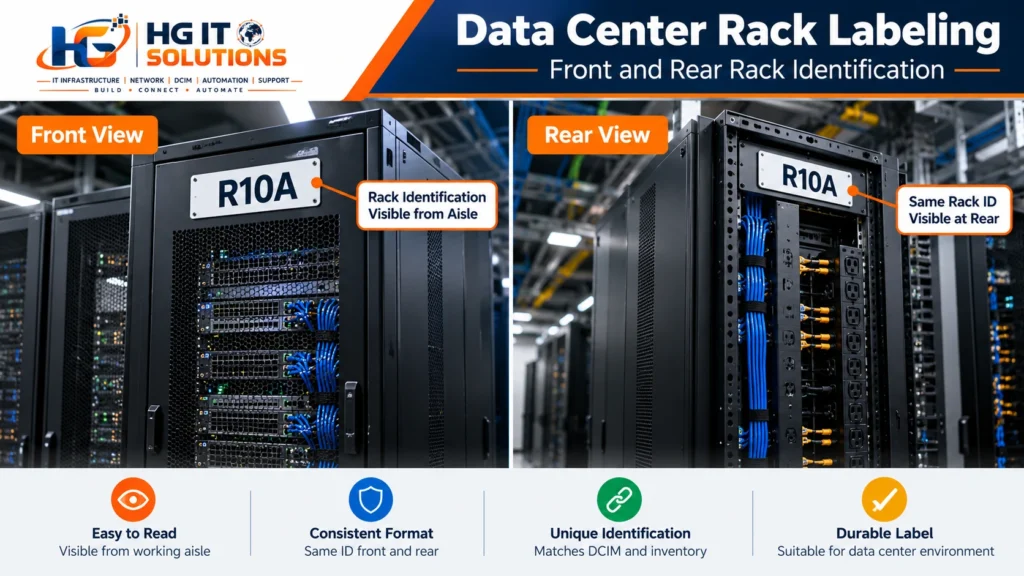
Label Both the Front and Rear of the Rack
This is one of the easiest details to overlook.
Many cabinets are clearly identified from the front but have poor or no identification at the rear.
That becomes a problem because a significant amount of data center work happens behind the rack.
Engineers may be working on power connections, PDUs, server power supplies, network interfaces, cable management, equipment replacement or hardware inspection.
After moving through multiple rear aisles, similar-looking cabinets can become surprisingly easy to confuse.
If the rack is identified as:
R10A
the same identifier should be clearly visible at both the front and rear where operationally required.
The engineer should not have to walk around the row simply to confirm which cabinet is being serviced.
Rack Labels Should Follow One Placement Standard
Correct information placed inconsistently can still slow down operations.
Imagine one rack ID placed at the top-left corner, another near the bottom, another inside the front door and another on the side panel.
All labels may technically be correct, but engineers still have to search for them.
Define a standard placement.
For example:
Front: Top section of the rack or cabinet door
Rear: Corresponding top section at the rear
The exact position depends on cabinet design and facility layout.
What matters is that engineers know where to look before they even reach the rack.
Consistency reduces search time.
U-Position Identification Matters More Than It Looks
Once the correct rack has been identified, the next question is:
Where exactly is the equipment?
Standard 19-inch racks use rack units, commonly written as U.
An asset record might indicate:
R10A-U24-CSW-01
That information becomes much more useful when the rack’s physical U positions can be identified clearly.
Poor U-position visibility creates several problems.
An engineer may count from the wrong direction.
A device may be documented at U24 but physically occupy more than one rack unit.
Equipment may have been moved without updating the record.
Or the cabinet’s original U markings may simply be difficult to read in a crowded rack.
This is especially important when devices occupy multiple rack units.
A 1U switch is relatively straightforward.
A 2U, 4U or larger device needs a clearly defined reference rule in the documentation standard.
For example, an organization may record the lowest occupied U position as the asset’s reference position.
Another environment may follow a different approved rule.
The important point is not which rule is chosen.
Define it once and apply it consistently.
Do Not Assume Every Rack Numbers U Positions the Same Way
Before documenting equipment positions, verify how the rack manufacturer marks the rack units.
Operational mistakes can occur when an engineer assumes U positions are being counted in one direction while the physical rack markings or existing documentation follow another convention.
The rack itself should be physically verified.
If additional U-position labels are installed, they should reinforce the approved numbering rather than create a second competing system.
This becomes particularly important during rack audits and DCIM implementation.
Never update dozens of infrastructure records based only on assumptions about physical rack position.
Verify the cabinet and U markings first.
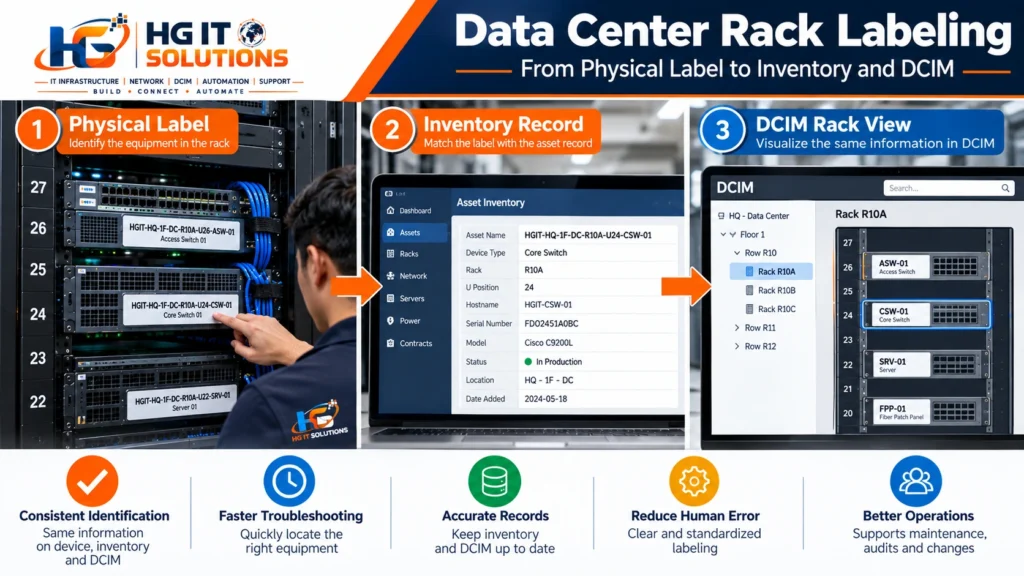
Equipment Labels Should Identify the Device Clearly
After locating the rack and U position, the engineer still needs to confirm the actual device.
Consider a rack containing:
- Two similar switches
- Several identical servers
- Redundant firewalls
- Multiple PDUs
- Patch panels
- Appliances from the same vendor
Model numbers alone may not be enough.
A physical equipment label should provide a clear connection to the approved asset identity.
For example:
HGIT-HQ-1F-DC-R10A-U24-CSW-01
Or, if the organization deliberately uses shorter physical labels:
R10A-U24-CSW-01
A shorter label can work when the site and room context is already unambiguous.
The rule should be documented rather than decided separately for every device.

The Physical Label and Digital Record Must Agree
This is one of the most important principles in the entire labeling process.
Suppose the physical switch says:
R10A-U24-CSW-01
but DCIM shows:
R10A-U26-CSW-01
Which one is correct?
Do not simply change whichever record is easiest.
First verify the physical installation.
The switch may have been moved.
The DCIM record may be outdated.
The label may never have been replaced.
Or an earlier rack audit may have recorded the wrong U position.
A discrepancy should trigger verification, not assumption.
A practical validation flow is:
Physical Asset → Physical Verification → Approved Record → Correct Label
Once validated, the physical label and authoritative digital record should represent the same asset.
Old Labels Can Be More Dangerous Than Missing Labels
A missing label immediately tells an engineer that additional verification is required.
An outdated label can create false confidence.
Imagine a server was previously installed at:
R10A-U18-SRV-02
and later moved to:
R12B-U30-SRV-02
The infrastructure record is updated correctly, but the old physical label remains attached.
An engineer sees the old label and assumes it is trustworthy.
That can be worse than having no label at all.
Whenever an asset is moved, renamed, replaced or decommissioned, the change process should include the physical label.
A useful principle is:
One active identity should have one current physical label.
Obsolete identifiers should be removed or clearly invalidated according to the organization’s change process.
Avoid Handwritten Labels as a Permanent Standard
Handwritten labels are sometimes unavoidable during temporary staging, emergency work or installation.
They should not become the permanent identification system.
Handwriting introduces several problems:
- Inconsistent character shapes
- Poor readability
- Different abbreviations
- Fading ink
- Unclear numbers and letters
- Inconsistent label sizes
- Difficult audits
Characters such as 0/O, 1/I, 5/S and 8/B can become particularly difficult to distinguish on small labels.
For permanent infrastructure, machine-printed labels provide much better consistency.
Temporary labels can still be useful during staging, but they should be replaced before final handover.
Label Material Matters
A perfectly designed naming convention is useless if the physical label falls off after a few months.
Data center labels may be exposed to:
- Warm exhaust air
- Cold airflow
- Dust
- Frequent handling
- Curved equipment surfaces
- Textured cabinet finishes
- Cleaning activity
- Long operating periods
Choose label material and adhesive appropriate for the surface and operating environment.
The label should remain readable and securely attached without unnecessarily damaging the equipment.
This is one reason ordinary office paper labels are rarely a good long-term infrastructure solution.
The physical implementation deserves the same planning as the naming convention itself.
For structured data center infrastructure, industry standards can also provide useful guidance. ANSI/TIA-942 covers requirements and considerations for data center infrastructure, including telecommunications and physical infrastructure practices
Readability Is More Important Than Decoration
Infrastructure labels are operational tools.
They do not need elaborate graphics.
They need to be readable.
Use:
- Clear fonts
- Adequate character size
- Strong contrast
- Predictable formatting
- Sufficient spacing
Avoid unnecessarily decorative fonts or complicated color schemes.
Color can help identify categories, but it should not become the only method used to communicate important information.
An engineer should still be able to understand the label when lighting is poor or colors are difficult to distinguish.
Use a Consistent Device-Type Dictionary
The device-type codes defined during asset naming should also remain consistent when physical labels are produced.
For example:
| Code | Meaning |
|---|---|
| CSW | Core Switch |
| ASW | Access Switch |
| RTR | Router |
| FW | Firewall |
| SRV | Server |
| PDU | Power Distribution Unit |
| UPS | Uninterruptible Power Supply |
| FPP | Fiber Patch Panel |
| KVM | Keyboard, Video and Mouse Switch |
These abbreviations are examples, not universal requirements.
Your organization may use a different code dictionary.
The important requirement is to maintain one approved dictionary.
If CSW means Core Switch in the asset-management system, physical labels should not suddenly use CORE, C-SW or SWC for the same device class.
Small variations eventually become large documentation problems.
Patch Panels Need Physical Identification Too
Patch panels are passive infrastructure, but that does not make them less important.
A rack may contain multiple fiber and copper patch panels that look almost identical.
Each panel should have a unique physical identity that matches the infrastructure documentation.
For example:
R10A-U41-FPP-01
This tells the engineer which rack, U position and fiber patch panel is being referenced.
At this stage, we are identifying the panel itself.
We are not yet defining individual port or cable identification.
Individual patch-panel ports, switch interfaces, cable IDs and source-to-destination information require a separate labeling strategy.
That will be covered in the next guide:
Data Center Cable Labeling Standards: Source-to-Destination Identification
Keeping asset, equipment and cable identification as related but separate standards makes the overall system easier to maintain.
PDU Labels Need Special Attention
Rack PDUs deserve clear identification because mistakes around power infrastructure can have more serious consequences than ordinary documentation errors.
A rack may contain two or more PDUs supporting redundant power paths.
For example:
R10A-PDU-A
R10A-PDU-B
The exact format depends on the power architecture.
What matters is that the identifier clearly distinguishes the power paths and matches the approved power documentation.
An engineer should never have to guess which PDU represents which feed.
Physical labels should support the facility’s electrical and operational safety procedures, not replace them.
Front and Rear Device Identification Can Prevent Confusion
Some equipment is easy to identify from the front but difficult to distinguish from the rear.
This is common when several identical servers or appliances are installed directly above and below each other.
Where operationally appropriate, the device identity should be visible from the side where engineers are expected to work.
This does not necessarily mean attaching large labels everywhere.
It means thinking about how the equipment is actually maintained.
Ask one practical question:
Can an engineer confirm the device identity before disconnecting anything?
If the answer is no, the physical identification process deserves another look.
Labels Should Support Maintenance, Not Create Risk
Never place labels where they:
- Block ventilation
- Cover warning information
- Hide serial numbers that need to remain visible
- Obstruct status LEDs
- Interfere with removable components
- Cover ports or connectors
- Prevent access to screws or latches
The label should help the engineer without interfering with the equipment.
This sounds obvious, but inconsistent field labeling often develops one device at a time without an overall placement standard.
Data Center Rack Labeling During New Installations
The best time to establish rack and equipment labeling is before the rack becomes crowded.
During a new rack deployment, define and verify:
Rack Identity → U Positions → Equipment Identity → Physical Labels → Inventory Record
before final handover.
Labeling should therefore be considered during rack planning rather than added months after equipment has entered production.
If you are preparing a new cabinet or data center deployment, our Data Center Rack Installation: 15 Essential Checks Before Installation guide covers rack location, dimensions, grounding, power, cooling, cable pathways, rack elevation and labeling requirements that should be checked before installation. HG IT Solutions Blog
Physical identification becomes much easier when it is planned before the first device is mounted.
What About Existing Data Centers With Poor Labels?
Many existing environments contain years of equipment, old identifiers and inconsistent documentation.
Trying to relabel everything in one uncontrolled exercise can create more confusion.
A safer approach is phased validation.
Step 1: Start With the Rack
Verify the room, row and rack identity.
Confirm that the physical cabinet matches the approved rack record.
Step 2: Validate U Positions
Check the rack’s physical U numbering and compare installed equipment with the existing inventory.
Step 3: Verify the Device
Confirm the device using available identifiers such as:
- Hostname
- Asset tag
- Manufacturer serial number
- Management information
- Existing documentation
Do not rely on a single questionable label.
Step 4: Resolve Conflicts
If the physical installation and documentation disagree, investigate the discrepancy before printing the new label.
Step 5: Apply the Approved Label
Once the asset identity is verified, apply the standardized physical label.
Step 6: Update the Authoritative Record
Ensure that the validated information is reflected in the organization’s controlled inventory or DCIM platform.
This approach takes longer than blindly printing hundreds of labels.
It also produces infrastructure data that can actually be trusted.
The Label Printer Is Not the Starting Point
A common mistake is to begin a labeling project by purchasing a printer and immediately producing labels.
The first question should not be:
Which label printer should we buy?
It should be:
What information have we agreed to identify, and which system defines the approved identity?
Before printing, define:
- Rack naming structure
- Device naming structure
- U-position rule
- Approved abbreviations
- Label placement
- Label size
- Material requirements
- Ownership
- Change process
- Verification process
Technology comes after the standard.
A powerful label printer cannot fix inconsistent infrastructure data.
Data Center Rack Labeling and DCIM Must Work Together
A DCIM platform may show a perfectly organized rack elevation.
But the value of that rack elevation depends on whether it represents the real cabinet.
For example, DCIM may show:
R10A → U24 → CSW-01
An engineer standing in front of R10A should be able to verify that relationship physically.
That creates a useful operational chain:
DCIM Record → Rack ID → U Position → Equipment Label → Physical Asset
During an audit, the same relationship should also work in reverse:
Physical Asset → Equipment Label → U Position → Rack ID → DCIM Record
When both directions work reliably, infrastructure documentation becomes much easier to trust.
For a broader explanation of how racks, assets, power, cooling, environmental monitoring and capacity information fit together, see our practical guide to Data Center Infrastructure Management (DCIM).
The important point is that DCIM does not remove the need for accurate physical identification.
It depends on it.
Who Should Own the Labeling Standard?
Without ownership, labeling standards slowly become optional.
Different teams may start creating their own abbreviations, label sizes and placement methods.
Define responsibility for:
- Approving rack identifiers
- Assigning asset identities
- Printing permanent labels
- Validating physical placement
- Updating records after moves
- Removing obsolete labels
- Auditing compliance
The owner may be a data center operations team, infrastructure team, DCIM team or another designated group.
The exact organizational structure is less important than having a clear process.
Moves, Adds and Changes Must Include Label Updates
A labeling standard only works if it survives change.
Whenever equipment is:
Moved → Added → Replaced → Renamed → Decommissioned
the workflow should consider both the digital record and physical label.
For example:
R10A-U24-CSW-01
is moved to:
R12B-U30-CSW-01
If your naming policy includes physical location in the asset identifier, that move may require changes across several systems.
Before renaming anything, consider dependencies such as monitoring, DNS, scripts, certificates and integrations.
In some environments, the operational hostname should remain stable while location is maintained separately in asset-management or DCIM fields.
This is why the asset naming policy and physical labeling policy must be designed together.
A Practical Data Center Rack Labeling Checklist
Before considering a rack and equipment labeling exercise complete, verify the following:
- Rack has a unique approved identifier.
- Rack ID matches the authoritative infrastructure record.
- Rack ID is visible from the front.
- Rack ID is visible from the rear where required.
- Label placement is consistent across cabinets.
- U positions are clearly understood and physically verified.
- Equipment labels match approved asset identities.
- Multi-U equipment follows a defined U-position rule.
- Patch panels have unique identifiers.
- Rack PDUs are clearly distinguished.
- Old or obsolete labels have been removed.
- Permanent labels are machine printed where appropriate.
- Label material is suitable for the operating environment.
- Labels do not block ventilation, LEDs or safety information.
- Physical installation has been compared with inventory or DCIM.
- Label changes are included in moves, adds and changes.
- Ownership and verification responsibilities are defined.
If several of these checks cannot be answered confidently, the problem may be more than cosmetic.
It can indicate a wider infrastructure documentation problem.
Where Rack Labeling Ends and Cable Labeling Begins
This distinction is important for this series.
Rack and equipment labeling answers:
Which rack is this?
Which device is this?
Where is the device installed?
It does not fully answer:
Where does this cable go?
For example:
R10A-U24-CSW-01
identifies the switch.
It does not identify a switch interface, patch-panel port or complete connection path.
Those details belong to cable and port documentation.
A complete connection may eventually need to describe something closer to:
Source Device → Source Port → Cable → Patch Panel → Destination Port → Destination Device
But we should not overload the asset or equipment label with all of that information.
That will be the focus of the next article in this series:
Data Center Cable Labeling Standards: Source-to-Destination Identification
There we will look specifically at cable IDs, Side-A/Side-B identification, switch interfaces, patch-panel ports, fiber panels and maintaining source-to-destination records.
Final Thoughts
Good data center rack labeling is not about covering every surface with stickers.
It is about making physical infrastructure understandable.
A well-designed process creates a direct relationship between:
Rack → U Position → Equipment → Physical Label → Inventory → DCIM
When those elements agree, engineers spend less time searching, guessing and validating basic information.
More importantly, they can approach infrastructure changes with greater confidence because the physical environment and digital documentation describe the same thing.
Asset naming gives infrastructure a consistent identity.
Rack and equipment labeling makes that identity visible in the real environment.
Cable labeling takes the next step by showing how those assets are physically connected.
Together, these practices create the reliable infrastructure data that inventory systems, DCIM, monitoring and future automation depend on.

Pingback: Data Center Cable Labeling Standards: Practical Guide