
Introduction
Walk into a well-organized data center and almost everything has an identity.
The data center room has a code. Rows and racks have identifiers. Servers, switches, storage systems, PDUs and other equipment have asset labels. Patch panels and ports are identified, and ideally the physical labels match the information maintained in inventory and infrastructure management systems.
At first, this may look like a simple documentation exercise.
It is not.
Naming and labeling are part of the operational foundation of a data center.
When an engineer is standing in front of several racks during an installation, maintenance window or outage, there should be no uncertainty about which rack, device or asset the documentation refers to.
The same principle applies digitally.
If a DCIM platform says a switch is installed in Rack R10A at U24, the engineer working on the data center floor should be able to identify that equipment without guessing which device the database means.
This becomes increasingly important as infrastructure grows.
A small server room may survive for years with names such as:
SW-01
SERVER-02
CORE-SWITCH
TEST-SERVER
Everyone on the team may know exactly what those names mean.
But what happens when two racks become twenty?
What happens when another room is added?
What happens when the organization operates multiple sites?
And what happens when the engineer who originally created those names is no longer available?
This is where a structured data center asset naming convention becomes important.
A naming convention creates predictable rules for identifying physical infrastructure. Instead of allowing every engineer, project or site to invent its own naming method, the organization establishes a common structure that can be understood by people and used consistently across documentation, monitoring, DCIM and automation systems.
For example, consider this fictional HG IT Solutions lab identifier:
HGIT-HQ-1F-DC-R10A-U24-DC-CSW-01
At first glance it may look complicated.
But when a documented structure exists, each component can provide useful context:
HGIT-HQ → Site or facility1F → First floorDC → Data center roomR10A → Rack 10AU24 → Rack Unit 24DC-CSW-01 → Data Center Core Switch 01
The objective is not to create the longest possible name.
The objective is to create an identification structure that remains consistent, understandable and manageable as the environment grows.
That becomes particularly important when physical infrastructure begins feeding systems such as Data Center Infrastructure Management (DCIM).
As discussed in our practical guide to Data Center Infrastructure Management (DCIM), the usefulness of a DCIM platform depends heavily on the quality and accuracy of the infrastructure data feeding it. HG IT Solutions Blog
A sophisticated DCIM dashboard cannot compensate for assets that are incorrectly named, duplicated, installed in undocumented locations or labeled differently on the data center floor.
And this is where the real problem begins.
Table of Contents
The Problem: Infrastructure Has Names, but No Naming Standard
Imagine a small data center with only a few racks.
The first network switch is installed and named:
SW-01
A second becomes:
SW-02
A server is:
SRV-01
And a temporary switch installed during a project becomes:
Test-Switch
Nothing appears wrong.
The engineers working in that environment know where everything is located.
Someone remembers that SW-01 is in the first rack.
Another engineer knows that Test-Switch is actually carrying an important connection even though the word “test” remains in its name.
The system works because the engineers themselves are carrying the missing infrastructure information in their memory.
Then the environment grows.
Five racks become twenty.
Another data center room is commissioned.
A second site begins using the same naming approach.
Suddenly both sites have a SW-01.
One engineer solves the problem by creating:
Main-SW-01
Another creates:
New-Core-Switch
A replacement installed a year later becomes:
New-Core-Switch-2
The devices still have names.
But the organization no longer has a naming system.
A 2:00 AM Alert Exposes the Real Problem
Now imagine the monitoring system generates an alert in the middle of the night:
SW-01 is unreachable.
The engineer receiving the alert immediately needs physical context.
Which site contains SW-01?
Which data center room?
Which rack?
At which rack unit is it installed?
Is it the access switch, aggregation switch or another device using a similar name?
The monitoring platform may identify it as:
SW-01
An old Excel inventory may contain:
Core Switch 1
A project handover document may call it:
DC Core Switch
The DCIM database may contain:
SW-001
And the physical label attached to the equipment may use another variation.
All of those records might refer to the same physical switch.
But during an outage, “might” is not good enough.
Before troubleshooting the original failure, someone now has to positively identify the equipment.
The team has two problems:
Problem 1: The switch is unreachable.
Problem 2: Nobody can immediately establish which physical switch the systems are referring to.
The equipment failure may sometimes be unavoidable.
The identification problem should not be.
Excel, Email and Paper: When Documentation Becomes Part of the Problem
The next problem usually develops slowly.
Infrastructure information has to be stored somewhere, and spreadsheets are often the natural starting point.
There is nothing inherently wrong with this.
Excel can be extremely useful for initial inventories, equipment surveys, bulk data preparation, project schedules and migration work.
The difficulty begins when a continuously changing data center is managed through multiple manually maintained copies.
Imagine an equipment move.
A server is physically relocated from one rack to another.
The engineer performing the work updates their local Excel file.
Later, the updated spreadsheet is emailed to another team.
That team already has an older copy.
A printed rack elevation near the data center still shows the previous location.
The monitoring platform continues using the existing device name.
And nobody has updated the DCIM record yet.
Now the infrastructure exists in several different versions:
Actual Data Center Floor
↓
Engineer's Excel File
↓
Emailed Spreadsheet
↓
Printed Rack Sheet
↓
Monitoring System
↓
DCIM Database
Which one represents the real environment?
This is where documentation stops being simply an administrative task and starts affecting operations.
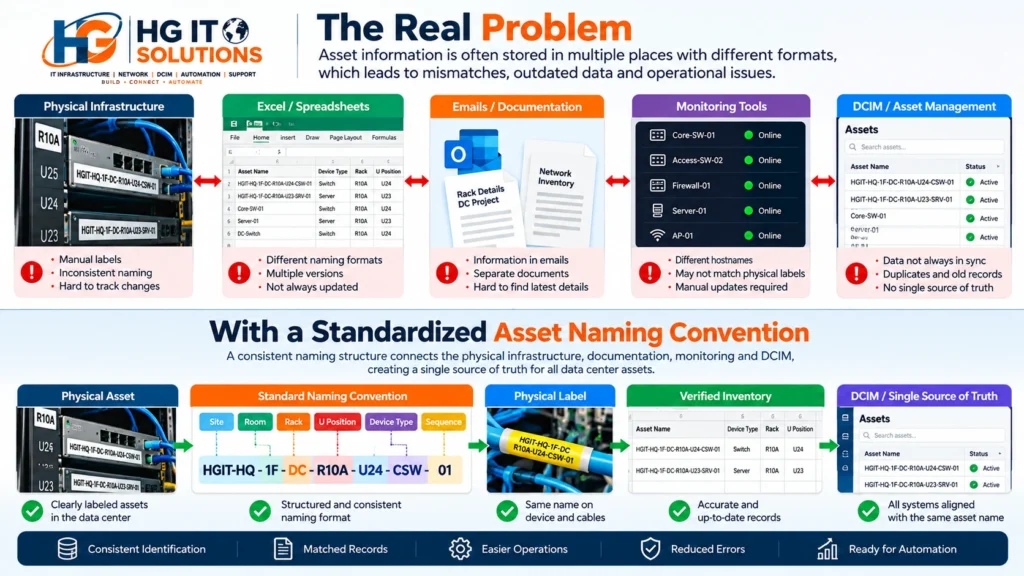
The Version-Control Problem
Consider a file named:
DC_Asset_List_Final.xlsx
Someone makes a change and saves:
DC_Asset_List_Final_v2.xlsx
Another engineer receives it and creates:
DC_Asset_List_Final_v2_Updated.xlsx
Later:
DC_Asset_List_Final_v2_Updated_Final.xlsx
The filenames may sound familiar to anyone who has worked with manually maintained project documentation.
The problem is not Excel itself.
The problem is determining which copy represents the current physical infrastructure.
Email makes the issue harder because attachments create additional independent copies.
Printed documents create another static version.
And physical infrastructure continues changing while those documents remain unchanged.
This is how data drift develops.
What Is Data Drift in a Data Center?
Data drift occurs when documented infrastructure gradually stops matching the real physical environment.
Consider a switch that was originally installed at:
Rack R10A / U24
Six months later, it is moved to:
Rack R12B / U30
The physical move is completed successfully.
Network connectivity works.
Services are restored.
But the inventory spreadsheet still shows R10A.
The rack elevation still shows U24.
The DCIM platform still believes the switch is in its original position.
Technically, the change was successful.
Operationally, the infrastructure data is now wrong.
The problem may remain invisible until the next maintenance activity or incident.
This is why DCIM asset management cannot be treated as only a software function. Physical changes and digital records must remain synchronized. Our existing DCIM guide discusses the same issue: once physical assets move without corresponding DCIM updates, trust in the platform begins to decline. HG IT Solutions Blog
Why This Matters Before Implementing DCIM
Organizations sometimes approach DCIM implementation by asking:
Which DCIM platform should we deploy?
That is an important question, but it may not be the first one.
Before importing thousands of assets into a DCIM platform, another question deserves attention:
Can we trust the asset data we are about to import?
Imagine importing an Excel inventory containing:
- Duplicate asset names
- Different abbreviations for the same device type
- Missing rack locations
- Incorrect U positions
- Retired equipment
- Old hostnames
- Inconsistent site codes
- Missing serial numbers
- Assets that have physically moved
- Equipment that no longer exists
The DCIM platform may import the data successfully.
But a successful import does not make inaccurate data accurate.
It simply moves the problem from Excel into a more sophisticated database.
This leads to an important principle:
DCIM should become a trusted source of infrastructure information—not a cleaner-looking copy of inconsistent records.
Before DCIM implementation, naming, asset identification and physical validation deserve careful attention.
Asset Name, Hostname, Asset Tag and Serial Number Are Not the Same Thing
One of the first steps in building a scalable data center asset naming convention is understanding that an asset can have several identifiers.
They do not necessarily serve the same purpose.
Consider a network switch.
Hostname
The operational hostname might be:
RUH01-DC1-R10A-SW-01
This may appear in DNS, CLI sessions, monitoring platforms, logs and network management systems.
Asset Tag
The organization may assign an internal asset tag such as:
HGIT-000784
This can be used for inventory, ownership, financial tracking or lifecycle management.
Serial Number
The manufacturer assigns a unique hardware serial number.
That serial number remains an important identifier even if the organization’s naming structure changes.
DCIM Record
The DCIM platform may maintain its own database object or internal identifier for the asset.
Physical Label
The device may also carry a human-readable label that helps an engineer identify it while standing in front of the rack.
These identifiers can be related without being identical.
Trying to put the serial number, asset tag, IP address, location, application, department and every other attribute into one hostname usually creates more problems than it solves.
A scalable system therefore begins by deciding:
What does this identifier need to accomplish?
Building a Scalable Data Center Asset Naming Convention
There is no single naming format that every data center should copy.
A colocation facility, enterprise data center, edge site and hyperscale environment can have very different requirements.
The goal is therefore not to create a universal format.
The goal is to establish a predictable hierarchy.
For a fictional HGIT lab environment, we could begin with:
[Site]-[Room]-[Rack]-[U Position]-[Device Type]-[Sequence]
For example:
HGIT-HQ-1F-DC-R10A-U24-CSW-01
Let’s break that structure down.

1. Site or Facility Code
The first layer should establish where the infrastructure belongs when location information is required in the identifier.
Examples could include:
RUH01
DXB01
DEL01
or, for a lab:
HGIT-HQ
The important requirement is consistency.
If one system uses:
RUH
another uses:
RIYADH
and another uses:
RUH01
then the organization has already created three representations of the same site.
Define the code once.
Document it.
Then reuse it consistently.
2. Room, Floor or Data Hall
The next layer can identify the physical area within the facility.
For example:
1F-DC
could represent:
First Floor → Data Center
Larger environments may instead use identifiers such as:
DH01 — Data Hall 01
SR02 — Server Room 02
MDF01 — Main Distribution Frame 01
The meaning of each abbreviation should be documented.
A code should not mean “Data Hall” at one site and “Server Room” at another unless the standard explicitly allows that structure.
3. Rack Identifier
Next comes the cabinet.
For example:
R10A
The rack identifier should match the physical rack label.
This sounds obvious, but it is one of the most important details.
If DCIM calls the cabinet R10A, the floor plan calls it Rack-10, and the sticker on the cabinet says CAB-010, engineers still need a translation between systems.
Ideally, the physical and digital rack identification strategy should be aligned.
Rack identification should also be established before equipment installation, along with rack position, orientation, rack elevation, power, cabling and other physical requirements. Our Data Center Rack Installation: 15 Essential Checks Before Installation guide covers these pre-installation considerations in more detail. HG IT Solutions Blog
4. Rack Unit Position
For equipment mounted inside a rack, the U position provides additional physical context.
Example:
U24
Now:
R10A-U24
means:
Rack R10A → Rack Unit 24
This can make physical identification significantly faster.
However, it introduces an important design decision.
What happens if the device moves from U24 to U30?
If the physical location is embedded in the hostname, moving the device may require renaming it.
That may affect:
- DNS
- Monitoring
- Certificates
- Automation
- Scripts
- Application dependencies
- Configuration management
- Operational procedures
This is why location information should not automatically be included in every hostname.
For some environments, location belongs in the asset label or DCIM fields, while the operational hostname remains location-independent.
The right decision depends on how frequently assets move and how the organization’s systems use hostnames.
5. Device Type
A controlled device-type code makes names easier to understand and validate.
For example:
| Code | Meaning |
|---|---|
| SW | Switch |
| CSW | Core Switch |
| ASW | Access Switch |
| RTR | Router |
| FW | Firewall |
| SRV | Server |
| PDU | Power Distribution Unit |
| UPS | UPS System |
| FPP | Fiber Patch Panel |
The exact abbreviations are not the important part.
Consistency is.
Avoid allowing one team to use SW, another SWT, another SWITCH, and another NSW for the same category.
A controlled list makes filtering, reporting and automation much easier.
6. Sequence Number
Finally, a sequence differentiates multiple devices of the same type.
For example:
CSW-01
CSW-02
A complete fictional asset identifier could therefore become:
HGIT-HQ-1F-DC-R10A-U24-CSW-01
The second core switch at another position could have its own corresponding asset identity.
But remember: this is an example architecture, not a universal standard that every data center should copy.
What Should Not Be Put in an Asset Name?
A common mistake is trying to make the name describe everything.
Consider:
RUH01-R10A-FINANCE-WINDOWS-10.20.30.40-DELL-SRV01
It certainly contains information.
The problem is that much of that information can change.
The IP address may change.
The server may move to another rack.
Finance may no longer own the workload.
The operating system may be upgraded.
The hardware role may change.
Now the name describes the server’s history rather than its current state.
As a general principle:
Avoid embedding frequently changing attributes into permanent identifiers unless there is a strong operational requirement.
Information such as these items is often better maintained as structured fields in DCIM, IPAM, CMDB or another authoritative system:
- IP address
- Operating system
- Application owner
- Department
- Hardware model
- Lifecycle status
- Business service
- Warranty information
A name should identify the asset.
It does not need to become the entire asset database.
Keep the Convention Short Enough to Use
There is another side to the problem.
A perfectly descriptive naming structure can become operationally painful if it is too long.
Consider an engineer using a CLI.
Compare:
HGIT-HQ-FIRST-FLOOR-DATACENTER-ROW-A-RACK-10-CORE-SWITCH-01
with:
RUH01-DC1-R10A-CSW-01
The second is easier to type, read, print and process.
A good data center asset naming convention therefore needs balance:
Enough information to be meaningful, but not so much information that the identifier becomes difficult to use.
Define Delimiters, Case and Numbering
Small formatting decisions matter when thousands of records are involved.
Choose a consistent delimiter.
For example:
RUH01-DC1-R10A-CSW-01
Do not randomly alternate between:
RUH01_DC1_R10A_SW01
ruh01-dc1-r10a-sw01
RUH01 DC1 R10A SW01
and
RUH01/DC1/R10A/SW01
The same applies to case.
If uppercase identifiers are the standard, document that requirement.
Numbering should also be predictable.
For example:
01, 02, 03 ... 10
rather than:
1, 2, 3 ... 10
Zero-padding makes sorting and machine processing more predictable.
Standardized terminology and infrastructure practices are also important at the industry level. The Telecommunications Industry Association maintains the TIA-942 data center infrastructure standard, which provides standardized requirements and nomenclature for data center infrastructure.
Make the Naming Convention Automation-Ready
This is where naming begins to connect with the future of infrastructure management.
A human can understand inconsistent names surprisingly well.
Software is less forgiving.
Suppose an automation workflow expects:
[SITE]-[ROOM]-[RACK]-[DEVICE]-[SEQUENCE]
Predictable identifiers can be validated before they enter the source of truth.
A simplified regular expression might look something like:
^[A-Z]{3}[0-9]{2}-DC[0-9]+-R[0-9]{2}[A-Z]?-(SW|CSW|RTR|FW|SRV|PDU)-[0-9]{2}$The exact expression will depend on the organization’s naming standard.
The important concept is that a predictable format can be validated by software.
That opens the door to workflows involving:
Naming Standard → DCIM/Source of Truth → API → Automation
For example, automation can potentially identify records that do not follow the approved naming structure before they are accepted into an inventory.
This becomes increasingly useful when infrastructure data is consumed by scripts, APIs, provisioning systems and platforms such as NetBox, Nautobot or DCIM solutions.
The Physical Label Must Match the Digital Record
A naming convention stored only inside software is incomplete.
Imagine the DCIM platform says:
RUH01-DC1-R10A-CSW-01
An engineer walks to Rack R10A.
The switch label says:
CORE-SWITCH-NEW
The digital naming standard may be excellent.
Operationally, the engineer still has to guess.
Physical labeling and digital records therefore need to be treated as parts of the same system.
At minimum, teams should establish consistent methods for identifying relevant infrastructure such as:
- Rooms and zones
- Rows
- Racks
- Installed equipment
- Patch panels
- PDUs
- Other critical physical assets
The exact label format and material will depend on the environment.
What matters is that the engineer standing on the data center floor and the engineer looking at the digital record are referring to the same asset.
Detailed rack and equipment labeling deserves its own discussion, because label placement, front/rear identification, U positions, patch panels and physical verification introduce another set of practical challenges.
In the next article in this series, we will move from naming architecture to the physical data center floor and look at how racks and equipment should be labeled so that digital records and real infrastructure remain aligned.
Naming Governance: Who Owns the Standard?
Even a well-designed naming convention can fail if nobody owns it.
Suppose the network team follows one standard.
The server team uses another.
A contractor creates labels based on a project drawing.
The facilities team uses different rack identifiers.
Within a few years, inconsistency returns.
A naming standard therefore needs governance.
Organizations should define:
- Who approves new site codes
- Who defines device-type abbreviations
- Who creates new asset identifiers
- Who updates records after moves or replacements
- Who verifies physical labels
- How exceptions are handled
- Which system is considered authoritative
The process does not need to be bureaucratic.
It needs to be clear.
If everyone can independently invent a new abbreviation, the naming convention will slowly stop being a convention.
Moving from Existing Random Names to a Standard
Most organizations will not start with an empty data center.
There may already be hundreds or thousands of assets with inconsistent names.
Renaming everything immediately can introduce unnecessary operational risk.
A safer approach is usually phased.
Step 1: Inventory Existing Assets
Collect the existing information from spreadsheets, monitoring systems, DCIM/CMDB platforms, project documentation and physical surveys.
Step 2: Identify Duplicates and Conflicts
Look for duplicate names, missing rack positions, conflicting site codes and devices that cannot be confidently matched to physical equipment.
Step 3: Define the New Standard
Document site codes, rack IDs, device abbreviations, sequence rules, delimiters and exceptions.
Step 4: Physically Validate Critical Assets
Do not assume every spreadsheet record is correct.
Where practical, verify critical equipment against the actual rack and device.
Step 5: Build the Mapping
Maintain a controlled relationship between:
Old Identifier → New Identifier
This becomes particularly important when other systems still depend on the previous hostname.
Step 6: Update Connected Systems Carefully
Monitoring, DNS, scripts, configuration management, documentation and other dependencies may need coordinated changes.
Step 7: Establish Change Control
Once the environment is cleaned up, future moves, additions and removals should update the physical and digital records as part of the same operational workflow.
Where DCIM Fits Into the Process
DCIM can become extremely useful once the underlying infrastructure information is trustworthy.
Instead of searching through separate spreadsheets, emails and printed documents, teams can work toward a controlled infrastructure record containing relationships such as:
Site → Room → Rack → Asset → Power → Connectivity → Capacity
But DCIM does not eliminate the need for operational discipline.
A server can still be moved without updating the database.
A rack can still receive the wrong physical label.
A device can still be entered twice.
A naming mistake can still be imported.
The difference is that a well-implemented DCIM environment gives teams a structured place to maintain and use that information.
This is why data preparation should be treated as part of DCIM implementation, not as something that happens after the software is installed.
Later in this series, we will take this problem one step further and look specifically at how to move infrastructure records from Excel and manual documentation into a DCIM platform without simply importing years of inconsistent data.

A Practical Naming Convention Checklist
Before adopting a naming standard, ask:
- Can another engineer understand the structure without knowing who created it?
- Are site and room codes documented?
- Are rack identifiers unique and physically visible?
- Are device-type abbreviations controlled?
- Is numbering consistent?
- Are frequently changing attributes kept outside permanent identifiers where appropriate?
- Can the format be validated programmatically?
- Does the physical label correspond with the digital record?
- Is there a process for moves, additions and changes?
- Is there an authoritative source for asset information?
- Can the convention scale to additional sites and racks?
- Is someone responsible for maintaining the standard?
If several of these answers are unclear, the naming convention probably needs more work before being deployed at scale.
Conclusion
A data center asset naming convention may look like a small part of infrastructure design, but its impact reaches much further.
In a small environment, engineers can compensate for inconsistent names with experience and memory.
At scale, that approach becomes difficult to sustain.
Assets move.
Engineers change.
New racks are installed.
Sites expand.
Spreadsheets multiply.
Email attachments become outdated.
Printed documentation falls behind the physical environment.
And eventually the organization can reach a point where the infrastructure itself is working, but nobody completely trusts the documentation describing it.
A scalable naming convention helps establish a common language between the physical data center and the systems used to manage it.
But naming is only the first layer.
The next challenge is making sure the identity stored digitally is also visible and consistent on the data center floor.
Next in this series: Data Center Rack and Equipment Labeling: A Practical Field Guide
After that, we will follow the connection all the way to the port and cable level in a dedicated guide to data center cable labeling and source-to-destination identification.
And when those foundations are established, we can tackle the larger challenge:
moving infrastructure records from spreadsheets, email and paper into a DCIM environment that engineers can actually trust.
Because successful DCIM implementation does not begin with a dashboard.
It begins with reliable infrastructure data.

Pingback: Data Center Rack Labeling: A Practical Guide
Pingback: Data Center Cable Labeling Standards: Practical Guide
Pingback: Ubuntu Server VM in VMware Workstation Pro 17
Pingback: NetBox Installation Ubuntu 24.04 – Step-by-Step Guide