
A 6kVA UPS installation in an existing 600mm network rack can present unexpected challenges when equipment dimensions, mounting requirements, and power distribution are not properly planned. In this real-world case study, we explain how our team handled a Legrand Daker DK+ UPS retrofit involving a 680mm-deep UPS, PDU restructuring, and approximately 30 minutes of planned network downtime.
Installing a UPS in an existing network rack may appear straightforward. The equipment arrives, the installation team identifies available rack space, mounts the UPS, connects the power distribution, and performs commissioning.
But what happens when the UPS is physically deeper than the network cabinet?
During a recent infrastructure project, our team encountered exactly this problem while installing a Legrand Daker DK+ 6kVA UPS with an external battery cabinet in an existing 42U network rack.
The cabinet measured approximately 600 mm wide and 600 mm deep. According to the manufacturer’s specifications, the selected UPS and external battery cabinet were each 680 mm deep.
That created an immediate physical compatibility problem.
The installation also required us to rearrange existing network equipment, reorganize cable pathways, add UPS-backed power distribution, and coordinate approximately 30 minutes of planned network downtime.
This was not simply a UPS installation. It became a real-world network infrastructure retrofit involving mechanical, electrical, and operational challenges.
In this case study, we explain what happened, why the original cabinet was unsuitable, how the power distribution was reorganized, and what engineers should consider to avoid similar problems.

Table of Contents
1. Project Background: Existing Network Infrastructure
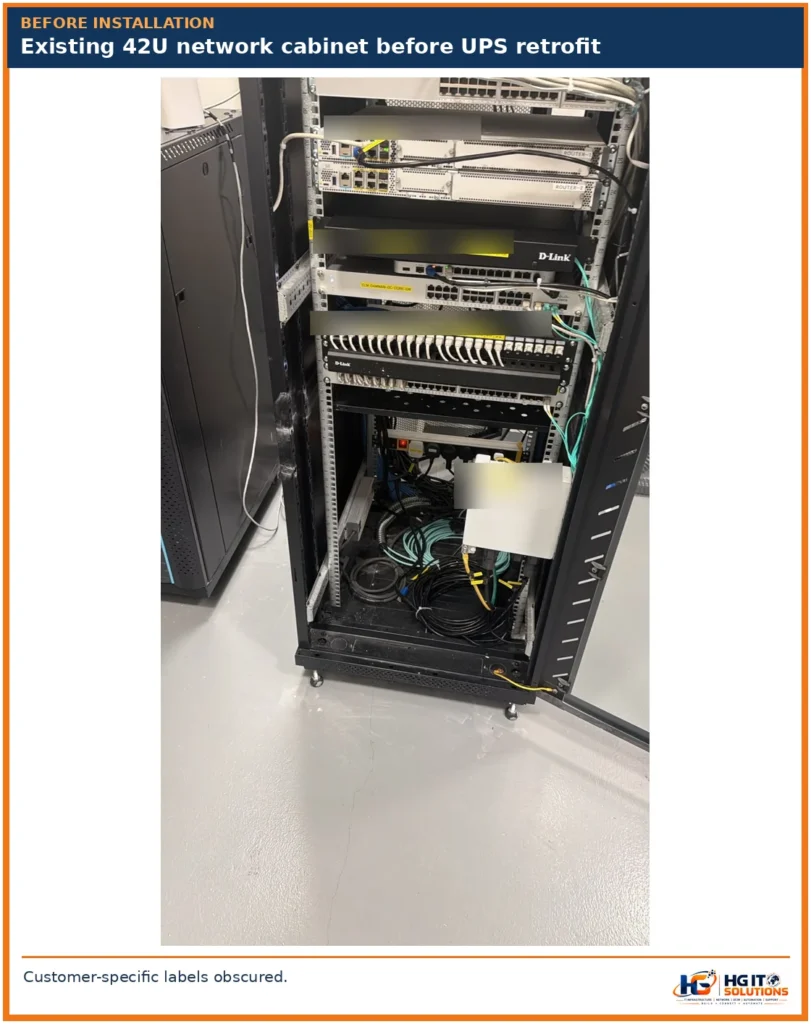
The project involved an operational three-floor building with network equipment distributed across several cabinets.
The infrastructure included:
- Ground Floor: Main 42U network cabinet containing critical network equipment.
- First Floor: Smaller 24U network cabinet.
- Second Floor: Smaller 24U network cabinet.
The ground-floor cabinet acted as the main network distribution point.
It housed routers, Cisco switches, copper patch panels, fiber connectivity equipment, power distribution units, and other communication devices.
The cabinet dimensions were approximately:
| Parameter | Existing cabinet |
|---|---|
| Rack height | 42U |
| External width | 600 mm |
| External depth | 600 mm |
| Primary function | Main network equipment cabinet |
| Existing power arrangement | Multiple PDUs |
| Installation environment | Operational network infrastructure |
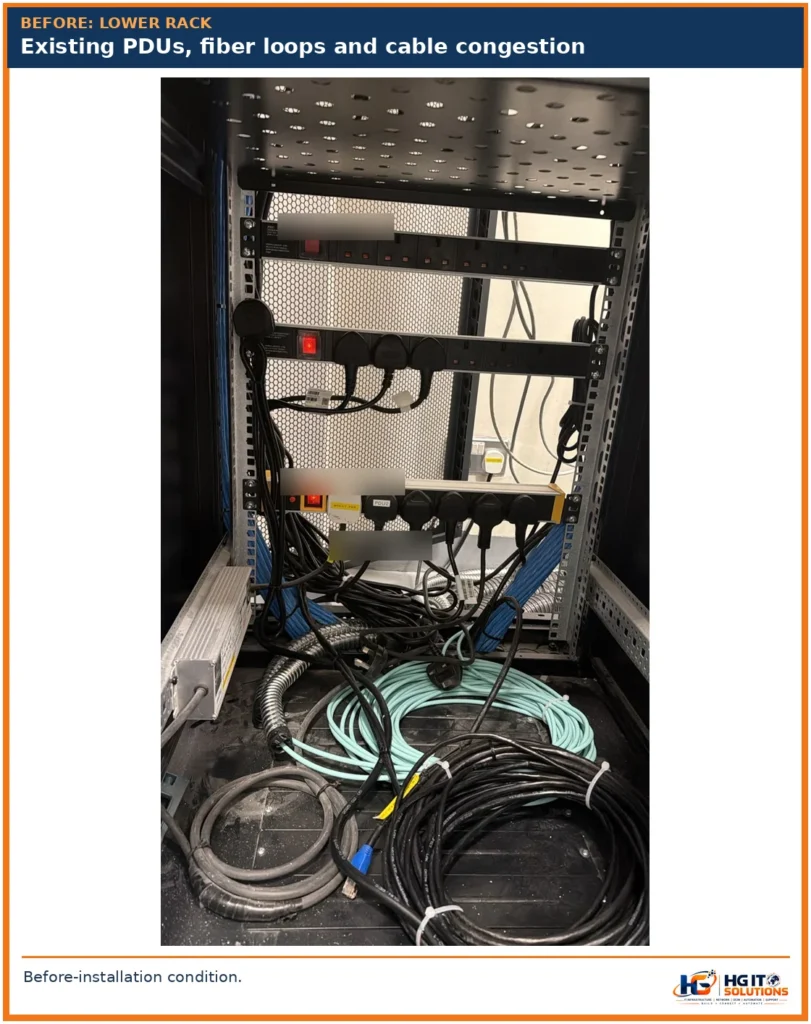
Before the UPS installation, the lower portion of the cabinet contained fiber cable loops, power cables, existing PDUs, and a ZTE communication device.
Although some vertical rack space appeared available, that space was not properly prepared for a large UPS and external battery installation.
This became one of the first challenges during the project.
Field observation: An apparently empty section of a network rack is not necessarily usable space. Equipment depth, mounting requirements, cabling, power distribution, and maintenance access must also be considered.
2. 6kVA UPS Installation: Equipment and Manufacturer Specifications
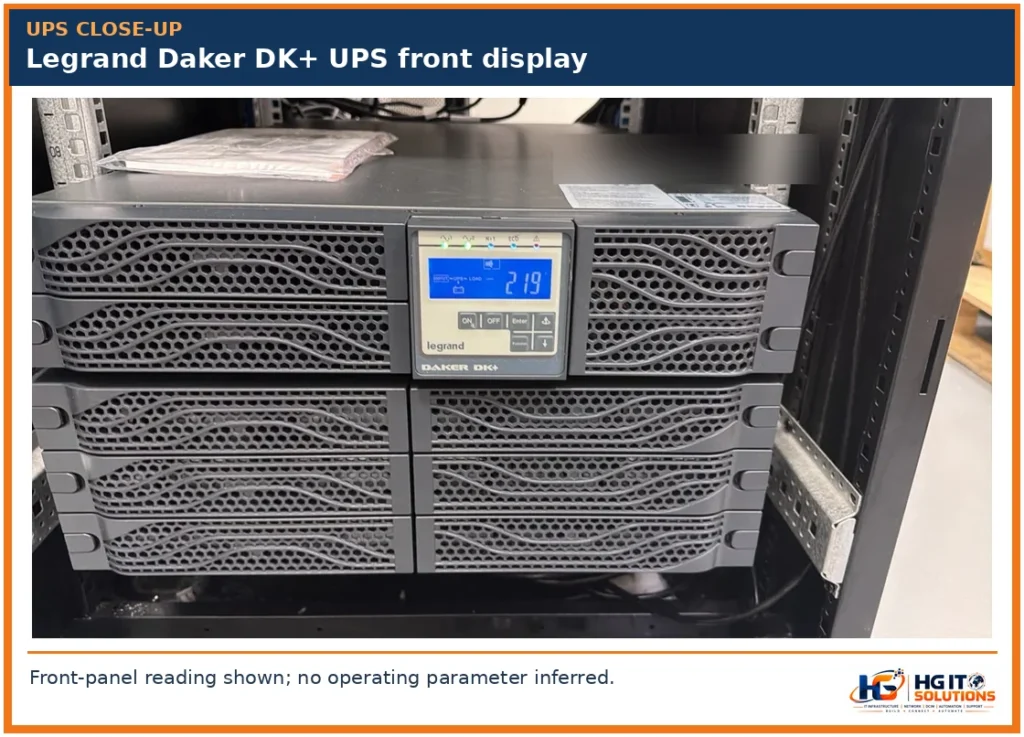
The project equipment schedule identified three Legrand components.
| Equipment | Legrand part number | Description |
|---|---|---|
| UPS | 310176 | Daker DK+ 6kVA UPS, external battery configuration |
| External battery cabinet | 310668 | Daker DK+ 5/6kVA battery cabinet |
| Rack support bracket kit | 310952 | UPS rack support bracket kit |
Legrand Daker DK+ 6kVA UPS specifications
According to the manufacturer’s product information, the Legrand Daker DK+ UPS, reference 310176, has the following specifications.
| Specification | Manufacturer information |
|---|---|
| Rated apparent power | 6000 VA |
| Rated active power | 6000 W |
| Output power factor | 1.0 |
| UPS technology | Online double-conversion |
| Rack installation format | 19-inch rack/tower convertible |
| Width in rack orientation | 440 mm |
| Height in rack orientation | 88 mm (approximately 2U) |
| Depth | 680 mm |
| UPS weight | 25 kg |
| External battery support | Yes, compatible configuration required |
The UPS supports a 6kW rated active output, but the actual connected load must remain within the manufacturer’s operating limits.
A 6kVA rating also does not establish battery backup duration.
Runtime depends on the battery configuration, connected load, battery condition, and operating parameters.
Official manufacturer reference: Legrand Daker DK+ 6kVA UPS — Part 310176.
External battery cabinet specifications
The selected external battery cabinet was Legrand reference 310668.
| Specification | Manufacturer information |
|---|---|
| Product | Daker DK+ external battery cabinet |
| Compatible UPS family | Daker DK+ 5/6kVA |
| Width | 440 mm |
| Height | 88 mm (approximately 2U) |
| Depth | 680 mm |
| Rack format | 19-inch |
| Battery configuration | Supplied without internal batteries |
This last detail is important: the specified battery cabinet reference is an enclosure supplied without internal batteries. The actual installed battery population, total weight, and backup runtime must be verified separately.
Official manufacturer reference: Legrand Daker DK+ External Battery Cabinet — Part 310668.
3. The Main Installation Problem: 680mm UPS Depth vs 600mm Rack Depth
The most significant challenge was identified when we attempted to accommodate the UPS and battery equipment inside the existing network cabinet.
The equipment specifications and cabinet dimensions were incompatible.
Actual dimension comparison
| Parameter | Dimension |
|---|---|
| Existing cabinet external depth | 600 mm |
| Legrand UPS chassis depth | 680 mm |
| Legrand external battery cabinet depth | 680 mm |
| Nominal depth difference | 80 mm |
The basic calculation is:
680 mm − 600 mm = 80 mm
The UPS chassis was already 80 mm deeper than the entire external depth of the existing cabinet.
This is a fundamental dimensional mismatch.
Why the actual installation problem is greater than 80mm
The 80 mm figure is only the difference between the equipment chassis depth and the cabinet’s external depth.
It does not include the additional installation space required for:
- Front and rear mounting arrangements.
- Power connectors and cable terminations.
- Cable bend radius.
- Ventilation clearance.
- Front and rear doors.
- Equipment servicing and replacement.
- Manufacturer-specified installation clearances.
The actual usable depth inside a cabinet is normally smaller than its external depth.
Therefore, an 80 mm nominal difference should not be interpreted as the complete additional clearance required for a safe installation.
What about the available rack units?
The UPS and external battery cabinet are each approximately 2U high in rack orientation.
Together, they represent approximately 4U of equipment height, excluding any additional installation allowances.
A 42U cabinet may have enough vertical rack space for this equipment while still being completely unsuitable in terms of depth.
Engineering lesson: Available rack units do not guarantee equipment compatibility.
For a more detailed explanation of cabinet dimensions, mounting depth, and rack selection, read our Data Center Rack Size Guide: 42U, 45U, 48U, Width & Depth.
4. Another Compatibility Issue: The Rack Support Bracket Kit
The project equipment schedule included Legrand rack support bracket kit reference 310952.
According to Legrand’s official product information, this bracket kit supports adjustable mounting arrangements starting from an 800 mm cabinet depth.
That created another compatibility concern.
The existing network cabinet was only 600 mm deep.
Even if sufficient vertical rack units were available, the intended support hardware and the cabinet geometry still required compatibility verification.
This is an important distinction because a UPS should not be supported solely on the assumption that its front mounting brackets will hold its weight.
Heavy equipment may require approved support rails or other manufacturer-specified mechanical support.
Official manufacturer reference: Legrand Rack Support Bracket Kit — Part 310952.
What should have been checked before procurement?
The equipment schedule should have been reviewed against the rack manufacturer’s dimensional drawing and the Legrand installation documentation.
The compatibility assessment should have covered the UPS depth, battery cabinet depth, support bracket requirements, equipment weight, and required service clearance.
This would have identified the physical mismatch before installation work began.
5. What Happened On-Site When the UPS Did Not Fit?
During the installation, our team reviewed the available cabinet space and evaluated the practical placement options.
The UPS and external battery equipment could not be fully accommodated within the existing cabinet depth.
The equipment was positioned in the lower cabinet area using an available support arrangement, with the external battery cabinet below the UPS.
However, the depth incompatibility remained, and the equipment projected beyond the intended cabinet enclosure space.
Was this an acceptable permanent solution?
Not automatically.
A field arrangement that allows equipment to be positioned does not necessarily meet the manufacturer’s approved installation requirements.
Before permanent operational acceptance, the following must be verified:
- Mechanical support and load rating.
- Rack stability and anchoring.
- Equipment restraint.
- Front and rear clearances.
- Power cable protection.
- Ventilation and thermal requirements.
- Access for maintenance.
- Compliance with the manufacturer’s installation instructions.
Where the existing cabinet cannot meet these requirements, the appropriate corrective action is to use a compatible deeper rack or a dedicated UPS enclosure.
Important: We are sharing this experience as a real installation challenge and engineering lesson, not as an example of an approved mounting method.
6. The Second Major Challenge: Existing Equipment and Cable Management
Before the UPS installation, the lower section of the network cabinet was occupied by several existing components.
These included fiber optic cables, copper cabling, power cables, conduits, PDUs, and a ZTE communication device.
The existing cable arrangement was not suitable for accommodating the new UPS and battery equipment without additional work.
What our team did
During the installation, we reviewed the existing rack arrangement and reorganized the necessary equipment and cabling.
This included relocating existing components, rearranging power distribution equipment, and organizing the device connections in a more structured sequence.
The work required careful planning because the rack was already supporting operational network services.
Why cable management matters during UPS installation
Poor cable management can create several problems:
- Reduced access to equipment.
- Difficulty tracing power connections.
- Restricted installation space.
- Unnecessary cable movement during maintenance.
- Potential interference with ventilation.
- Increased troubleshooting complexity.
Fiber optic cables also require appropriate bend-radius protection, while power and communication cables must follow the applicable routing and separation requirements.
The installation reinforced the importance of designing cable pathways before equipment is installed rather than treating cable organization as a final housekeeping task.
7. Adding a New UPS-Backed PDU and Restructuring Power Connections
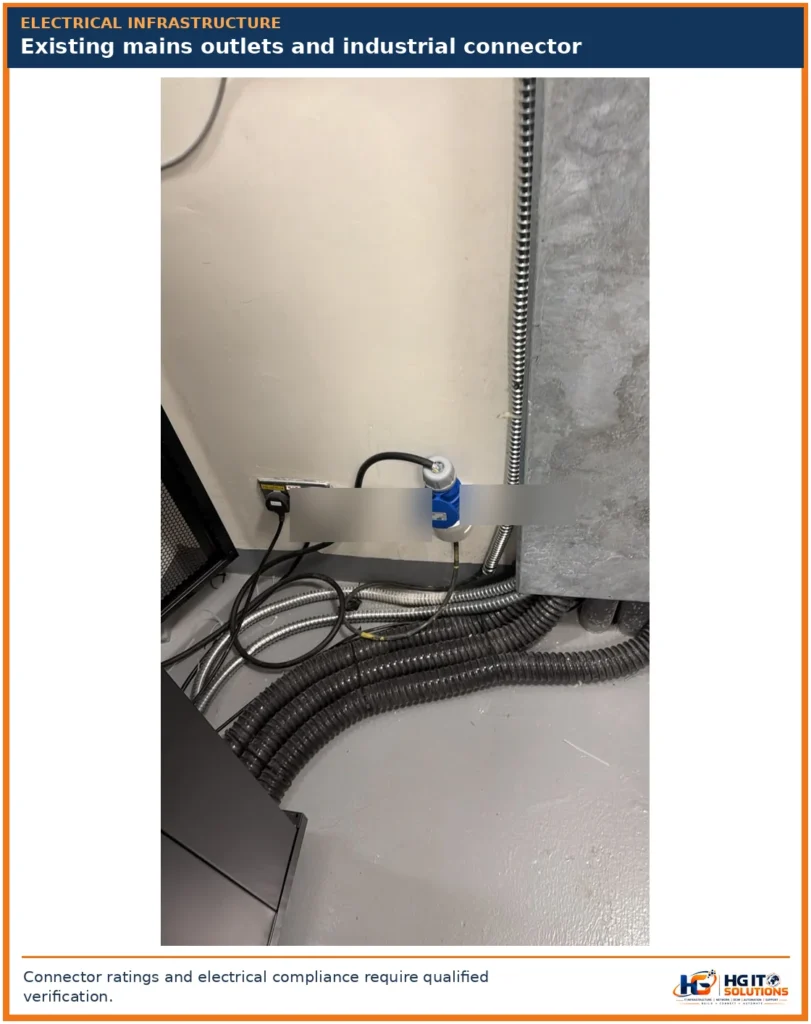
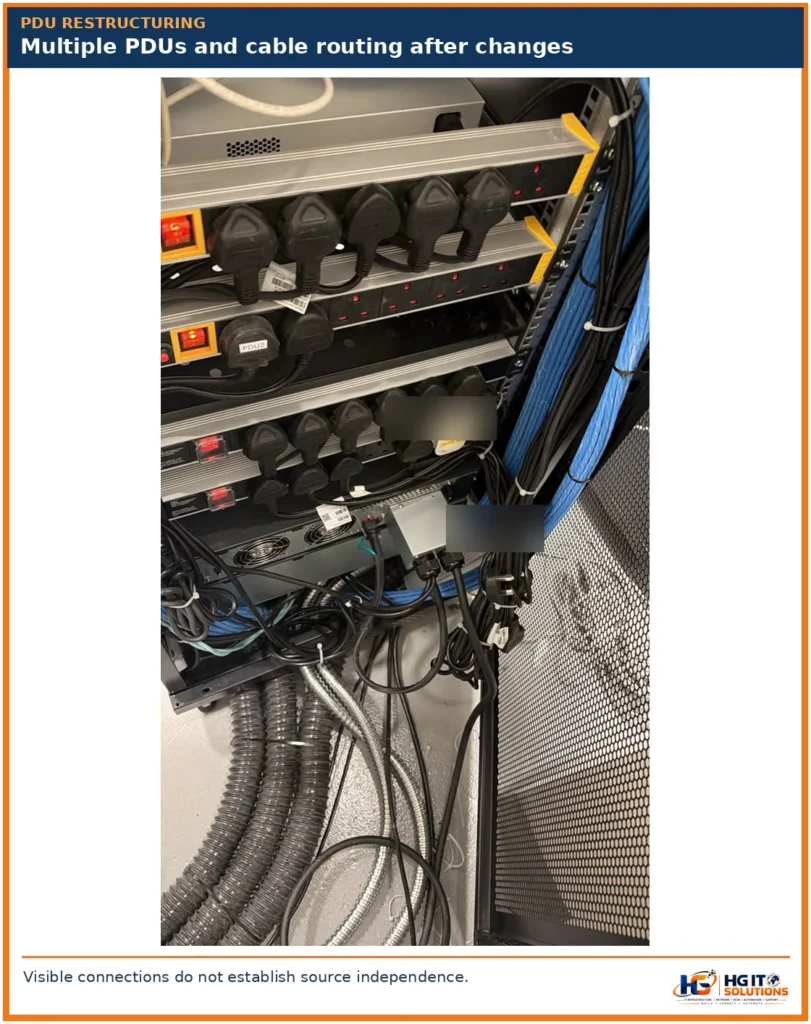
The existing network cabinet contained multiple PDUs.
However, the installation of the UPS required a revised power distribution arrangement.
Our team added a new UPS-backed PDU and reorganized the connected network devices according to their power supply configurations.
The objective was to ensure that the main network equipment received UPS-backed power.
For devices equipped with two power supplies, one connection was maintained through the UPS-backed distribution while the other remained connected to the main electrical supply.
Why PDU restructuring was necessary
The original power connections were not organized in a way that fully supported the new UPS distribution arrangement.
Instead of simply connecting equipment to any available outlet, the team reviewed the device sequence and restructured the connections.
This is an important practice because power distribution should be documented and organized according to the actual equipment requirements.
Essential PDU planning considerations
A new PDU must be selected according to its electrical rating and intended use.
Engineers must verify:
- PDU rated current and voltage.
- UPS output characteristics.
- Connected equipment load.
- Connector and cable compatibility.
- Upstream circuit protection.
- Protective earthing.
- Available electrical capacity.
- Future expansion requirements.
Adding a PDU does not increase the UPS output capacity.
Similarly, the number of PDU outlets should never be used as a substitute for calculating the actual connected electrical load.
8. Why a 30-Minute Network Shutdown Was Required
One of the most important operational challenges was the need to migrate existing devices to the new power distribution arrangement.
Several network devices had only one power supply.
Because these devices could not simply switch between two independent power inputs, their existing connections had to be interrupted during migration.
The work therefore required an approximately 30-minute planned network shutdown.
During this period, the team completed the necessary power connection changes and cabinet restructuring.
Why single-PSU devices can require downtime
A device with a single PSU normally has only one electrical input.
When that connection is disconnected, the device loses power unless an appropriately engineered power continuity solution is available.
This becomes important during:
- UPS installations.
- PDU replacement.
- Electrical maintenance.
- Network rack migration.
- Power circuit upgrades.
- Power cable restructuring.
How to plan a similar maintenance window
Before performing a UPS retrofit, the engineering team should prepare an inventory of affected devices and identify their power supply configurations.
The maintenance plan should include the approved outage window, affected network services, configuration backups where appropriate, connection schedule, rollback plan, and post-change verification.
The main lesson is that UPS integration into a live network environment must be treated as a controlled infrastructure change.
It is not simply a hardware installation.
9. Final Power Distribution: Single-PSU and Dual-PSU Devices
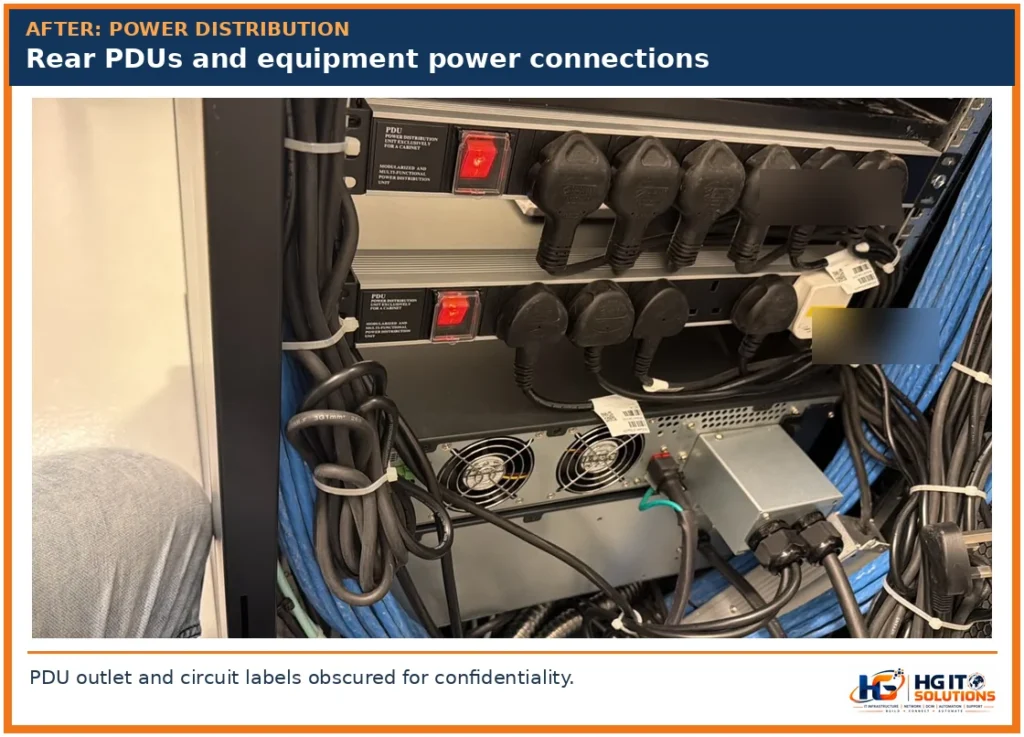
After the power distribution restructuring, the main network equipment was connected to UPS-backed power.
The connection arrangement depended on the device’s power supply configuration.
Single-PSU network devices
The power path was:
UPS Output → UPS-Backed PDU → Single-PSU Network Device
This arrangement allows the device to receive power through the UPS-backed distribution.
During a utility failure, continued operation depends on the UPS condition, connected load, battery capacity, and available runtime.
Dual-PSU network devices
For compatible dual-PSU devices, the arrangement was:
Power Supply 1 → UPS-Backed PDU
Power Supply 2 → Main Electrical Supply
This provided two power connections for the relevant devices.
However, two power connections do not automatically establish independent A/B electrical redundancy.
The UPS input and direct mains supply may still share the same upstream electrical infrastructure.
In addition, the device’s power supplies must be capable of supporting the intended operating and failure conditions.
UPS protection is not the same as full redundancy
A UPS can provide battery-backed power during certain supply interruptions.
True electrical redundancy requires consideration of the entire power path, including upstream circuits, UPS architecture, PDUs, protective devices, and possible common points of failure.
The arrangement used in this project should therefore be described as UPS-backed power distribution with a separate mains connection for compatible dual-PSU devices—not automatically as a fully redundant A/B system.
10. Mechanical Safety: UPS Weight, Battery Load and Rack Stability
UPS installations require careful mechanical planning.
According to Legrand’s product information, the selected UPS unit weighs approximately 25 kg.
The external battery cabinet’s final installed weight depends on its actual battery population and configuration.
The combined equipment load must be assessed before approving the mounting arrangement.
Why equipment weight matters
Heavy equipment introduces concentrated loads on rack rails, shelves, and mounting hardware.
The cabinet itself must also be capable of supporting the total installed load.
Why lower mounting positions are preferred
Heavy equipment is generally positioned toward the bottom of a rack to improve stability.
However, placing equipment at the bottom does not automatically make the installation safe.
The support arrangement must still be rated and approved for the equipment.
Why rack anchoring matters
A heavy UPS or battery module can affect cabinet stability, particularly when equipment is extended for maintenance.
Rack leveling, anchoring, equipment restraint, and floor loading must therefore be reviewed.
Why ventilation matters
UPS equipment generates heat during operation.
Restricted airflow can affect reliability and operating conditions.
Manufacturer-specified ventilation clearances must be maintained, and equipment should not be positioned where power cables or cabinet panels obstruct required airflow.
11. What Would Have Been the Better Solution?
This project highlighted the importance of evaluating infrastructure compatibility before procurement.
Several approaches should be considered for similar installations.
Option 1: Use a deeper compatible rack
A deeper rack may provide the space required for the UPS, battery cabinet, mounting rails, rear connections, and ventilation.
However, rack depth alone does not guarantee compatibility.
The selected cabinet must be checked against the exact equipment and rail kit requirements.
Option 2: Use a dedicated UPS enclosure
A separate UPS cabinet or enclosure may be a better choice when the existing network rack is too shallow or heavily populated.
This can also reduce the need to rearrange network equipment.
The dedicated enclosure must still meet the applicable electrical, mechanical, thermal, and access requirements.
Option 3: Redesign the rack and power layout
If the network infrastructure is due for expansion, a broader cabinet redesign may be justified.
This could include improved equipment positioning, cable routing, power distribution, and documentation.
The most appropriate solution depends on site space, electrical infrastructure, budget, operational requirements, and manufacturer compatibility.
For related guidance, see our Data Center Rack Layout Planning: Rows, Aisles & Clearance.
12. UPS Installation Planning Checklist
The following checklist summarizes the key items that should be reviewed before installing a large UPS in an existing network cabinet.
Equipment and rack compatibility
- Verify the exact UPS model and part number.
- Confirm UPS width, height, and depth.
- Confirm external battery cabinet dimensions.
- Check rack mounting depth and rail compatibility.
- Verify equipment weight and support ratings.
- Confirm rack load capacity and stability.
- Check ventilation and service clearances.
Electrical planning
- Calculate the actual connected load.
- Confirm UPS rated kVA and kW.
- Determine required backup runtime.
- Verify battery compatibility and configuration.
- Check input and output circuit requirements.
- Confirm PDU and cable ratings.
- Verify earthing and electrical protection.
- Identify upstream single points of failure.
Network and operational planning
- Identify all single-PSU devices.
- Document dual-PSU connections.
- Prepare the device power mapping.
- Review existing cable routes.
- Identify affected network services.
- Approve the maintenance window.
- Prepare a rollback procedure.
- Verify equipment and services after migration.
For a broader checklist covering rack positioning, grounding, cabling, airflow, and documentation, read our Data Center Rack Installation: 15 Essential Checks Before Installation.
13. The Importance of As-Built Documentation
Whenever existing infrastructure is modified, the documentation should be updated.
This is especially important when devices, PDUs, or power connections are relocated.
Useful records include:
- Updated rack elevation.
- Equipment inventory.
- UPS and battery details.
- PDU outlet assignments.
- Device power source mapping.
- Cable routing changes.
- Maintenance records.
- Outstanding corrective actions.
Without updated documentation, future engineers may not know which equipment is connected to UPS-backed power and which devices still depend on direct mains supply.
This can create unnecessary risk during future maintenance.
Maintaining accurate rack and power records also supports longer-term infrastructure management and DCIM practices.
14. Key Lessons Learned from This Real Installation
This site experience reinforced several practical engineering principles.
Lesson 1: Available rack space does not mean available installation capacity
A 42U rack may have free vertical units but insufficient depth for large equipment.
Lesson 2: Manufacturer dimensions should be checked before procurement
The selected UPS and battery cabinet were each 680 mm deep, while the existing cabinet had an external depth of only 600 mm.
This mismatch should have been identified during the design review.
Lesson 3: Rack support hardware must also be compatible
Equipment dimensions are only part of the assessment.
Rail kits, support brackets, mounting geometry, and load ratings must also be verified.
Lesson 4: Existing cable management can affect new installations
Poorly organized cabling and existing equipment can restrict the usable installation space.
Lesson 5: UPS integration may require network downtime
Single-PSU devices may need a planned outage when their power connections are migrated.
In this project, the required shutdown was approximately 30 minutes.
Lesson 6: Power distribution should be designed and documented
UPS-backed and mains-connected power paths must be clearly identified.
Lesson 7: A practical workaround is not necessarily an approved permanent solution
If the equipment cannot be mounted within the required mechanical and electrical limits, the installation needs an appropriate corrective design.
Lesson 8: Future expansion should be considered from the beginning
Network cabinets should be selected according to expected infrastructure requirements, not only the equipment currently installed.
15. Final Thoughts
Our experience installing a Legrand Daker DK+ 6kVA UPS and external battery cabinet in an existing 600 mm-deep network rack demonstrated how quickly a seemingly straightforward upgrade can become a complex infrastructure retrofit.
The manufacturer’s specified UPS depth was 680 mm, creating an immediate 80 mm nominal mismatch with the cabinet’s external depth.
The existing cabinet also contained equipment and cabling that had to be reorganized.
Adding UPS-backed power distribution required PDU restructuring and approximately 30 minutes of planned network downtime because several devices had single power supplies.
Although the necessary power migration and equipment rearrangement work was performed, the cabinet depth and mounting compatibility issues remained important engineering considerations requiring verification and an appropriate permanent solution.
The biggest takeaway is simple:
A successful UPS installation begins with accurate equipment specifications, proper rack selection, structured power distribution, and realistic future expansion planning.
For network engineers, IT infrastructure consultants, and facility teams, these checks can prevent unnecessary rework, avoidable downtime, and potentially unsafe installation arrangements.
At HG IT Solutions, we share real-world infrastructure experiences to help engineers make better technical decisions before they reach the installation stage.
Frequently Asked Questions
1. Can a Legrand Daker DK+ 6kVA UPS fit inside a 600mm rack?
The specified UPS has a chassis depth of 680 mm, which exceeds the 600 mm external depth of the cabinet in this case. A compatible cabinet and approved mounting arrangement are required.
2. What are the dimensions of the Legrand Daker DK+ 6kVA UPS?
The Legrand Daker DK+ 6kVA UPS, reference 310176, measures approximately 440 mm wide, 88 mm high, and 680 mm deep in rack orientation.
3. What are the dimensions of the external battery cabinet?
The Legrand Daker DK+ battery cabinet, reference 310668, measures 440 mm wide, 88 mm high, and 680 mm deep.
4. Why did the UPS installation require a 30-minute shutdown?
Some existing network devices had single power supplies. Their power connections needed to be interrupted during migration to the new UPS-backed PDU arrangement.
5. Can one PSU connect to a UPS and the other to mains?
Compatible dual-PSU devices may support this arrangement when the electrical design and manufacturer requirements permit it. However, it does not automatically provide fully independent A/B redundancy.
6. Does a 6kVA UPS provide 6kW of output power?
The Legrand Daker DK+ 6kVA model referenced in this project is rated at 6000 VA and 6000 W with an output power factor of 1.0. Other UPS models may have different kVA-to-kW ratings.
7. Is an 800mm-deep rack always suitable for this UPS?
Not necessarily. The selected support bracket kit, equipment depth, mounting rails, cable clearance, ventilation, and maintenance access must all be verified against the actual rack model.
8. What is the best way to avoid UPS rack installation problems?
Review the equipment schedule, manufacturer dimensions, cabinet mounting depth, mechanical load ratings, electrical requirements, battery configuration, and future expansion needs before procurement.
Manufacturer Technical References
- Legrand Daker DK+ 6kVA UPS — Reference 310176
- Legrand Daker DK+ External Battery Cabinet — Reference 310668
- Legrand UPS Rack Support Bracket Kit — Reference 310952
Editorial note: This article documents an actual site installation challenge. Customer-identifying information has been omitted. The described on-site positioning is not presented as an approved permanent mounting method. Electrical work, battery installation, and UPS commissioning must follow manufacturer instructions and applicable safety requirements.
