
Introduction
Installing a rack in a data center is not simply a matter of finding an empty space and placing a cabinet there. Long before the rack is anchored, populated with equipment, connected to power, or patched into the network, its physical position needs to be carefully planned.
A rack that is installed in the wrong location or orientation can create problems throughout the life of the facility. It may interfere with cooling airflow, reduce maintenance access, complicate cable routing, conflict with overhead infrastructure, or make future expansion more difficult.
This is why data center rack layout planning should be treated as an important infrastructure activity rather than just a physical installation task.
In this guide, we will look at the practical considerations involved in planning rack locations, rows, hot and cold aisles, equipment orientation, working clearance, infrastructure coordination, and future expansion.
This article is part of the HG IT Solutions Data Center Rack Installation Series, where we cover rack infrastructure from initial planning through installation, cabling, power, cooling, labeling, documentation, and commissioning.
Rack layout planning is one part of the overall installation process. Before positioning any cabinet, it is also important to verify the site, drawings, power, cooling, cabling and installation requirements covered in our Data Center Rack Installation Checklist.
Table of Contents
Why Data Center Rack Layout Planning Matters
The rack layout becomes the physical foundation for many other systems inside the data center.
Rack position can affect cooling, electrical distribution, structured cabling, equipment installation, maintenance access, containment, monitoring, safety, and future capacity.
A rack may be perfectly leveled, correctly bonded, and professionally cabled, but if it is installed in the wrong location or facing the wrong direction, the overall installation can still create operational problems.
One simple principle is therefore worth remembering:
Verify the layout before fixing anything permanently.
Moving an empty rack before installation is usually manageable. Moving a fully populated rack after servers, network equipment, fiber, copper, and power connections have been installed is a completely different situation.
Good layout planning helps prevent that problem before it starts.
Start With the Latest Approved Rack Layout
The first reference for rack installation should be the latest approved floor layout, construction drawing, or rack layout plan.
Do not assume that the drawing available on site is automatically the latest revision.
During a data center project, layouts may change because of electrical, mechanical, architectural, cooling, network, or operational requirements. A rack row shown in an earlier drawing may have been shifted, shortened, expanded, or reoriented in a later revision.
Before marking the floor, verify the basic information on the approved drawing.
This normally includes:
- Rack ID and naming convention
- Row identification
- Rack sequence within the row
- Front and rear orientation
- Reference dimensions
- Nearby walls, columns, and doors
- Electrical distribution locations
- Cooling infrastructure
- Cable tray or pathway locations
- Drawing number and revision
Do not position a rack based only on a verbal instruction such as “put it beside the previous rack.”
The physical installation should match approved project documentation.
This becomes particularly important on larger sites where multiple installation teams may be working simultaneously.
Understand the Entire Room Before Positioning Individual Racks
Before focusing on a single rack, understand the room as a complete infrastructure environment.
A data center white space may contain much more than server cabinets.
Depending on the facility design, it may include network racks, storage cabinets, cooling units, electrical distribution equipment, busways, cable trays, containment systems, monitoring devices, fire protection equipment, structural columns, access doors, and maintenance areas.
The rack layout needs to coexist with all of these systems.
For example, a rack position may appear correct from an IT perspective but conflict with an overhead electrical busway. Another location may provide sufficient floor space but leave poor access to a cooling unit or building service.
This is why rack layout planning should be coordinated across disciplines rather than performed in isolation.
Before installation begins, physically walk through the area whenever possible and compare actual site conditions with the drawing.
A drawing tells you what is planned.
The site tells you what is actually there.
Both need to agree.
Plan the Row Before Planning the Individual Rack
A common mistake is to position racks one at a time without first establishing the complete row.
Instead, define the row before fixing individual cabinets.
Determine the row start point, end point, alignment, orientation, rack sequence, and aisle boundaries.
Once these references are established, individual racks can be positioned consistently.
This is especially important when a row contains many cabinets.
A small alignment error at the first rack can become increasingly visible as additional racks are installed. By the end of a long row, what started as a minor deviation may create noticeable alignment problems.
Use permanent project references such as approved grid lines, structural references, or clearly defined dimensions wherever possible.
Avoid using temporary objects as the main measurement reference.
The objective is to create a straight, repeatable rack line that matches the approved design.
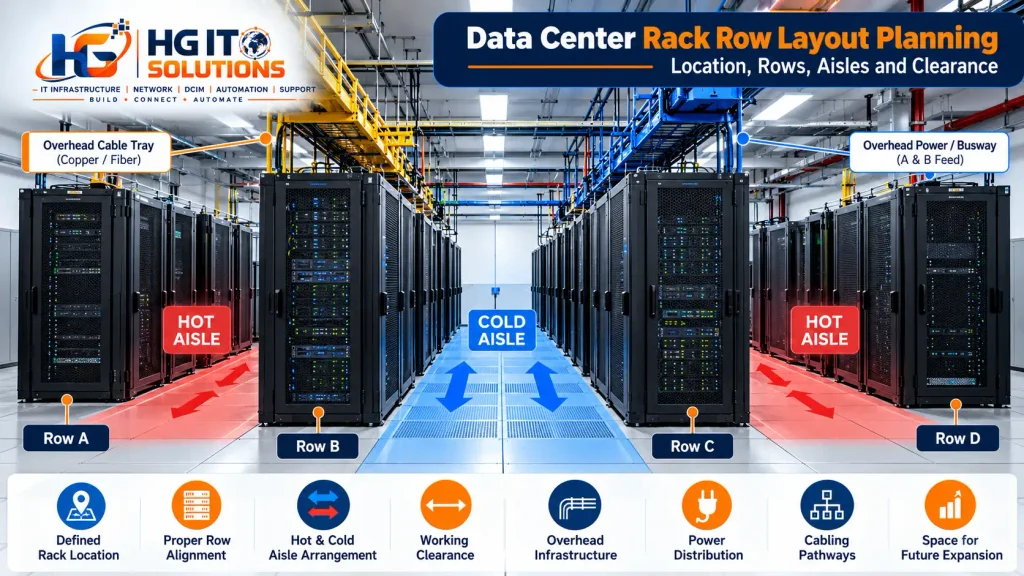
Understand Hot Aisle and Cold Aisle Layout
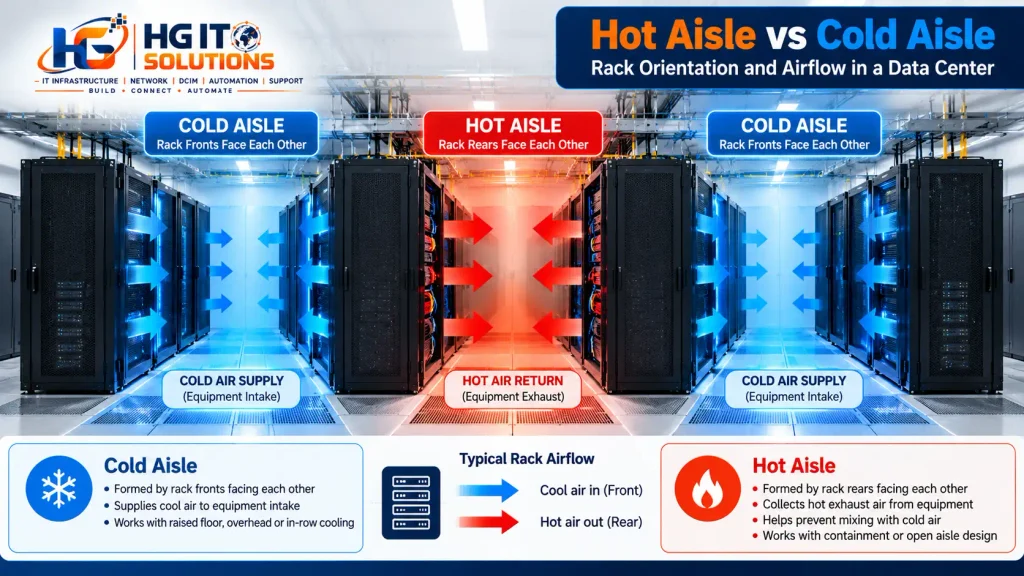
One of the fundamental concepts in modern data center rack planning is the hot aisle/cold aisle arrangement.
Most conventional servers draw cooling air through the front of the chassis and exhaust warmer air from the rear.
Rack rows can therefore be arranged so that the fronts of opposing racks face each other and the backs of opposing racks face each other.
The area between rack fronts becomes the cold aisle.
The area between rack rears becomes the hot aisle.
This arrangement helps separate equipment intake air from hot exhaust air and supports a more predictable cooling strategy.
If racks are installed with incorrect orientation, hot exhaust air may be directed toward the intake side of another row. This can contribute to air recirculation and make cooling management more difficult.
Therefore, before positioning a rack, confirm:
- Which side is the equipment intake side?
- Which side is the exhaust side?
- Where is the intended cold aisle?
- Where is the intended hot aisle?
- Does the rack orientation match the cooling design?
These questions should be answered before the rack is anchored.
Do Not Assume Every Device Uses Front-to-Rear Airflow
Although front-to-rear airflow is common in server environments, not every piece of IT equipment follows exactly the same airflow pattern.
Some network switches and specialized devices may use different airflow directions depending on their hardware configuration.
This matters when planning rack orientation and equipment placement.
A rack may face the correct direction, but incorrectly selected or installed equipment can still introduce airflow problems inside the cabinet.
During planning, review the airflow requirements of major equipment where necessary, particularly high-density network or compute devices.
The goal is not simply to make all rack doors face the same direction.
The real objective is to make sure cooling air reaches equipment intakes and hot exhaust is directed toward the intended return path.
Plan the Cold Aisle Around Equipment Intake
The cold aisle is primarily an equipment intake zone.
Depending on the facility, conditioned air may reach this area through raised-floor tiles, overhead systems, in-row cooling, or other cooling architectures.
Whatever cooling method is used, rack fronts should coordinate with the intended supply-air strategy.
During planning, check whether anything could obstruct the cooling path.
This might include temporary materials, poorly positioned equipment, unnecessary floor obstructions, or infrastructure that interferes with the designed airflow.
The cold aisle should also remain practical for installation and operations.
Technicians may need to install servers, replace equipment, connect console devices, open rack doors, or use lifting equipment in this area.
Cooling and operational access therefore need to be considered together.
Plan the Hot Aisle for Exhaust and Maintenance
The rear of a rack can become one of the busiest areas during installation and maintenance.
It may contain:
- Server power cords
- Rack PDUs
- Copper patching
- Fiber connections
- Cable managers
- Grounding or bonding connections
- Environmental sensors
- Equipment exhaust
- Network connections
The hot aisle therefore needs to support more than airflow.
Technicians must be able to access equipment, trace cables, replace components, inspect power connections, and perform maintenance safely.
A layout that leaves inadequate rear access may look efficient on a drawing but become difficult to operate in practice.
When evaluating a hot aisle, think about what happens after the data center becomes operational.
Can a technician comfortably work behind the rack?
Can rear doors open as intended?
Can equipment connections be reached?
Can cabling be maintained without blocking access?
Good rack planning considers these practical activities from the beginning.
Do Not Treat Aisle Width as a Universal Number
It is tempting to define one fixed aisle width and apply it to every data center.
In practice, required clearance depends on several factors.
These can include local codes, project specifications, rack dimensions, equipment size, door design, containment systems, maintenance procedures, accessibility requirements, lifting equipment, electrical requirements, and emergency egress.
For this reason, a value used on one project should not automatically be copied to another.
The approved project design and applicable requirements should determine the final clearance.
From an operational perspective, however, the aisle should provide enough room for the activities expected to take place there.
Ask practical questions such as:
Can the rack door open properly?
Can a server be installed or removed?
Can a technician work safely?
Can a lifting device reach the rack?
Will containment doors or panels operate correctly?
Is the required access path maintained?
A clearance dimension is useful only if the resulting space actually works.

Consider Rack Door Operation
Rack doors are often overlooked during layout planning.
A cabinet may physically fit into the planned footprint while its door creates a problem when opened.
Check front and rear door operation before finalizing the layout.
Consider whether the doors are perforated, split, single-leaf, removable, or reversible.
A door may conflict with another rack, a wall, containment structure, column, or nearby equipment.
This is particularly important near row ends and confined spaces.
If the rack uses split rear doors, the required operating space may differ from a cabinet with one large rear door.
The correct approach is to evaluate the actual rack model being installed rather than planning around a generic cabinet outline.
Check Equipment Installation and Removal Space
Rack clearance should also consider the equipment that will eventually be installed inside the cabinet.
Large servers, storage systems, UPS components, chassis-based switches, and other heavy devices may require significant working space during installation or replacement.
A rack may be accessible enough for routine patching but still provide insufficient space to safely remove a deep or heavy chassis.
Ask:
How deep is the equipment?
How will it be supported during installation?
Will a server lift be used?
Can the equipment be removed without interfering with the opposite row?
Is there enough space to maneuver replacement hardware?
These questions are especially important for high-density or specialized racks.
Designing only for the empty cabinet can result in problems once real equipment arrives.
Coordinate the Rack Layout With Power Distribution
Rack position and electrical infrastructure should be planned together.
Depending on the data center design, rack power may be supplied through overhead busways, underfloor distribution, remote power panels, floor-mounted systems, or other architectures.
Before fixing the rack location, verify how power will reach the cabinet.
Check the relationship between the rack and:
- Power distribution routes
- A and B power feeds
- Rack PDUs
- Whips or power cables
- Overhead busways
- Underfloor pathways
- Isolation or maintenance access
Power cables should not need awkward routing simply because the rack was installed without considering the electrical design.
If redundant A and B feeds are planned, both routes should be considered during layout coordination.
A physically well-positioned rack should support the intended power redundancy rather than making it more difficult to implement.
Coordinate With Overhead Cable Trays
Modern data centers frequently use overhead pathways for fiber and copper cabling.
Rack rows therefore need to align with the cable pathway strategy.
Before installation, look upward as well as at the floor.
Verify the relationship between the rack and:
- Fiber runners
- Copper cable trays
- Ladder racks
- Power pathways
- Busways
- Containment framing
- Other overhead services
A rack that is slightly offset from the intended pathway can make vertical cable drops unnecessarily difficult.
Poor alignment may result in excessive cable bends, awkward drop locations, longer cable routes, or poor separation between services.
The objective is to provide a clean transition from the main pathway into the rack.
Good cable management starts with good rack positioning.
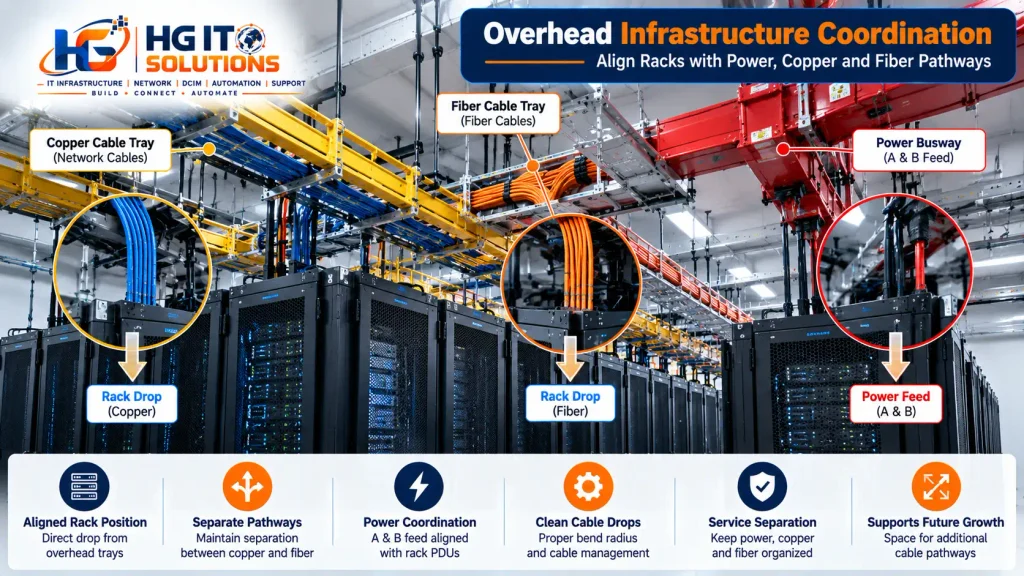
Consider Copper and Fiber Pathways Separately
Copper and fiber cabling have different physical characteristics and installation requirements.
Even when both enter the same rack, they should not automatically be treated as one pathway.
During layout planning, understand where each service is expected to enter the rack.
Consider fiber bend management, copper cable volume, vertical managers, patch panel locations, and the relationship between overhead or underfloor pathways.
The layout should support organized routing without forcing cables across unsuitable areas.
This becomes increasingly important as rack density grows.
A rack with a small number of connections may tolerate a less-than-perfect pathway.
A network rack containing hundreds of copper and fiber connections may not.
Planning ahead makes future cabling cleaner and easier to maintain.

Check Structural and Floor Considerations
Rack location also has a structural dimension.
A fully populated cabinet can be significantly heavier than an empty rack.
Servers, storage systems, UPS equipment, network chassis, PDUs, and cabling all contribute to the final load.
The project design should therefore confirm that the supporting structure is appropriate for the intended equipment load.
In raised-floor environments, rack position should also coordinate with the floor system and any required support arrangement.
Do not assume that because an empty rack can stand at a location, the same position is automatically suitable for the final operating load.
Actual equipment weight, load distribution, anchoring requirements, seismic requirements where applicable, and project structural criteria should be reviewed by the responsible design disciplines.
Rack installers should follow the approved design rather than making structural assumptions on site.
Check Walls, Columns, Doors, and Fixed Obstructions
Architectural elements can significantly affect rack layout.
Columns are an obvious example, but smaller conflicts can also create operational problems.
Check for:
- Structural columns
- Walls
- Room doors
- Emergency exits
- Access panels
- Electrical cabinets
- Cooling equipment
- Fire protection infrastructure
- Building service access points
A rack should not prevent required access to another system.
Similarly, an aisle should not terminate in a way that creates an avoidable operational obstacle.
Always evaluate the full rack footprint plus the space required to operate and maintain it.
Coordinate With Cooling Infrastructure
Rack layout and cooling design are closely connected.
The position of cooling units, supply paths, return paths, containment systems, and high-density racks can all influence the final layout.
Do not assume that every rack in the room has the same cooling requirement.
A lightly loaded network rack and a high-density compute rack may create very different heat loads.
During layout planning, understand whether the cooling design has specific rack-density assumptions.
If high-density equipment is planned, confirm that its position is consistent with the cooling strategy.
This becomes even more important when using containment or localized cooling systems.
Plan for Hot or Cold Aisle Containment
Many modern data centers use containment to further reduce mixing between supply and exhaust air.
Depending on the design, either the hot aisle or cold aisle may be enclosed.
Containment can introduce additional physical requirements such as:
- Doors
- Roof panels
- End-of-row structures
- Sealing components
- Sensors
- Fire-system interfaces
- Support frames
Rack rows must align properly for the containment system to work as designed.
Small rack-positioning inconsistencies that might be visually acceptable in an open aisle can become much more problematic when containment panels and doors are installed.
If containment is part of the project, coordinate rack dimensions and row alignment with the containment system before anchoring the cabinets.

Leave Space for Future Expansion
One of the most valuable questions during layout planning is:
What happens when more capacity is required?
A data center is rarely static.
Additional compute, storage, networking, security, or customer requirements may lead to new racks being installed later.
If future expansion is expected, the layout should consider it from the beginning.
This may involve reserving rack positions, extending cable pathways, planning power capacity, preserving cooling capability, or leaving space for additional containment.
An empty floor position should not automatically be treated as wasted space.
Sometimes that space represents planned capacity.
The key is to document its intended purpose so it is not accidentally consumed by unrelated equipment.
Use Consistent Rack and Row Naming
Physical layout and documentation should use the same naming convention.
For example, a rack may be identified by room, row, and rack position.
The exact naming method will vary between organizations, but consistency is essential.
The rack ID shown on:
- Floor plans
- Rack labels
- Rack elevations
- Cable schedules
- Power documentation
- DCIM platforms
- Network documentation
should refer to the same physical cabinet.
Inconsistent naming creates unnecessary confusion during installation and troubleshooting.
A technician should be able to read a rack ID on a drawing and locate that cabinet confidently on the data center floor.
Mark the Floor Before Moving Racks Into Position
Once the layout has been verified, rack positions can be physically marked according to the project installation procedure.
Floor marking provides an opportunity to identify layout errors before heavy cabinets are moved into place.
Depending on site requirements, installers may establish rack boundaries, centerlines, row lines, anchor points, or other references.
Before accepting the marking, check the row from multiple perspectives.
Is it straight?
Does it match the drawing?
Are the rack positions correctly sequenced?
Are the aisles consistent?
Does the row coordinate with overhead infrastructure?
Are front and rear orientations clear?
This is a good stage to identify problems because corrections are still relatively easy.
Perform a Dry Layout Check Before Anchoring
Whenever the project allows it, verify the physical arrangement before permanent anchoring.
Positioning the first few cabinets can reveal issues that were not obvious from drawings alone.
For example, you may discover that a rack door conflicts with a nearby structure, a cable tray drop is misaligned, or a planned maintenance area is tighter than expected.
Do not ignore these observations simply because the drawing shows the rack in that location.
The correct response is to compare the site condition with approved documentation and escalate discrepancies through the project process.
Do not make undocumented layout changes on site.
A small unauthorized adjustment can affect power, cooling, cabling, containment, or future rack positions.
Check Row Alignment Before Final Fixing
Once racks are positioned, check the overall row before final fixing.
Do not evaluate only the individual cabinet.
Stand at the end of the row and inspect the alignment visually, then verify it using the appropriate measurement method.
Check that:
- Rack fronts form a consistent line
- Rack rears are properly aligned
- Cabinet spacing matches the design
- Rack heights and orientation are correct
- Aisles remain consistent
- Containment interfaces align where applicable
Correcting a row at this stage is far easier than after equipment and cabling have been installed.
Think Like the Technician Who Will Maintain the Rack
One of the best ways to evaluate a rack layout is to imagine performing real maintenance in that location.
Suppose a server fails at 2:00 AM.
Can the technician reach it comfortably?
Can the front and rear doors open?
Can the server be removed?
Can power feeds be identified?
Can network cables be traced?
Can another technician pass safely if necessary?
Now imagine installing additional equipment six months later.
Is there room for the required tools and lifting equipment?
Good design is not only about how the data center looks on installation day.
It is also about how practical the environment remains throughout its operational life.
Common Rack Layout Planning Mistakes
Several problems repeatedly appear when rack layout planning is rushed.
Using an outdated drawing
Always confirm the current approved revision before installation.
Installing a rack in the correct location but wrong orientation
A cabinet can be positioned at the right coordinates and still face the wrong aisle.
Ignoring overhead infrastructure
Floor positioning should coordinate with cable trays, fiber runners, power distribution, and containment above the rack.
Assuming every aisle requires the same clearance
Clearance should reflect applicable requirements and actual operational needs.
Planning only for the empty rack
Consider equipment depth, door operation, server removal, cable volume, and maintenance activities.
Forgetting future capacity
Today’s empty rack position may be part of tomorrow’s expansion plan.
Making undocumented field changes
Even a small rack shift can affect multiple infrastructure systems.
These mistakes are usually easier and cheaper to prevent during planning than to correct later.
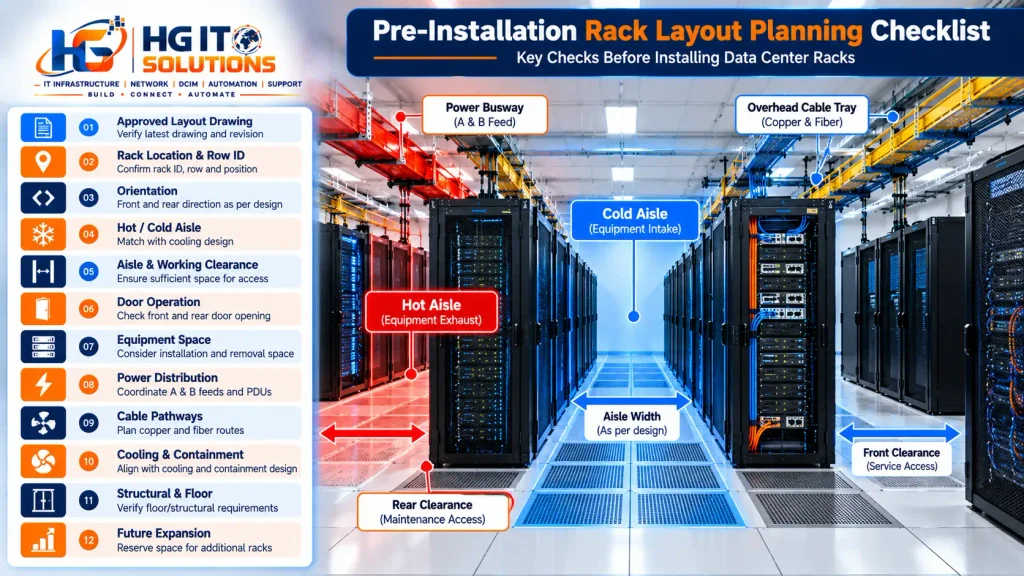
Practical Pre-Installation Rack Layout Checklist
Before a rack is permanently installed, verify the following:
- Latest approved layout drawing is available
- Drawing revision has been confirmed
- Room and row IDs are correct
- Rack ID matches the drawing
- Rack sequence is correct
- Front and rear orientation is confirmed
- Hot aisle and cold aisle arrangement is understood
- Required aisle and working clearances are available
- Rack doors can operate correctly
- Equipment installation and removal space is considered
- Power distribution routes are coordinated
- A and B feed strategy is understood where applicable
- Copper and fiber pathways are coordinated
- Overhead tray or busway alignment has been checked
- Cooling infrastructure is considered
- Containment requirements are coordinated
- Structural or raised-floor requirements are addressed
- Walls, columns, doors, and fixed services have been checked
- Future rack positions are protected where required
- Floor marking matches approved dimensions
- Final row alignment is verified before anchoring
This checklist does not replace the approved project drawings, manufacturer instructions, engineering requirements, or applicable codes and standards. It provides a practical field-level verification process before installation progresses.
Rack Layout Planning and Industry Standards
Data center layout should always be coordinated with the standards, codes, manufacturer requirements, and project specifications applicable to the facility.
Standards such as ANSI/TIA-942 provide broader guidance for data center telecommunications infrastructure and associated facility considerations, while ASHRAE publishes widely used guidance related to thermal management and data center cooling.
However, standards should not be reduced to a few universal measurements copied from one project to another.
The correct rack layout depends on the facility design, equipment, cooling architecture, electrical system, local requirements, safety considerations, and operational objectives.
For field teams, the safest approach is straightforward:
Use the approved project design, verify actual site conditions, and escalate discrepancies before permanent installation.
Final Thoughts
Good data center rack installation begins before the rack is anchored to the floor.
The location of each cabinet affects cooling, power, cabling, maintenance, safety, containment, and future expansion.
That is why data center rack layout planning should be completed carefully and verified against both approved documentation and actual site conditions.
Start with the latest drawing. Establish the rack rows. Confirm front and rear orientation. Understand the hot aisle and cold aisle strategy. Verify working clearance. Coordinate with power, cooling, and cable pathways. Check future expansion requirements. Then verify the complete row before permanent fixing.
These steps may take additional time during the planning stage, but they can prevent much larger problems later.
A clean and reliable data center does not begin with cable management.
It begins with putting the rack in the right place.
Frequently Asked Questions
What is data center rack layout planning?
Data center rack layout planning is the process of determining where racks will be positioned, how rows will be arranged, which direction equipment will face, how aisles will be formed, and how the rack layout will coordinate with cooling, power, cabling, maintenance, and future expansion requirements.
What is a hot aisle and cold aisle?
In a conventional arrangement, the fronts of opposing racks face each other to form a cold aisle, while the rears of opposing racks face each other to form a hot aisle. This helps separate equipment intake air from hot exhaust air.
How much clearance should be left between data center rack rows?
There is no single clearance value that should be blindly applied to every facility. Required aisle dimensions depend on the approved project design, applicable codes and standards, rack and equipment dimensions, maintenance requirements, containment, accessibility, and safety considerations.
Should server racks face each other?
In a conventional hot aisle/cold aisle arrangement, rack fronts typically face other rack fronts across the cold aisle, while rack rears face other rack rears across the hot aisle. The final arrangement should follow the facility’s approved cooling and equipment design.
Why should overhead infrastructure be checked before installing racks?
Rack positioning needs to coordinate with overhead cable trays, fiber pathways, electrical distribution, busways, and containment. Poor alignment can create difficult cable drops, unnecessary bends, longer routes, or installation conflicts.
Should future racks be considered during the initial layout?
Yes. If expansion is expected, future rack positions should be considered together with power capacity, cooling capacity, cable pathways, containment, and access requirements so that additional racks can be installed without major redesign.
What should be checked before anchoring a data center rack?
At minimum, verify the rack ID, row, position, orientation, aisle arrangement, working clearance, floor or structural requirements, power and cable pathways, cooling coordination, door operation, overhead infrastructure, and overall row alignment against the approved project documentation.
Continue the Data Center Rack Installation Series
Rack layout planning establishes where the cabinets will be installed, but the next step is making sure the selected rack itself is suitable for the equipment and infrastructure it will support.
In the next article in this series, we will cover Data Center Rack Size Guide: 42U, 45U, 48U, Width & Depth, including how rack height, width, depth, equipment dimensions, cable-management space, and future capacity influence rack selection.
For the complete pre-installation overview, also read our Data Center Rack Installation Checklist, which covers the key checks that should be completed before rack installation begins.
