
Introduction
A cable can be installed perfectly, routed neatly through the correct pathway, and connected to the correct equipment — but if nobody can confidently identify where it starts and where it ends, troubleshooting quickly becomes difficult.
Consider a simple maintenance ticket:
“Verify the network connection from the core switch in Rack R10A to the fiber patch panel.”
The engineer reaches the rack and finds dozens of similar fiber or copper cables.
The switch is labeled correctly.
The patch panel is labeled correctly.
The rack identification is clear.
But the cable itself only has a small handwritten label such as:
SW-01
That immediately creates more questions.
Which switch?
Which port?
Where does the other end terminate?
Is the label still accurate after previous changes?
Can the engineer disconnect this cable without tracing it manually?
This is where data center cable labeling becomes an operational requirement rather than a cosmetic task.
A practical cable labeling standard should allow an engineer to identify the connection from either end without relying on memory, assumptions, or outdated spreadsheets.
In the previous guides, we covered Data Center Asset Naming and Data Center Rack Labeling.
Those standards answer two important questions:
What is this device?
and
Where is this equipment installed?
Cable labeling adds the next question:
What is this connected to?
Together, these create the physical foundation required for reliable infrastructure documentation and DCIM connectivity records.
Table of Contents
The Real Problem: The Cable Exists, but the Connection Is Unclear
In a small environment, engineers may know most connections from memory.
A cable might simply be labeled:
SW1-P17
and everyone understands what it means.
That approach becomes increasingly unreliable as the environment grows.
More racks are installed.
Additional switches are deployed.
Patch panels expand.
Fiber trunks are added.
Engineers change.
Equipment moves.
Ports are reassigned.
Old connections are removed.
New cables are installed during maintenance windows.
Eventually, the original label no longer provides enough information.
A label such as:
SW1-P17
may identify one side of the connection, but it does not necessarily tell an engineer where the cable goes.
A better cable identification system should help answer:
Where am I?
Which port is this cable connected to?
Where does the opposite end terminate?
That is the basic principle behind source-to-destination cable identification.
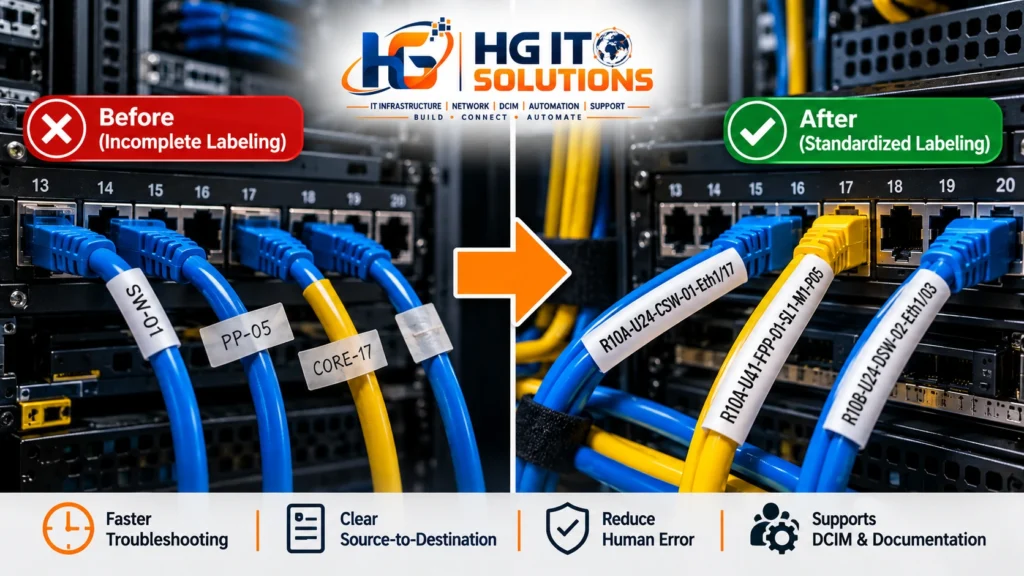
A 2:00 AM Cable Trace Is a Good Test of Your Labeling Standard
Imagine an application becomes unreachable during a night maintenance window.
Monitoring indicates that the affected network path includes a connection on a core switch.
The engineer reaches the rack.
The switch has 48 ports.
Multiple fiber patch cords have the same color and similar routing.
The cable management is clean, but the labels are inconsistent.
One cable says:
CORE-17
Another says:
PP-05
Another has an old handwritten tag.
Several have no readable identification at all.
At this point, even an experienced engineer may need to physically trace cables through vertical managers, horizontal managers, patch panels, or overhead pathways.
That takes time.
More importantly, manual tracing increases the risk of touching or disconnecting the wrong connection.
A useful labeling standard should reduce that dependency on physical tracing.
The engineer standing at either end should be able to understand the connection before making a change.
What Should a Data Center Cable Label Actually Identify?
A cable label should contain enough information to identify the connection reliably without becoming unreadable.
For many structured environments, the useful information includes:
Local equipment or termination point
Local port
Remote equipment or termination point
Remote port
Depending on the organization, a separate Cable ID may also be included.
A structured labeling approach can also align with recognized telecommunications infrastructure administration practices. The ANSI/TIA-606 standard provides a framework for identifying, labeling, and documenting telecommunications infrastructure, helping organizations maintain consistent identification across physical infrastructure.
Consider this fictional HG IT Solutions example:
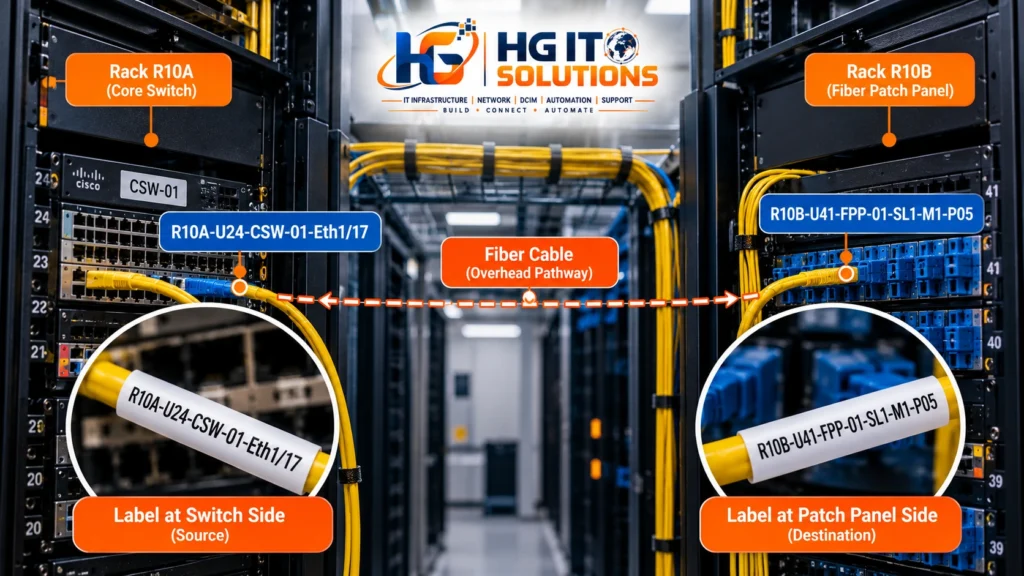
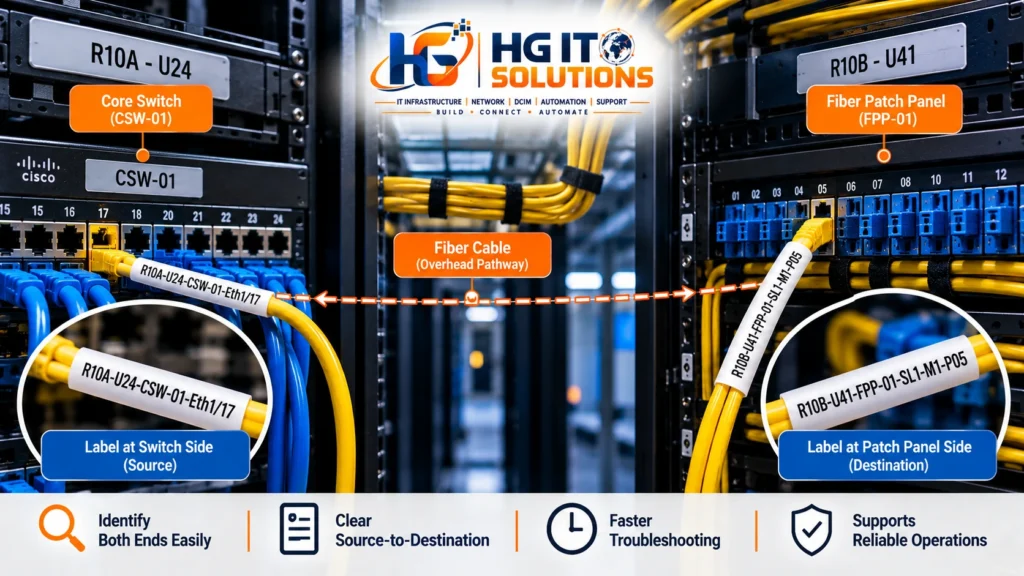
R10A-U24-CSW-01-Eth1/17
This identifies:
R10A → Rack 10A
U24 → Rack Unit 24
CSW-01 → Core Switch 01
Eth1/17 → Ethernet Port 1/17
Now consider the remote termination:
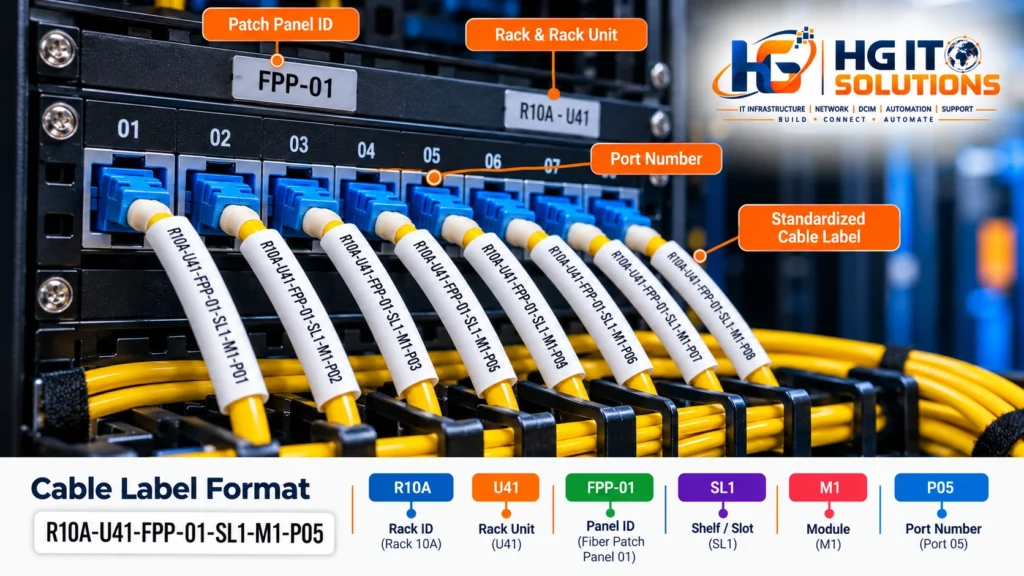
R10A-U41-FPP-01-SL1-M1-P05
This could represent:
R10A → Rack 10A
U41 → Rack Unit 41
FPP-01 → Fiber Patch Panel 01
SL1 → Slot 1
M1 → Module 1
P05 → Port 05
The exact abbreviations are not universal.
What matters is that the organization defines them clearly and uses them consistently.
Source-to-Destination Cable Labeling
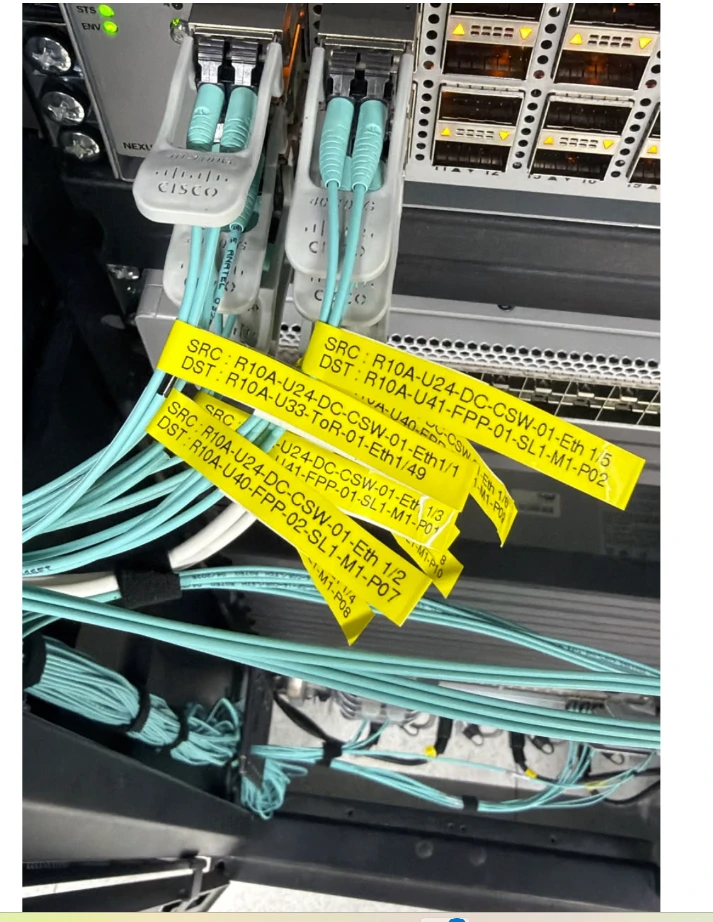
One practical method is to identify both endpoints directly on the cable.
For example:
Side A
SRC: R10A-U24-CSW-01-Eth1/17
DST: R10A-U41-FPP-01-SL1-M1-P05
At the opposite end:
Side B
SRC: R10A-U41-FPP-01-SL1-M1-P05
DST: R10A-U24-CSW-01-Eth1/17
Notice what changed.
The physical connection did not change.
Only the engineer’s perspective changed.
At the switch end, the switch is the local source and the patch panel is the remote destination.
At the patch-panel end, the patch panel becomes the local reference and the switch becomes the remote reference.
This allows an engineer working from either side to understand the complete connection.
“Source” and “Destination” Do Not Always Mean Traffic Direction
This distinction is important.
In networking, source and destination often describe the direction of network traffic.
That is not necessarily what they mean on a physical cable label.
A duplex fiber connection, for example, carries communication in both directions.
For labeling purposes, SRC and DST can simply describe the two physical endpoints according to the organization’s labeling convention.
If the words source and destination could create confusion in your environment, another approach is:
END-A: R10A-U24-CSW-01-Eth1/17
END-B: R10A-U41-FPP-01-SL1-M1-P05
The terminology matters less than consistency.
Document the rule and make sure engineers interpret it the same way.
Label Both Ends of Every Cable
A cable labeled at only one end is only partially identified.
Suppose the switch end contains:
DST: R10A-U41-FPP-01-SL1-M1-P05
but the patch-panel end has no label.
An engineer starting from the switch can identify the remote termination.
An engineer starting from the patch panel cannot confidently identify the switch connection without tracing the cable or checking another record.
For operationally important cabling, identification should therefore be available at both accessible ends.
A simple principle is:
Cable End A → identifies End A and End B
Cable End B → identifies End B and End A
That makes the connection understandable from either working location.
Cable ID vs Source-to-Destination Information
Not every organization wants long endpoint information printed directly on every cable.
Another valid model is to assign each cable a unique identifier.
For example:
CBL-000184
The same Cable ID appears at both ends.
The infrastructure database or DCIM system then contains:
CBL-000184
Endpoint A: R10A-U24-CSW-01-Eth1/17
Endpoint B: R10A-U41-FPP-01-SL1-M1-P05
This approach creates shorter physical labels.
However, it introduces a dependency.
If an engineer only sees:
CBL-000184
they may need access to the cable schedule, database, or DCIM platform to understand where the cable terminates.
That is why some organizations use a hybrid approach:
Unique Cable ID + Endpoint Information
For example:
CBL-000184
TO: R10A-U41-FPP-01-SL1-M1-P05
There is no single format suitable for every data center.
The correct design depends on label size, operational requirements, cable density, available systems, and how technicians actually work.
Port Identification Is Just as Important as Device Identification
Knowing that a cable connects two devices is often not enough.
Consider:
R10A-CSW-01 → R10A-FPP-01
Both endpoints are identifiable.
But a 48-port switch connected to a high-density fiber panel may contain dozens of connections between those same devices.
The missing information is the port.
Compare that with:
R10A-U24-CSW-01-Eth1/17
to
R10A-U41-FPP-01-SL1-M1-P05
Now the connection can be identified at port level.
This becomes especially important during troubleshooting, migration, switch replacement, patch-panel work and planned maintenance.
Patch Panel Identification Needs a Defined Structure
Patch panels can become one of the most confusing parts of cable documentation.
A simple copper panel may only require:
PP01-P24
But modular or high-density fiber systems may include several identification layers.
For example:
FPP-01-SL1-M1-P05
could mean:
FPP-01 → Fiber Patch Panel 01SL1 → Slot 1M1 → Module 1P05 → Port 05
Another environment may use cassette, tray, adapter or position identifiers instead.
Do not copy an identifier structure simply because another data center uses it.
Build the structure around the actual hardware deployed in your environment.
The goal is that an engineer can take the identifier from the documentation and locate the exact physical termination point without guessing.
Copper and Fiber Can Follow the Same Identification Principle
Copper and fiber cabling are physically different, but the basic documentation requirement remains similar:
Identify both endpoints clearly.
For a copper connection:
R12A-U30-ASW-01-Gi1/0/24
↔
R12A-U42-PP-01-P24
For a fiber connection:
R10A-U24-CSW-01-Eth1/17
↔
R10A-U41-FPP-01-SL1-M1-P05
The detailed fields can change depending on the infrastructure.
The underlying relationship remains:
Equipment → Port → Cable → Remote Port → Remote Equipment
Do Not Use Cable Color as the Primary Identifier
Cable colors can be useful.
An organization may use different colors to distinguish network functions, environments, cable types or other operational categories.
But color should not normally be the only method used to identify a connection.
There are several reasons.
Color standards may change.
Replacement cables may not be available in the required color.
Different teams may interpret colors differently.
Lighting conditions can affect visual identification.
Multiple cables of the same color may exist in the same pathway.
A cable label provides explicit information.
Color provides visual classification.
They can complement each other, but they should not be treated as the same thing.
Label Placement Matters
A technically correct label is not useful if nobody can read it.
Labels should normally be positioned close enough to the connector for the engineer to understand which connection they belong to, while avoiding interference with connector operation, bend radius or maintenance.
The label should remain readable without requiring unnecessary cable movement.
This is particularly important in high-density fiber environments.
If engineers must pull cables out of a bundle just to read their labels, the labeling system itself can introduce operational risk.
Do Not Place Labels Where They Interfere With Cable Performance
Physical labeling should never compromise the cable installation.
For example, labels should not force excessive bending near a fiber connector.
They should not interfere with latches.
They should not obstruct patch-panel numbering.
They should not create unnecessary stress around cable entry points.
They should also remain compatible with the cable diameter and environment.
Good identification and good cable management should support each other.
Printed Labels Are Better Than Permanent Handwritten Identification
Handwritten labels can be useful temporarily during installation or emergency work.
They are much less reliable as a permanent standard.
Handwriting varies between engineers.
Ink can fade.
Abbreviations become inconsistent.
Small text becomes difficult to read.
Printed labels provide more consistent:
Font size
Character spacing
Formatting
Abbreviations
Durability
Readability
But buying a label printer is not the first step.
The organization should define the identification standard before deciding how labels will be printed.
The Label Printer Is Not the Cable Labeling Standard
This mistake is surprisingly common.
A team buys an industrial label printer and immediately begins creating labels.
Engineer A prints:
SW01-P17
Engineer B prints:
R10A-SW1-17
Engineer C prints:
CORE SWITCH PORT17
The labels may look professional.
The data is still inconsistent.
Before printing labels, define:
Cable identification format
Rack identifiers
Equipment identifiers
Port naming
Patch-panel hierarchy
Cable ID format
Endpoint terminology
Label placement
Label material
Who is allowed to create or change records
Only then should the physical printing process begin.
Existing Cable Schedules Often Contain Multiple Versions
Many data centers already maintain cable information in Excel.
There is nothing inherently wrong with using Excel.
It can be extremely useful during surveys, data cleanup, migration and bulk import preparation.
The operational problem begins when several copies become active at the same time.
For example:
Engineer A Excel
↓
Engineer B Excel
↓
Email Attachment
↓
Printed Cable Schedule
↓
DCIM Record
↓
Actual Connection
Now imagine one cable is moved from Port 17 to Port 21.
The physical connection is updated.
One spreadsheet is updated.
Another spreadsheet is not.
The printed copy remains unchanged.
The DCIM record still shows Port 17.
The cable label may still reference the old connection.
This is data drift.
The problem is not Excel itself.
The problem is multiple uncontrolled versions of infrastructure information.
Never Trust an Old Cable Schedule Without Physical Verification
When cleaning an existing environment, a spreadsheet should be treated as a useful reference — not automatically as physical truth.
Suppose the schedule says:
R10A-U24-CSW-01-Eth1/17
↔
R10A-U41-FPP-01-SL1-M1-P05
Before creating new permanent labels, verify the actual connection.
Check the equipment.
Check the port.
Check the patch-panel position.
Check both ends where practical and safe.
Resolve discrepancies before updating the authoritative record.
A useful workflow is:
Existing Record → Physical Verification → Resolve Conflict → Approved Connection → New Label → Authoritative Record
This prevents old documentation errors from simply receiving new professional-looking labels.
Old Cable Labels Can Be More Dangerous Than Missing Labels
A missing label tells an engineer:
This connection needs verification.
An incorrect label can create false confidence.
Imagine a cable originally connected:
CSW-01-Eth1/17 → FPP-01-P05
Later, it is moved:
CSW-01-Eth1/21 → FPP-01-P05
The physical change is completed, but the original label remains.
Months later, an engineer trusts the label during maintenance.
The problem is no longer incomplete documentation.
It is incorrect documentation presented as reliable information.
For that reason, cable moves should include label updates as part of the same change activity.
Moves, Adds and Changes Must Include Cable Documentation
Cable labeling cannot be treated as a one-time project.
Infrastructure changes continuously.
New equipment is installed.
Switches are replaced.
Ports are migrated.
Patch panels are added.
Circuits are rerouted.
Old cables are removed.
Every approved move, add or change should consider:
Physical connection
Cable label
Cable schedule
Port record
Asset record
DCIM connectivity record
If only the cable is moved, the infrastructure and documentation immediately begin to diverge.
Remove Abandoned and Obsolete Labels
During cleanup, teams sometimes add new labels without removing obsolete ones.
A single cable may then contain:
Old label
Temporary migration label
New permanent label
That can be worse than having no label.
Once a connection is verified and the new standard is approved, obsolete identification should be removed according to the organization’s change process.
The physical cable should communicate one current, authoritative identity.
Data Center Cable Labeling During New Installations
New installations are the easiest time to establish clean documentation.
Do not wait until hundreds of cables are connected before deciding how they should be identified.
Define the standard during planning.
A practical workflow can be:
Rack Identification
↓
Equipment Identification
↓
Patch Panel Identification
↓
Port Identification
↓
Cable ID / Endpoint Assignment
↓
Cable Installation
↓
Physical Labeling
↓
Verification
↓
Documentation / DCIM Update
This is also why cable labeling should not be designed independently from rack and equipment identification.
If the rack identifier is inconsistent, the cable identifier will inherit the same inconsistency.
For new rack deployments, our Data Center Rack Installation: 15 Essential Checks Before Installation covers the infrastructure checks that should happen before equipment and cabling are finalized.
What About Existing Data Centers With Poor Cable Labels?
Existing environments require a different approach.
Trying to relabel thousands of cables immediately can create unnecessary risk.
A controlled cleanup is usually safer.
Step 1: Define the Standard
Agree on rack IDs, equipment names, patch-panel identifiers, port notation, cable IDs and label format.
Step 2: Select a Controlled Scope
Start with one rack, row, system or migration project rather than the entire facility.
Step 3: Compare Documentation With Reality
Use existing spreadsheets, diagrams and DCIM records as references.
Step 4: Physically Verify Connections
Confirm endpoints before changing permanent identification.
Step 5: Resolve Conflicts
Do not simply choose whichever record looks newest.
Investigate the actual infrastructure.
Step 6: Apply the Approved Labels
Label both ends according to the new standard.
Step 7: Update the Authoritative Record
The physical infrastructure and digital record should now describe the same connection.
Step 8: Expand Gradually
Use lessons from the first scope to improve the process before moving to additional racks.
This approach reduces operational risk while steadily improving data quality.
Cable Labels and DCIM Connectivity Records Must Agree
A DCIM platform can represent physical connectivity between equipment, ports, patch panels and infrastructure.
But the graphical connection inside the software is only useful when it matches reality.
Consider this chain:
Switch Port
↓
Cable
↓
Patch Panel Port
↓
Structured Cabling
↓
Remote Patch Panel
↓
Patch Cord
↓
Destination Device Port
A DCIM system may display the entire path.
But if one physical connection changes without updating the record, the visualization becomes inaccurate.
The same principle discussed in our practical guide to Data Center Infrastructure Management (DCIM) applies here:
DCIM visibility can only be as reliable as the infrastructure data feeding it.
A DCIM platform does not automatically correct poor cable documentation.
If incorrect endpoint information is imported, the result may simply be a cleaner-looking representation of incorrect connectivity.
Physical Cable Identification and DCIM Should Support Each Other
A useful operational relationship is:
Physical Cable → Cable Label → Endpoint Verification → Connectivity Record → DCIM
And in the opposite direction:
DCIM Connection → Equipment → Port → Cable ID → Physical Cable
An engineer should be able to start from either the physical infrastructure or the digital record and arrive at the same connection.
That is when infrastructure documentation becomes genuinely useful.
Excel Can Still Be Useful Before DCIM
Organizations moving toward DCIM do not need to stop using spreadsheets immediately.
Excel can be valuable for:
Cable surveys
Bulk data collection
Data cleanup
Naming normalization
Duplicate detection
Import preparation
Migration staging
The important question is:
Which system is authoritative after implementation?
If Excel, email attachments, printed records and DCIM are all independently edited, the organization still has multiple sources of truth.
A better transition is:
Excel / Existing Records
↓
Data Cleanup
↓
Physical Verification
↓
Naming and Labeling Standardization
↓
Approved Import Dataset
↓
DCIM
↓
Controlled Change Process
That topic deserves its own detailed guide, which we will cover later in:
From Excel to DCIM: How to Prepare and Migrate Data Center Infrastructure Records
Who Should Own the Cable Labeling Standard?
The answer varies by organization.
Responsibility may involve:
Data Center Operations
Network Team
Structured Cabling Team
Facilities
DCIM Administrator
Project Team
Change Management
The important point is not which team owns it.
The important point is that ownership is defined.
Someone should be responsible for maintaining:
Naming rules
Label format
Cable ID allocation
Port conventions
Documentation requirements
Change procedures
Verification requirements
Without ownership, standards gradually become optional.
A Practical Data Center Cable Labeling Checklist
Before considering the labeling process complete, verify the following:
- Every required cable has clear identification at both accessible ends.
- Rack identifiers match the approved rack naming standard.
- Equipment identifiers match physical and digital asset records.
- Port identifiers match the actual hardware.
- Patch-panel positions follow a documented hierarchy.
- Both endpoints can be identified without relying on memory.
- Cable IDs are unique where unique IDs are used.
- Labels are readable from the normal maintenance position.
- Labels do not interfere with connectors, bend radius or cable management.
- Temporary or obsolete labels have been removed.
- Moves and port changes trigger label and documentation updates.
- Existing records were physically verified before permanent relabeling.
- Cable schedules and DCIM connectivity records match the verified physical infrastructure.
- One authoritative source for ongoing connectivity information has been defined.
From Asset Identity to Complete Physical Connectivity
A reliable data center documentation model develops in layers.
First:
Asset Naming
answers:
What is this device?
Then:
Rack and Equipment Labeling
answers:
Where is this device physically installed?
Finally:
Cable Labeling
answers:
What is this device connected to?
Together:
Asset Identity → Rack Location → Equipment Label → Port → Cable → Remote Port → Remote Equipment
That chain becomes the foundation for reliable connectivity documentation.
Once these physical standards are established, DCIM implementation becomes much easier because the software is receiving structured, verified infrastructure information instead of inconsistent records.
Final Thoughts
Good cable management is not only about neat routing.
And good data center cable labeling is not simply about attaching a printed tag to each cable.
The objective is operational traceability.
An engineer should be able to stand at a rack, identify a cable, understand its local termination, determine its remote endpoint, compare that information with the infrastructure record and make a maintenance decision with less uncertainty.
A practical progression looks like this:
Asset Naming
↓
Rack & Equipment Labeling
↓
Port Identification
↓
Source-to-Destination Cable Labeling
↓
Physical Verification
↓
Connectivity Records
↓
DCIM
The labels themselves are only one part of the system.
The real value comes when the physical infrastructure, documentation and DCIM records all describe the same connection.
That is how cable labeling moves from a documentation task to a reliable part of day-to-day data center operations.

Pingback: NetBox Installation Ubuntu 24.04 – Step-by-Step Guide