
Introduction
A network switch, router, firewall or wireless controller can be forwarding traffic perfectly while its management access remains poorly protected.
This is an important distinction.
Network device security is not only about firewall rules, VLAN segmentation or protecting user traffic. Engineers also need to protect the interfaces and services used to configure, monitor and maintain the infrastructure itself.
Consider a switch that is accessible through SSH from every internal subnet.
The device may not be exposed directly to the internet. It may even use encrypted SSH instead of Telnet.
But if any compromised workstation on the internal network can reach the management interface and repeatedly attempt administrative access, the management plane still has unnecessary exposure.
The better question is not simply:
“Is SSH enabled?”
It is:
“Who can reach SSH, how are administrators authenticated, what privileges do they receive, and can their activity be traced?”
This guide looks at network device security from that practical operational perspective.
We will focus on SSH, SNMP, administrative access, AAA, management networks, logging, configuration backups and the controls that help protect the management plane throughout the device lifecycle.
Table of Contents
Why Network Device Security Matters
Network infrastructure devices occupy a privileged position.
A compromised workstation may expose one user’s data.
A compromised network device can potentially affect traffic for an entire floor, site, VLAN, server environment or business service.
Depending on the device and the attacker’s privileges, unauthorized administrative access could allow someone to modify:
- VLAN assignments
- Routing
- Access control lists
- DNS or DHCP-related settings
- Network management configuration
- Authentication settings
- Logging destinations
- Interface configuration
- VPN settings
- Firewall policies
- Monitoring services
This is why management access deserves its own security design.
Cisco describes the management plane as the functions used to access, configure and monitor a device, including protocols such as SSH and SNMP. Protecting this plane is particularly important because losing trusted administrative control can make incident recovery significantly harder. Cisco
The Management Plane Is Different from User Traffic
It helps to separate three concepts.
The data plane forwards normal user and application traffic.
The control plane handles protocols and processes that allow the network itself to operate, such as routing protocols.
The management plane provides administrative and monitoring access to infrastructure devices.
Examples of management-plane services include:
- SSH
- HTTPS
- SNMP
- TACACS+
- RADIUS
- Syslog
- NTP
- NETCONF or other management APIs
- Secure file-transfer mechanisms
A switch can therefore be doing its data-plane job correctly while still having an unnecessarily exposed management plane.
That is why management security should be reviewed separately from ordinary connectivity.
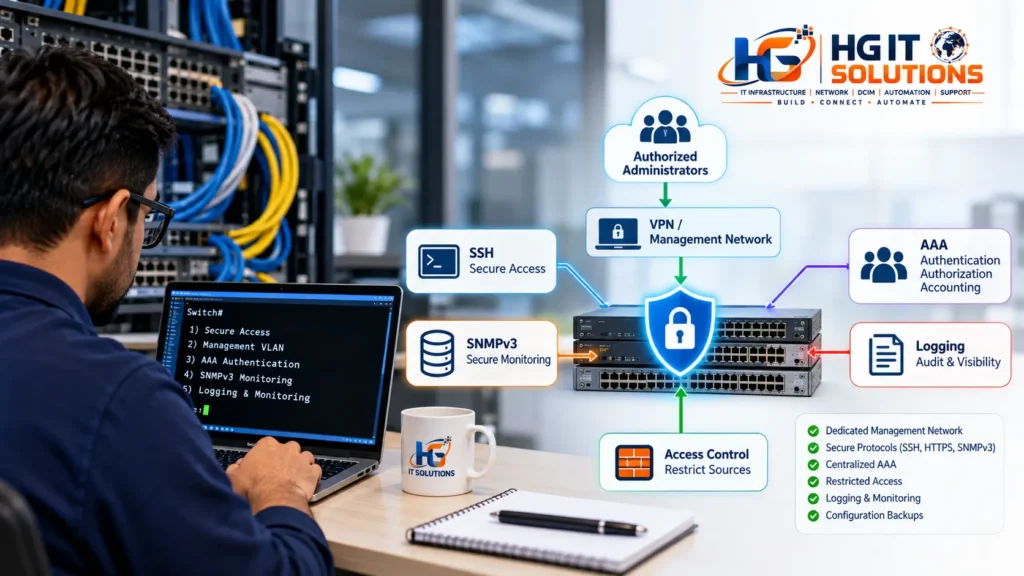
A Realistic Security Problem: Trusted Network Does Not Mean Trusted Access
One common assumption is:
“The management IP is internal, so it is secure.”
Internal addressing is useful, but it is not an access-control policy.
Imagine a switch with this management IP:
10.20.100.15
SSH is enabled.
An administrator can connect successfully.
At first glance, everything appears fine.
Now ask another question:
Which systems are allowed to initiate that SSH connection?
If users from office VLANs, Wi-Fi networks, test environments and unrelated server segments can all reach TCP port 22 on the switch, the attack surface is much larger than necessary.
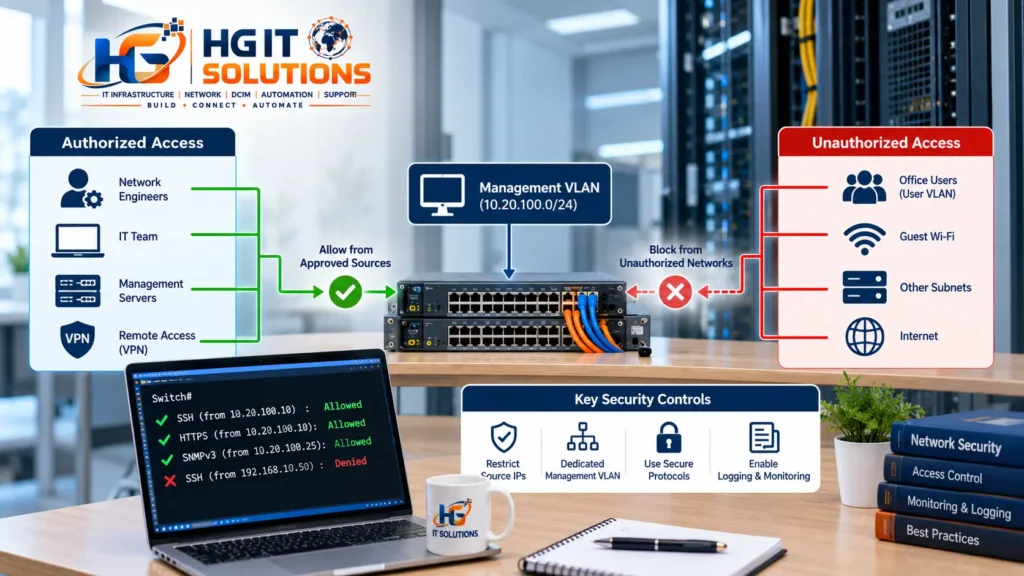
A more controlled design might allow management access only from:
10.20.10.0/24 – IT Management Network
or, in a more restricted environment, only from approved administration workstations, jump hosts or privileged access systems.
The exact architecture varies.
The principle does not:
Reachability to a management service should be intentionally controlled.
Start With an Inventory of Management Interfaces
Before hardening devices, determine what actually exists.
For each switch, router, firewall, wireless controller or other managed infrastructure device, document at least:
- Device name
- Device role
- Management IP address
- Management interface or VLAN
- Physical location
- Supported management protocols
- Authentication method
- Monitoring method
- Software or firmware version
- Logging destination
- Configuration backup method
This often exposes inconsistencies immediately.
One switch may use SSH and centralized AAA.
Another may still use a shared local account.
A third may have an HTTP interface enabled that nobody knew existed.
A fourth may accept SNMP requests from a much larger network than required.
You cannot reliably harden what you have not identified.
Disable Telnet and Use SSH for CLI Access
Telnet should not be used for normal administrative access where secure alternatives are available.
The major problem is straightforward: Telnet does not provide the confidentiality expected for modern administrative sessions.
SSH provides encrypted remote terminal access and should be preferred.
Current Cisco secure-operations guidance recommends SSHv2 rather than Telnet and identifies Telnet as a protocol that should not be used for management. sec.cloudapps.cisco.com
A simplified Cisco-style configuration might look similar to:
ip ssh version 2

line vty 0 15
 transport input ssh
This is only an illustration.
Exact syntax, supported cryptographic algorithms and configuration requirements vary between IOS, IOS XE, NX-OS, IOS XR and products from other vendors.
Always verify the configuration against the documentation for the actual platform and software release.
SSH Alone Does Not Make Management Access Secure
Replacing Telnet with SSH is an improvement.
It is not the complete security design.
Consider two environments.
Environment A
SSH is enabled.
Every internal subnet can reach it.
Several engineers share the same administrator account.
Logging is limited.
Old accounts remain active.
Environment B
SSH is enabled.
Only approved management sources can reach it.
Each administrator has an individual identity.
Authentication is centrally controlled.
Privileges are assigned appropriately.
Administrative activity is logged.
Both environments use SSH.
Their security posture is very different.
NIST’s guidance on SSH access management similarly emphasizes that secure SSH use involves more than encryption; authentication credentials and keys need appropriate provisioning, termination and monitoring throughout their lifecycle. NIST Computer Security Resource Center
Restrict Administrative Access by Source Network
A management service should normally not accept connections from every network simply because routing exists between them.
Restrict management access to approved sources.
Depending on the architecture, these could include:
- Management VLANs
- Administrator workstations
- Network management servers
- Jump hosts
- Privileged access management systems
- Operations networks
- Approved VPN address pools
For example:
ADMIN-NETWORK → SSH → NETWORK DEVICEmay be permitted.
While:
USER-VLAN → SSH → NETWORK DEVICEis denied unless there is a documented requirement.
Cisco’s infrastructure security guidance specifically recommends restricting network-device management access to trusted internal sources and permitted protocols. sec.cloudapps.cisco.com
Use a Dedicated Management VLAN or Network
Where practical, separate infrastructure management traffic from ordinary user traffic.
A dedicated management network provides a clearer security boundary and makes access policies easier to understand.
For example:
VLAN 10  – Users
VLAN 20  – Servers
VLAN 30  – Voice
VLAN 100 – Network Management
The management VLAN should not simply become another universally reachable VLAN.
Its value comes from combining segmentation with controlled access.
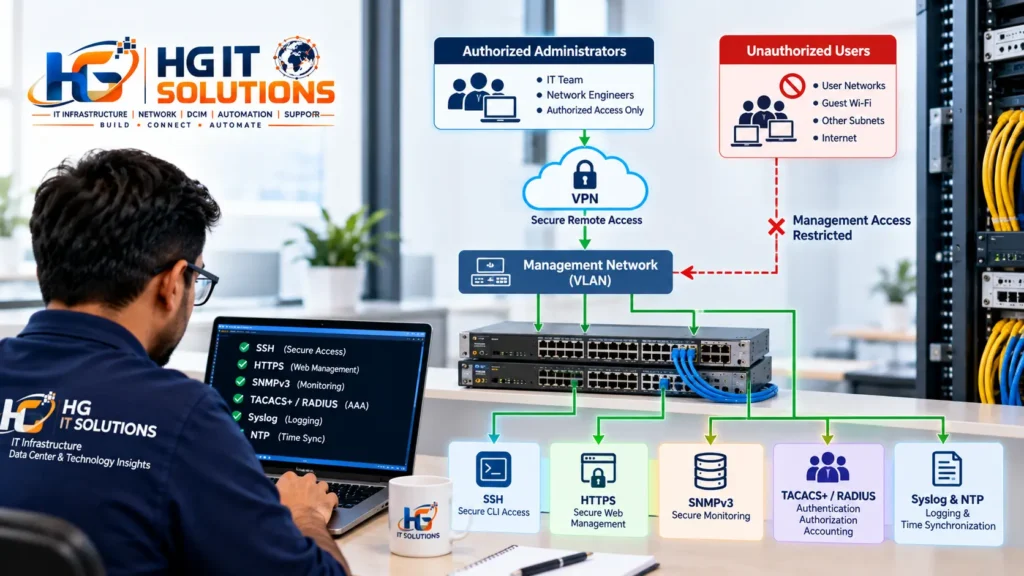
A stronger architecture might look like:
Administrator
     |
     v
Secure VPN / Admin Network
     |
     v
Jump Host or Controlled Access Point
     |
     v
Management Network
     |
     v
Switches / Routers / Firewalls
Some environments go further and implement physically or logically separate out-of-band management networks.
The appropriate design depends on business requirements, risk and infrastructure scale.
Protect Web-Based Management Interfaces
Many devices provide a browser-based administrative interface.
If the GUI is required, prefer secure HTTPS-based management supported by the platform.
Unencrypted HTTP administration should normally be disabled.
If the web interface is not required at all, consider disabling it.
This follows a broader hardening principle:
Do not expose a management service simply because the device supports it.
Cisco’s current secure-operations guidance recommends secure management protocols and lists unencrypted HTTP among management protocols that should not be used. sec.cloudapps.cisco.com
Local Accounts vs Centralized AAA
Local accounts are simple.
On a few isolated devices, they may be manageable.
As infrastructure grows, however, local-only administration creates operational challenges.
Imagine 100 network devices and five administrators.
If one engineer leaves the organization, every relevant device may need to be checked to ensure that person’s local account is removed.
Centralized AAA changes this model.
AAA stands for:
Authentication – Who are you?
Authorization – What are you allowed to do?
Accounting – What administrative activity can be recorded?
Centralized AAA can make administrative access more consistent and auditable.
Cisco specifically describes AAA as a mechanism for validating credentials, assigning privilege levels and maintaining accounting records related to administrative activity. sec.cloudapps.cisco.com
TACACS+ and RADIUS for Administrative Access
TACACS+ and RADIUS can both participate in centralized authentication architectures, but they are not identical.
For infrastructure administration, TACACS+ is commonly used where supported because it can provide detailed administrative authorization and accounting capabilities.
RADIUS is also widely deployed for centralized authentication and network access use cases.
The correct choice depends on the devices, identity architecture and organizational requirements.
The important operational improvement is moving away from unmanaged shared credentials toward centrally controlled identities.
A simplified design might be:
Engineer
   |
   v
Network Device
   |
   v
AAA Server
   |
   +--> Authentication
   +--> Authorization
   +--> Accounting
Organizations should also plan carefully for AAA outages.
A tightly controlled emergency local account may be required so administrators are not completely locked out when centralized authentication infrastructure is unavailable.
Cisco also recommends retaining appropriate local backup authentication when remote AAA services cannot be reached. sec.cloudapps.cisco.com
Avoid Shared Administrator Accounts
Consider an account named:
admin
Five engineers know its password.
A configuration change occurs at 2:00 AM.
Later, the team discovers that the change caused an outage.
The logs show:
admin logged in
Who was actually using the account?
Without additional evidence, attribution becomes difficult.
Individual administrative identities are much better:
haider.ali
netops01
engineer02
The exact naming convention is organization-specific.
What matters is that administrative activity can be tied to an authorized identity rather than an anonymous shared credential.
Apply Least Privilege to Administrative Access
Not every person who needs access to a network device needs unrestricted configuration privileges.
A monitoring account may only need read access.
A service desk engineer may need a limited set of operational commands.
A senior network administrator may require full configuration privileges.
Automation accounts should receive only the access required by their function.
This is the principle of least privilege.
Do not automatically turn every authenticated user into a full administrator.
SNMPv2c vs SNMPv3: Why the Difference Matters
SNMP is extremely useful for network monitoring.
It allows monitoring systems to collect information such as:
- Interface status
- Interface counters
- CPU utilization
- Memory utilization
- Environmental information
- Device availability
But SNMP versions differ significantly in their security capabilities.
Legacy community-string-based SNMP deployments require particular care. A community string should not be treated as equivalent to modern user-based authentication with confidentiality protections.
Where supported and operationally practical, SNMPv3 should be preferred because it provides stronger security capabilities, including authentication and privacy options.
Cisco’s current secure-operations guidance identifies SNMPv3 as the preferred SNMP version and advises against using SNMPv1 or v2 for secure management. sec.cloudapps.cisco.com
Secure SNMP Configuration and Restrict Monitoring Sources
Moving to SNMPv3 is only part of the job.
Ask:
Which systems actually need to query the device?
If the Network Management System is:
10.20.100.25
there may be no reason for arbitrary user networks to send SNMP requests to the infrastructure.
Restrict SNMP access to approved monitoring systems wherever the platform supports it.
Also review whether write capabilities are actually required.
Many monitoring deployments only require read access.
Do not provide broader privileges than the operational requirement demands.
Disable Unused Management Services
Network devices may support numerous services accumulated over many years of product development.
A device should not run a service simply because it is available.
Review whether you actually need:
- Telnet
- HTTP
- FTP
- TFTP
- Legacy SNMP versions
- Discovery protocols on unnecessary interfaces
- Unused APIs
- Unused management agents
Every unnecessary service increases configuration complexity and may increase attack surface.
Cisco’s current hardening guidance explicitly recommends disabling unnecessary services and preferring secure protocols such as SSHv2, HTTPS and secure file-transfer mechanisms where appropriate. sec.cloudapps.cisco.com
Protect Console and Out-of-Band Management Access
Network security is not limited to IP-based remote access.
Physical console access can provide powerful administrative capabilities.
Console ports should therefore be treated as privileged interfaces.
Physical access to network racks and data center rooms should be controlled appropriately.
For larger or more critical environments, out-of-band management can provide an independent administrative path when the production network is unavailable.
But out-of-band does not mean automatically secure.
Console servers and management networks themselves require:
- Strong authentication
- Restricted reachability
- Logging
- Patch management
- Secure protocols
- Controlled physical access
An insecure console server can become a gateway to many otherwise protected devices.
Use NTP So Security Logs Have Reliable Timestamps
Logs are much less useful when every device has a different clock.
Imagine investigating an incident:
Firewall: 02:14
Core Switch: 02:19
Access Switch: 02:08
AAA Server: 02:15
Reconstructing the actual sequence becomes unnecessarily difficult.
Reliable time synchronization helps correlate events across:
- Network devices
- Firewalls
- Authentication systems
- Monitoring platforms
- Servers
- Security tools
Use approved time sources and protect the time architecture according to the capabilities and requirements of the environment.
Send Logs to a Central Syslog or Monitoring Platform
Local device logs are useful.
They should not always be the only copy.
If a device fails, is rebooted or is compromised, locally stored evidence may be lost or become unavailable.
Central logging can help preserve operational and security events.
Useful events may include:
- Login successes
- Login failures
- Configuration changes
- Interface changes
- AAA events
- System restarts
- Security warnings
- Administrative sessions
Logs are only valuable if somebody can retrieve and interpret them.
Retention, access control and monitoring processes matter just as much as enabling syslog.
Configuration Backups Are Part of Security
Configuration backups are often treated purely as an operations task.
They also contribute to security and recovery.
Suppose an unauthorized change modifies:
- An ACL
- An administrator account
- An SNMP configuration
- A routing policy
- A management service
A known-good configuration backup can help engineers determine what changed and restore the expected state.
Backups should themselves be protected.
Network configurations can contain sensitive information about:
- IP addressing
- Network topology
- Authentication configuration
- Monitoring systems
- VPNs
- Security controls
Do not treat configuration files as harmless text documents.
Keep Network Device Software and Firmware Maintained
A device may have excellent access-control configuration and still be exposed to known software vulnerabilities.
Maintain an inventory of device models and software versions.
Then establish a process to review:
- Vendor security advisories
- Recommended releases
- Known vulnerabilities
- Support lifecycle status
- Upgrade requirements
- Compatibility dependencies
Do not upgrade production infrastructure blindly just because a newer release exists.
Network upgrades require planning, compatibility validation, configuration backups and rollback procedures.
For a practical example of network device software maintenance, see our guide to upgrading Cisco Catalyst 9200L IOS XE from USB using cat9k_lite.
Security maintenance and operational stability need to work together.
Do Not Expose Management Interfaces Directly to the Internet
Direct internet exposure of administrative interfaces should generally be avoided.
Instead of:
Internet
   |
   v
Public Management Interface
   |
   v
Network Device
a controlled design may use:
Remote Administrator
       |
       v
Secure Remote Access
       |
       v
Approved Admin Network / Jump Host
       |
       v
Network Device
The exact architecture will depend on the organization.
The goal is to avoid turning device administration into an unnecessarily public service.
Secure Remote Administration Through VPN or Controlled Access
Remote engineers often need to manage infrastructure.
That does not mean every network device should individually accept remote connections from the internet.
A better design centralizes remote access.
For example:
Engineer
   |
   v
VPN
   |
   v
Privileged / Management Network
   |
   v
SSH / HTTPS
   |
   v
Network Device
Higher-security environments may add a hardened jump host or privileged access management system between the remote user and network devices.
This creates a more controlled point for authentication, authorization and logging.
What Changes During Moves, Adds and Configuration Changes?
Security controls can drift during ordinary operational work.
A temporary troubleshooting ACL is created.
A new monitoring server is allowed.
An engineer enables HTTP for testing.
A local account is created during an AAA outage.
SNMP access is expanded during migration.
None of these changes necessarily begins as malicious activity.
The problem occurs when temporary changes become permanent by accident.
Every move, add or change should therefore consider whether it modified:
- Management reachability
- Administrative accounts
- AAA configuration
- SNMP permissions
- Logging
- Management services
- ACLs
- Backup configuration
Security baselines should survive normal operations.
How to Verify Network Device Security
Do not assume a configuration is secure because the commands look correct.
Test the result.
From an approved management workstation:
SSH → Expected to succeedFrom an ordinary user network:
SSH → Expected to failFrom the authorized NMS:
SNMP → Expected to succeedFrom an unauthorized host:
SNMP → Expected to failThen test:
- Central AAA authentication
- Authorization level
- Accounting records
- Local emergency access procedure
- HTTPS restrictions
- Syslog delivery
- NTP synchronization
- Configuration backups
Security verification should test both sides:
What should work?
and
What should not work?
Practical troubleshooting is also important when network infrastructure behaves differently after configuration changes or recovery procedures. See our guide on troubleshooting an Aruba AP-515 after a factory reset when the expected SSID does not appear.
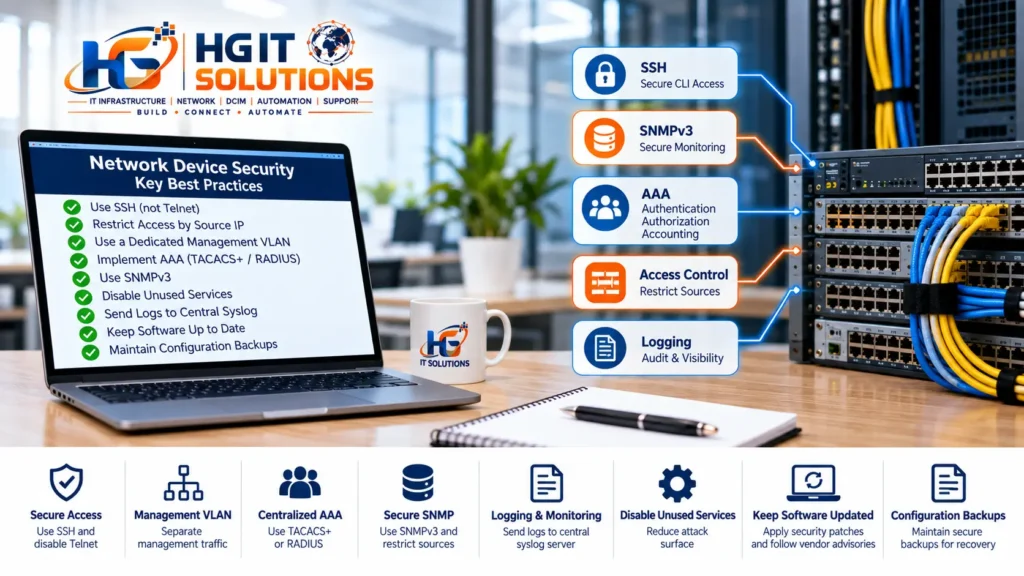
Practical Network Device Security Checklist
Use this checklist as a starting point for a management-plane review.
- Inventory network devices and management IP addresses
- Identify all enabled management services
- Disable Telnet where SSH is available
- Use supported secure SSH configurations
- Restrict SSH to approved management sources
- Disable unnecessary HTTP management
- Use HTTPS where web administration is required
- Implement a controlled management VLAN or network where appropriate
- Review centralized AAA
- Use individual administrator identities
- Remove stale administrative accounts
- Apply least privilege
- Prefer SNMPv3 where supported
- Restrict SNMP to authorized monitoring systems
- Disable unused services
- Protect physical console access
- Secure out-of-band management
- Configure reliable time synchronization
- Send important events to centralized logging
- Maintain protected configuration backups
- Track device software and firmware versions
- Review vendor security advisories
- Avoid direct internet exposure of management interfaces
- Use controlled remote-access methods
- Verify allowed and denied management paths
- Review management security after infrastructure changes
A checklist does not replace an organization-specific security policy.
It helps prevent common controls from being forgotten.
Common Network Device Security Mistakes
Several network device security mistakes appear repeatedly in real infrastructure, especially when management access grows without a consistent hardening standard.
Enabling SSH and Assuming the Job Is Finished
SSH protects the session in transit, but access still needs authentication, authorization and reachability controls.
Allowing Management Access from Everywhere Internally
An internal IP address does not automatically represent a trusted administrator.
Using One Shared Administrator Account
Shared credentials reduce accountability and make offboarding harder.
Leaving Old Local Accounts Active
Accounts created for engineers, vendors or troubleshooting may remain long after they are needed.
Using Legacy SNMP Without Reviewing the Risk
Monitoring often survives for years because nobody wants to break it. That does not mean its security configuration should remain untouched forever.
Enabling Services for Troubleshooting and Forgetting Them
Temporary HTTP, Telnet, ACL or local-account changes can become permanent configuration drift.
Collecting Logs Without Reviewing Them
Logging alone does not provide effective monitoring.
Keeping Backups Without Protecting Them
Configuration repositories can contain highly valuable infrastructure information.
Hardening Devices Without Testing Operations
A security change that unexpectedly locks out monitoring or administrators can create its own outage.
Good security changes should be implemented with verification and rollback planning.
How Network Security Monitoring Supports Infrastructure Operations
Security and network operations should not exist as completely separate activities.
The same infrastructure information can help both teams.
For example:
A network engineer may notice repeated SSH failures.
A security analyst may correlate those failures with activity from a compromised workstation.
A monitoring platform may detect a configuration change.
AAA accounting may identify the administrator involved.
A configuration backup system may show exactly what changed.
Centralized visibility makes each individual control more useful.
This is one reason management-plane security is not just about preventing unauthorized access.
It is also about making legitimate administration controlled, observable and recoverable.
Final Thoughts
Network device security begins with a simple realization:
Being able to log in securely is not the same as having secure administrative access.
SSH is important.
SNMPv3 is important.
AAA is important.
Management VLANs, ACLs, logging and configuration backups are important.
But no single technology creates a secure management plane by itself.
The stronger approach is layered:
Controlled Management Path
        ↓
Restricted Reachability
        ↓
Secure Protocol
        ↓
Individual Authentication
        ↓
Appropriate Authorization
        ↓
Administrative Accounting
        ↓
Central Logging
        ↓
Configuration Backup
        ↓
Continuous Verification
The objective is not to make network administration difficult.
It is to ensure that the right people can manage the right infrastructure through the right path — while unauthorized access is restricted and legitimate changes remain traceable.
As infrastructure grows, these controls become even more important.
A few manually managed switches can hide inconsistent practices for years.
At data center or enterprise scale, those inconsistencies become operational and security risks.
Build the management security standard early, document it clearly, test it regularly and update it whenever the infrastructure changes.

Overall, this is a strong and informative guide that provides practical security recommendations without making the subject unnecessarily complicated. It would be valuable as a reference for both experienced engineers and professionals who are developing their network security practices. I am fully satisfied and such a great and informatic platform.
Pingback: Physical Access Control Systems: A Practical Guide
Pingback: Access a Server Without Monitor and Keyboard | HGIT Tool