
Introduction
Physical security often begins with a simple question: who should be allowed through this door?
For a small room, a traditional lock and key may be enough. But as an environment grows, physical access becomes more difficult to manage. Offices may have employees, visitors and contractors. Server rooms may contain critical network and computing equipment. Data centers can have multiple security zones where access must be restricted to specific personnel.
This is where physical access control systems become important.
A properly designed access control system does more than unlock a door. It provides a controlled method of identifying users, deciding whether access should be granted, recording access events and integrating the door with other building and security infrastructure.
Depending on the environment, the system may use cards, PIN codes, biometric credentials, mobile credentials or a combination of these methods.
However, selecting the right technology is only part of the job.
The reader, controller, lock, door contact, power supply, emergency release mechanism, network connectivity and management platform all need to work together as one reliable system.
This guide explains the practical concepts behind physical access control, the main system types, their advantages and limitations, and the factors organizations should consider before selecting a solution.
Table of Contents
What Is a Physical Access Control System?
A physical access control system is a security system used to control and monitor access to a building, room or restricted area.
Instead of relying only on a mechanical key, the system uses an identity or credential to determine whether a person should be allowed through a controlled door.
Physical access control is widely used to manage entry into buildings, offices, server rooms and other restricted areas. For another industry perspective, Axis Communications explains physical access control in terms of secured entry points, electronic credentials, access decisions and the core components that work together within a physical access control system.
That credential could be:
- An RFID or proximity card
- A smart card
- A PIN code
- A fingerprint
- Facial recognition
- A mobile credential
- Or a combination of multiple authentication methods
The basic concept can be represented as:
User → Credential → Reader → Controller → Access Decision → Door Lock → Event Record
For example, an employee presents a card to a reader installed beside a secure door.
The reader sends the credential information to the access controller or associated system. The system checks whether that credential is authorized for that particular door at that particular time.
If access is permitted, the locking mechanism is released.
If access is denied, the door remains secured and the event can be recorded.
This ability to centrally control, change and review access is one of the biggest differences between electronic access control and traditional keys.
Why Physical Access Control Is Important
Not every person inside a facility should automatically have access to every area.
An office employee may need access to the main workplace but not the network room.
A facilities technician may require access to electrical or mechanical areas but not necessarily to IT equipment.
A data center engineer may need access to one technical area while another restricted zone requires additional authorization.
Visitors and contractors may need temporary access for a specific purpose and limited period.
Physical access control provides a way to enforce these boundaries.
This approach is also consistent with established physical security guidance. NIST physical access control guidance addresses verifying access authorization, controlling entry and exit points, maintaining physical access records, and managing access for employees and visitors
Instead of asking only:
“Can this person enter the building?”
a properly designed system can ask:
“Which areas can this person access, and when?”
That distinction becomes increasingly important as facilities become larger and more complex.
Physical security is also directly related to infrastructure security. Firewalls, passwords and network segmentation cannot prevent someone with physical access from unplugging equipment, connecting an unauthorized device, removing hardware or interfering with critical infrastructure.
For sensitive environments, physical and logical security therefore need to complement each other.
Traditional Keys vs Electronic Access Control
Traditional locks still have legitimate uses.
They are inexpensive, familiar and do not normally depend on network connectivity or electronic controllers. For a small environment with only a few trusted users, a mechanical lock may be perfectly reasonable.
The problem appears when access needs to change frequently.
Imagine that 50 employees have physical keys and one key is lost.
Depending on the security requirement, the organization may need to replace or re-key the lock and redistribute keys.
With an electronic access control system, an individual credential can usually be disabled without replacing the physical locking hardware or affecting every other authorized user.
Electronic systems can also provide information that a normal key cannot easily provide, such as:
- Which credential was used
- Which door was accessed
- When the event occurred
- Whether access was granted or denied
- Whether a door remained open
- Whether an unauthorized attempt occurred
This does not mean electronic access control is automatically better for every door. It means that it provides capabilities that become valuable when access must be controlled, changed and audited.
How Physical Access Control Systems Work
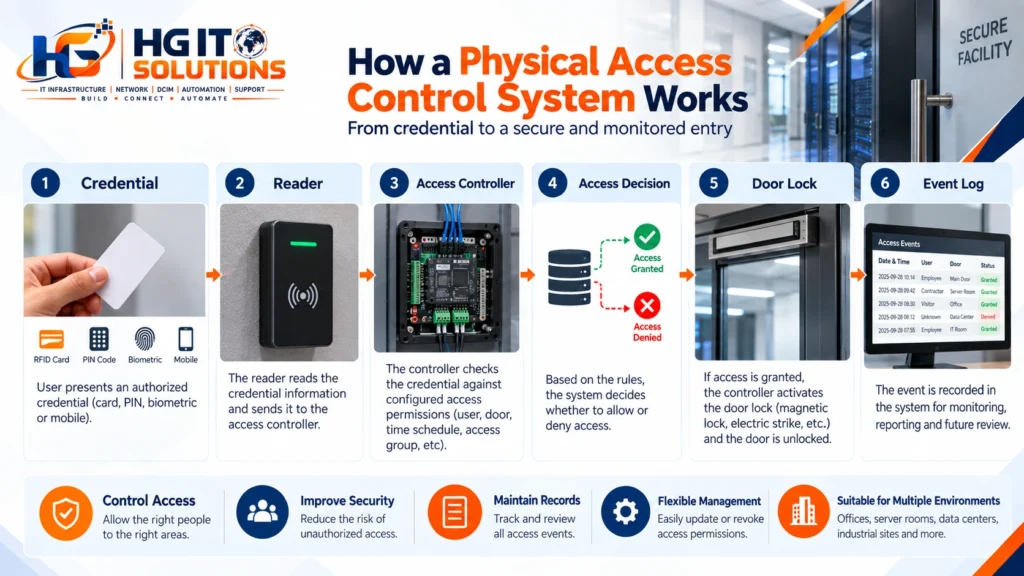
Although implementations vary between manufacturers and environments, most systems contain the same basic functional stages.
1. Identification
The user presents a credential.
This could be a card, PIN, fingerprint, mobile credential or another supported identity method.
2. Credential Reading
A reader captures the credential information.
The reader itself does not always make the final authorization decision. In many centralized systems, it communicates with an access controller.
3. Authorization
The system checks the credential against configured access permissions.
The decision may depend on several factors, including:
- User identity
- Door or security zone
- Time schedule
- Access group
- Credential status
- Additional authentication requirements
4. Door Operation
If authorization is successful, the controller activates the appropriate locking circuit and allows the door to open.
If authorization fails, the door remains secured.
5. Monitoring and Logging
The system records the event.
Additional devices such as door contacts can provide information about whether the door actually opened, closed correctly or remained open longer than expected.
This is why a complete access control system should not be viewed as only a card reader mounted beside a door.
Main Components of an Access Control System
A typical electronic access-control installation can include several components.
Access Reader
The reader is the user-facing device installed near the controlled entry point.
Depending on the system, it may read:
- Cards
- Key fobs
- PINs
- Fingerprints
- Faces
- Mobile credentials
Some readers support multiple credential methods in the same unit.
Access Controller
The controller is an important part of many access control systems.
It processes information from readers and other field devices and controls the locking mechanism according to configured rules.
Depending on the architecture, one controller may manage a single door or multiple doors.
Locking Hardware
The locking mechanism physically secures or releases the door.
Common options include:
- Electromagnetic locks
- Electric strikes
- Electrified locks
- Other specialized locking hardware
The correct choice depends on the door, security requirements, emergency behavior and applicable building or life-safety requirements.
Door Contact
A door contact provides information about the physical state of the door.
This allows the system to determine whether the door is open or closed.
It can also help detect conditions such as a door being held open longer than expected.
Request-to-Exit Device
A request-to-exit device, often called REX, allows the system to recognize legitimate exit activity.
Depending on the design, this may involve a push button, motion sensor or another exit mechanism.
Emergency Release
Certain door configurations may require an emergency release method so that the locking arrangement behaves correctly during an emergency.
The exact requirements depend on the door type, system design and applicable regulations.
Power Supply and Battery Backup
Electronic access control depends on reliable power.
For this reason, access-control power supplies may include battery backup or may be supported by other resilient power arrangements.
Power failure behavior should be considered during design rather than discovered after an outage.
Types of Physical Access Control Systems
There is no single access-control technology that is ideal for every environment.
The right solution depends on factors such as facility size, security level, number of users, number of doors, management requirements and budget.
Understanding the major types helps make that decision more practical.

Standalone Access Control
A standalone access-control system operates primarily at an individual door or small group of doors without requiring a large centralized management platform.
This can be useful for:
- Small offices
- Storage rooms
- Residential applications
- Small server rooms
- Individual restricted areas
The main advantage is simplicity.
Deployment may be less complex, and the system can be appropriate when only a limited number of users and doors need to be managed.
The limitation becomes more visible as the environment grows.
If many standalone doors need individual administration, changing permissions across the facility can become time-consuming.
For this reason, standalone systems can be practical at small scale but may not provide the centralized visibility required by larger organizations.
Centralized and Networked Access Control
A centralized system allows multiple doors, controllers and users to be managed through a common platform.
This approach is more common in larger offices, campuses, commercial buildings and data-center environments.
Administrators may be able to manage:
- Users
- Credentials
- Door permissions
- Access groups
- Time schedules
- Event history
- Alarm conditions
- Multiple buildings or locations
Centralized management becomes especially valuable when an organization needs to change access permissions frequently.
For example, when an employee changes department, the organization can modify the employee’s access privileges rather than physically replacing locks.
When an employee leaves the organization, the credential can be disabled.
Network connectivity, however, introduces another infrastructure dependency.
Modern physical access control systems may use IP networks for controller communication, management, monitoring and integration with other platforms. The network supporting those systems should therefore be designed and secured appropriately.
Where access-control controllers and management platforms depend on the IP network, good network device security also becomes part of maintaining a reliable security infrastructure.
Card-Based Access Control
Card-based systems remain common in commercial environments.
The user presents an authorized card or credential to the reader, and the system determines whether access should be granted.
Cards are convenient because permissions can be managed electronically.
If a card is lost, it can normally be disabled and replaced without changing the lock.
Card systems can also support different access groups.
For example:
General Employee → Office Areas
IT Engineer → Office + Server Room
Data Center Technician → Authorized Technical Zones
Visitor → Temporary Approved Areas
However, card technology matters.
Organizations should avoid assuming that every proximity or RFID card provides the same level of security. Credential technology, encryption capabilities and system architecture can differ significantly between products.
PIN and Keypad Access Control
A keypad allows a user to enter a numeric code to request access.
PIN-based systems can be simple and convenient, particularly for smaller installations.
They also remove the requirement for a physical card.
However, PINs have an obvious operational weakness: people can share them.
A common code used by many people provides less individual accountability than unique credentials.
For higher-security environments, a PIN may therefore be more useful as an additional authentication factor rather than the only credential.
For example:
Card + PIN
provides stronger identity verification than a shared keypad code.
Biometric Access Control
Biometric systems use a physical characteristic to help verify identity.
Common examples include:
- Fingerprint recognition
- Facial recognition
- Iris recognition
One advantage of biometrics is that a fingerprint or face cannot be casually handed to another employee in the same way as a card or PIN.
This can make biometric authentication attractive for higher-security areas.
However, biometric systems introduce additional considerations.
These can include:
- Cost
- Enrollment
- Recognition performance
- Environmental conditions
- User acceptance
- Privacy requirements
- Protection of biometric information
- Backup access procedures
For this reason, biometric access should not automatically be treated as the correct choice for every door.
The security requirement should justify the technology.
Mobile and Smart Credentials
Some modern physical access control systems allow smartphones or other supported devices to act as credentials.
Depending on the platform, communication may use technologies such as NFC or Bluetooth.
Mobile credentials can reduce dependence on physical cards and may simplify credential distribution in some organizations.
However, organizations still need to consider:
- Device compatibility
- Lost phones
- User enrollment
- Credential revocation
- Mobile-device security
- Availability during phone or battery failure
Convenience should be balanced with operational reliability.
Card vs PIN vs Biometric Access Control
There is no universal winner between these technologies.
Each solves a slightly different problem.
Card access is generally convenient and scalable, but cards can be lost, borrowed or shared.
PIN access can be inexpensive and simple, but codes can be observed or shared.
Biometric access can provide stronger association between a credential and an individual, but it usually introduces greater cost and operational complexity.
Mobile credentials can improve convenience and credential distribution, but they introduce dependency on compatible mobile devices and supporting technology.
In some environments, combining methods may provide a better balance.
For example:
Card + PIN
or:
Card + Biometric
may be appropriate where stronger verification is required.
The correct approach should be based on risk and operational requirements rather than choosing the technology that appears most advanced.
Magnetic Locks vs Electric Strikes
The locking hardware is just as important as the credential technology.
Two terms frequently encountered in access-control projects are magnetic lock and electric strike.
An electromagnetic lock uses magnetic force to secure the door when energized.
An electric strike modifies the locking point in the door frame and works with suitable mechanical locking hardware.
Both can be used in access-control environments, but they operate differently and have different installation, door-hardware, power and emergency-egress considerations.
The decision should not be made simply on which product is cheaper or easier to purchase.
Door construction, required security behavior, emergency release and local requirements all need to be considered.
We will cover magnetic locks and electric strikes in detail in a separate installation-focused guide.
Fail-Safe vs Fail-Secure
Another important concept is what happens when electrical power is lost.
A fail-safe locking arrangement is designed to unlock when power is removed.
A fail-secure arrangement is designed to remain locked from the secured side when power is removed, while required egress provisions still need to be maintained.
The terminology sounds simple, but selecting the appropriate behavior can have serious security and life-safety implications.
A designer must consider questions such as:
- What happens during a power failure?
- Can occupants exit safely?
- What happens during a fire alarm?
- Does the door protect a critical area?
- Is battery backup available?
- What do applicable regulations require?
This is an area where security requirements and life-safety requirements must be coordinated rather than treated independently.
Physical Access Control for Offices
Office environments usually contain several different access requirements.
A typical facility may include:
- Main entrance
- Employee areas
- Meeting rooms
- Management offices
- Network room
- Storage areas
- Electrical rooms
- Restricted records areas
Not every door requires the same level of security.
For example, a normal employee entrance might use card access, while a critical IT room could require more restricted authorization.
The value of centralized access control is that different permissions can be assigned without requiring completely separate physical key systems.
Time schedules can also be useful.
An employee might be permitted to enter during normal operating hours, while security or facilities personnel may require different schedules.
Physical Access Control for Data Centers and Server Rooms
Data centers require a more layered approach to physical security.
Access to the building does not necessarily mean access to the data hall.
Similarly, access to the data hall does not necessarily mean unrestricted access to every cage, rack or technical room.
A simplified layered approach could look like:
Site Perimeter → Building Entrance → Security Check → Data Center Area → Data Hall → Restricted Cage/Room
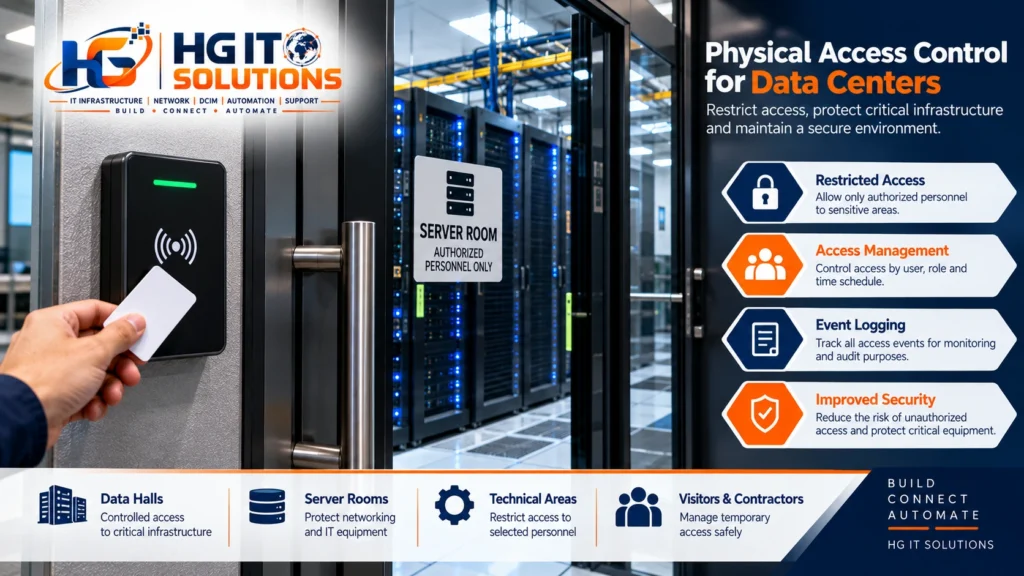
Each layer can apply different access requirements.
This approach reduces the risk created by giving broad access simply because someone is authorized to enter the facility.
For server rooms and data centers, access records can also be valuable during operational troubleshooting.
Suppose equipment is unexpectedly disconnected or a rack door is found open.
Knowing who entered the area and when can help reconstruct the event.
This demonstrates an important principle:
Physical security is not separate from infrastructure operations.
The two often support each other.
Physical Access Control for Homes and Residential Buildings
Access control is not limited to enterprise environments.
Residential buildings and smart homes increasingly use electronic access technologies such as:
- Keypads
- Smart locks
- Fingerprint readers
- Video door stations
- Mobile access
- Intercom integration
The requirements are usually different from a data center.
A home may prioritize convenience, simple administration and integration with smart-home systems.
A data center may prioritize layered authorization, auditability, redundancy and strict control.
The technology may appear similar, but the design objectives are different.
This is why access control should always begin with the environment and requirement rather than with a product.
Visitor and Contractor Access
Permanent employees are only one group that may require access.
Organizations also need to consider:
- Visitors
- Vendors
- Maintenance teams
- Contractors
- Delivery personnel
- Temporary staff
Giving temporary personnel permanent credentials creates unnecessary risk.
A better approach is to define access based on the purpose and duration of the visit.
A contractor working in a technical room may need access only to that area and only during an approved maintenance window.
When the work is complete, the temporary access can expire or be revoked.
This is one of the practical advantages of centrally managed access control.
Why Access Logs Matter
Access control is not only about allowing or denying entry.
The event history can also provide useful operational and security information.
A typical log may include:
- Credential identity
- Door
- Date and time
- Access granted
- Access denied
- Door forced open
- Door held open
- Controller events
- Administrative changes
These records can support investigations, audits and troubleshooting.
But logs are useful only when the supporting system is maintained properly.
Incorrect system time, poor user management or shared credentials can reduce the value of access records.
For example, if several people share one card, the log identifies the credential but may not reliably identify the individual who actually used it.
Access Control and Fire/Life-Safety Systems
Security must never be considered in isolation from life safety.
Certain electronically controlled doors may need to respond appropriately during emergency conditions.
Depending on the design and applicable requirements, this may involve integration with fire-alarm systems or dedicated emergency-release mechanisms.
The objective is to ensure that the security system does not create an unsafe condition during an emergency.
This is also why terms such as fail-safe and fail-secure should not be selected purely from an IT or security perspective.
Door hardware, fire strategy, emergency egress and applicable codes all need to be considered by the appropriate professionals.
Access Control and CCTV Integration
Access control and CCTV perform different functions, but they can complement each other.
An access-control event tells the system that a credential was presented at a particular door.
CCTV can provide visual context around that event.
For example, if a credential is used at a restricted door, an integrated security platform may allow an operator to review associated video footage.
This can be useful when investigating:
- Unauthorized attempts
- Tailgating
- Forced-door events
- Suspicious activity
- Access outside expected hours
However, CCTV design is a substantial topic on its own.
Camera placement, image quality, recording, storage, network design, retention and monitoring requirements all deserve separate consideration, so we will cover CCTV infrastructure in dedicated guides rather than trying to compress the subject into access control alone.
Access Control Is Also an Infrastructure System
It is easy to think of physical security as a collection of individual security products.
In practice, modern access control can depend on several infrastructure layers.
A system may involve:
Door Hardware → Field Cabling → Controller → Power → Network → Server/Platform → Monitoring

A weakness in any one of these layers can affect the complete solution.
A perfectly configured access-control server cannot compensate for unreliable door hardware.
A high-quality reader cannot solve an unstable power supply.
A correctly installed controller cannot provide reliable centralized management if its network connectivity is poorly designed.
This is why HG IT Solutions approaches technologies such as access control as part of the wider infrastructure environment rather than as isolated devices.
Reliable systems depend on how the individual components are designed, connected, powered, documented and maintained together.
Common Physical Access Control Mistakes
Several problems appear repeatedly when access-control projects are treated as simple device installations.
Choosing Hardware Before Understanding the Door
A reader and lock may look straightforward until the actual door construction, frame, existing hardware and emergency requirements are considered.
The door should be surveyed before final hardware selection.
Giving Too Many People Broad Access
Convenience can gradually lead to excessive permissions.
Access should normally follow the principle that users receive the access required for their role rather than unrestricted access to every controlled area.
Using Shared Credentials
Shared cards or shared PINs reduce accountability.
Where individual event tracking matters, individual credentials are preferable.
Ignoring Power Failure
A system may work perfectly during commissioning but behave unexpectedly during an actual power outage.
Power-loss behavior should be designed and tested.
Ignoring the Network
For networked systems, connectivity and network security are part of system reliability.
Poor Documentation
Door IDs, controller information, cable identification, power sources and device records should be documented.
Poor documentation makes future troubleshooting and expansion unnecessarily difficult.
Installing Without Considering Future Growth
A small installation may later expand to additional doors, floors or buildings.
Planning for reasonable growth can avoid unnecessary replacement later.
What to Consider Before Choosing an Access Control System
The first question should not be:
“Which access-control brand should we buy?”
The better starting point is:
“What are we trying to protect, and how should access work?”
Before selecting equipment, consider:
- Number of doors
- Number of users
- Security level
- Door types
- Credential type
- Visitor requirements
- Required event history
- Time schedules
- Emergency behavior
- Network availability
- Power and backup requirements
- Integration requirements
- Future expansion
- Administration responsibilities
A small office with three doors has very different requirements from a multi-building campus or data center.
Understanding those requirements first makes technology selection much easier.
Can a Small Access Control System Scale Later?
This is worth considering even for small installations.
An organization may begin with only two controlled doors.
Later it may want to add:
- More doors
- Another floor
- Another building
- Additional credential types
- CCTV integration
- Visitor management
- Centralized monitoring
A system that works well for two doors may not necessarily be the best platform for fifty.
That does not mean every small organization should purchase an enterprise platform.
It means future requirements should at least be considered before the initial design is finalized.
Good infrastructure planning balances today’s requirement with realistic future growth.
Practical Physical Access Control Checklist
Before implementing or reviewing a system, a simple checklist can help.
- Identify all doors requiring controlled access.
- Define who should access each area.
- Determine whether access schedules are required.
- Review the physical door and locking hardware.
- Select appropriate credential technology.
- Decide whether standalone or centralized management is required.
- Determine how visitors and contractors will be handled.
- Review power and backup requirements.
- Define required behavior during power failure.
- Coordinate emergency and fire-alarm requirements.
- Determine whether door contacts and REX devices are required.
- Review network requirements for connected controllers.
- Plan individual credential management.
- Define logging and retention requirements.
- Consider future expansion.
- Document doors, controllers, cabling and power sources.
- Test both normal operation and failure conditions.
A successful access-control project is not simply one where the reader turns green when a card is presented.
The complete system should behave predictably during normal use, unauthorized attempts, equipment failures and emergency conditions.
Physical Security Should Be Designed as a Complete System
The most important lesson is that access control should not begin and end with a card reader.
A reliable solution requires coordination between:
People + Credentials + Readers + Controllers + Doors + Locks + Power + Network + Monitoring + Emergency Systems
Each part has a different role.
The credential identifies or helps authenticate the user.
The controller applies access rules.
The locking hardware physically controls the opening.
Door monitoring provides status.
The network may provide centralized communication.
The management platform provides administration and event visibility.
Emergency systems help ensure that security does not conflict with life-safety requirements.
When these elements are designed independently, gaps are more likely to appear.
When they are treated as one infrastructure system, the result is easier to operate, troubleshoot and expand.
Final Thoughts
Physical access control systems provide much more than an electronic replacement for a traditional key.
They allow organizations to define who can access a protected area, when that access is permitted and how access events are recorded.
The appropriate solution may be very different for a home, office, server room or data center.
A small facility may only need simple standalone access control. A larger environment may require centralized controllers, multiple security zones, individual credentials, detailed logging, resilient power and integration with other security systems.
The important part is not selecting the most advanced reader or the most expensive platform.
It is understanding the actual security requirement and designing the complete system around it.
At HG IT Solutions, we look at access control as part of the wider infrastructure environment. Physical security, structured cabling, network connectivity, power, monitoring and system integration increasingly depend on each other.
The objective is straightforward:
Build the infrastructure correctly, connect the right systems, and create a solution that remains practical to operate and maintain.
In upcoming guides, we will go deeper into practical access-control topics including door hardware, magnetic locks, electric strikes, readers, controllers, wiring, power supplies, fire-alarm integration, installation practices and troubleshooting.
