
1. Introduction
Selecting a rack for a data center may appear straightforward. You check the number of rack units, choose a cabinet width and depth, confirm the quantity, and proceed with procurement.
However, rack selection becomes more complicated when the actual equipment, power distribution, cable pathways, cooling arrangement, and installation environment are considered.
A cabinet that looks suitable on a drawing may become difficult to work with once servers, network switches, patch panels, rack PDUs, fiber cables, and power cords are installed.
A 42U rack may have enough mounting space but insufficient room for cable management. A 48U rack may provide additional capacity but create access problems under overhead cable trays. Similarly, a 1200mm-deep cabinet does not automatically guarantee that every server and rail kit will fit.
This Data Center Rack Size Guide explains how to compare 42U, 45U, and 48U racks, understand cabinet width and depth, calculate equipment requirements, and select a suitable rack for installation and long-term operations.
The objective is not simply to choose the largest cabinet available. It is to select a rack that supports the equipment, infrastructure, and maintenance activities throughout its operational life.
Table of Contents
2. Why Data Center Rack Size Selection Matters
A data center rack is more than a structure for mounting IT equipment.
It is an important part of the overall infrastructure design because it affects:
- Equipment mounting and accessibility
- Power distribution and rack PDU placement
- Copper and fiber cable management
- Cooling and airflow
- Floor space utilization
- Equipment installation and replacement
- Physical security and maintenance
- Future capacity and expansion
Incorrect rack selection can create problems that are difficult or expensive to resolve after installation.
For example, selecting a narrow rack for a high-density network deployment may leave insufficient space for vertical cable managers.
Choosing a shallow cabinet for deep servers may cause conflicts between equipment, rear doors, power cords, and cable-management arms.
Similarly, choosing a taller rack without checking overhead clearance can interfere with cable trays, busways, lighting, or containment structures.
Rack size selection should therefore be completed during the design and planning stage, not after equipment arrives at the site.
3. Understanding the Standard 19-Inch Data Center Rack
Most enterprise servers, network switches, patch panels, and rack-mounted IT equipment use the 19-inch mounting format.
An important distinction is that 19 inches does not represent the external width of the cabinet.
It refers to the nominal width of the equipment front panel, including its mounting flanges.
A standard 19-inch equipment panel is 482.6mm wide.
The rack itself may have an external width of 600mm, 800mm, or another manufacturer-supported dimension.
The extra cabinet width accommodates the enclosure frame, side panels, vertical cable managers, power distribution, and other accessories.
The 19-inch mounting system is associated with the EIA-310 family of specifications and IEC 60297.
What is a rack unit (U)?
A rack unit, commonly written as U or RU, is the standard measurement used to describe vertical equipment mounting space.
1U = 1.75 inches = 44.45mm
Examples:
| Equipment Height | Vertical Mounting Space |
|---|---|
| 1U | 44.45mm |
| 2U | 88.90mm |
| 3U | 133.35mm |
| 4U | 177.80mm |
| 6U | 266.70mm |
A 2U server occupies two rack units, while a 4U storage appliance occupies four rack units.
The mounting rails normally contain repeating hole patterns that allow equipment to be positioned at defined rack-unit locations.
During installation, technicians should follow the rack-unit markings rather than treating every mounting hole as an independent installation position.
4. 42U vs 45U vs 48U: What Is the Difference?
The primary difference between 42U, 45U, and 48U racks is their available vertical mounting capacity.
However, that difference affects much more than equipment quantity.
Rack height comparison
| Parameter | 42U Rack | 45U Rack | 48U Rack |
|---|---|---|---|
| Rack units | 42U | 45U | 48U |
| Nominal mounting height | 1866.9mm | 2000.25mm | 2133.6mm |
| Mounting height in inches | 73.5″ | 78.75″ | 84″ |
| Additional U compared with 42U | — | 3U | 6U |
| Typical application | General IT infrastructure | Higher equipment capacity | High-density deployments |
| Main consideration | Capacity planning | Overhead access | Height and serviceability |
Important: These figures represent the vertical mounting space, not the complete external height of the cabinet.
Actual cabinet height depends on the manufacturer, frame construction, base, leveling feet, casters, top panels, and other accessories.
Always use the approved manufacturer dimensional drawing when checking installation clearance.

42U Data Center Rack
A 42U rack is a widely used option for enterprise data centers, server rooms, network infrastructure, and colocation environments.
It offers a practical balance between mounting capacity and equipment accessibility.
A typical 42U rack may accommodate:
- Rack-mounted servers
- Network switches
- Fiber and copper patch panels
- Rack-mounted storage
- Cable managers
- Security appliances
- Other compatible IT equipment
The actual quantity depends on equipment height, power requirements, cooling, weight, and cable-management needs.
A 42U rack can be a good choice when equipment capacity is moderate and technicians need convenient access to devices near the top of the cabinet.
However, choosing 42U only because it is familiar can result in insufficient capacity for future deployments.
45U Data Center Rack
A 45U cabinet provides three additional rack units compared with a 42U cabinet.
Although three rack units may appear insignificant, they can be useful in environments where floor space is limited.
For example, the additional space could accommodate three 1U devices or a combination of compatible equipment totaling 3U.
A 45U cabinet may be suitable when:
- The room has sufficient vertical clearance.
- Additional equipment capacity is required.
- Rack density must be increased without adding another cabinet.
- Maintenance access remains practical.
- Power and cooling capacity support the planned load.
The extra rack units should not be treated as permission to overload the cabinet.
48U Data Center Rack
A 48U cabinet provides six additional rack units compared with a 42U cabinet.
This represents approximately 14.3% more nominal mounting space.
For large deployments, the additional space can improve equipment consolidation and reduce the number of cabinets required for a given RU demand.
However, a taller rack introduces additional considerations.
These include overhead infrastructure clearance, top-of-rack accessibility, equipment handling, cabinet stability, and the potential need for suitable access equipment during maintenance.
A 48U cabinet should be selected only after verifying that the physical environment and operational procedures can support it.
5. More Rack Units Do Not Automatically Mean More Usable Capacity
One common mistake is assuming that a rack with more available units can always support more equipment.
In practice, rack capacity is limited by several factors.
These include:
- Available rack units
- Electrical power capacity
- Cooling capacity
- Cabinet load rating
- Cable-management capacity
- Equipment depth and rail compatibility
- Maintenance accessibility
For example, a 48U cabinet may have unused mounting space while its allocated electrical capacity is already fully committed.
Similarly, a rack may have available rack units but insufficient cooling capacity for additional high-density servers.
The correct approach is to evaluate rack capacity across all relevant infrastructure dimensions.
Available rack units are only one part of the capacity calculation.
6. Understanding Data Center Rack Width: 600mm vs 800mm
Rack width is another important factor during cabinet selection.
Two common external cabinet widths are 600mm and 800mm.
Both may support standard 19-inch rack-mounted equipment.
The difference is primarily the additional internal space available around the equipment mounting area.
600mm vs 800mm rack comparison
| Parameter | 600mm Rack | 800mm Rack |
|---|---|---|
| External width | 600mm | 800mm |
| 19-inch mounting compatibility | Yes, when specified | Yes, when specified |
| Side cable-management space | Generally more limited | Generally more generous |
| Floor width requirement | Lower | Higher |
| High cable-density suitability | Depends on design | Often more flexible |
| Vertical PDU placement | Model-dependent | May offer more options |
| Typical consideration | Space efficiency | Cabling and service access |
When to select a 600mm rack
A 600mm-wide cabinet may be appropriate for deployments where equipment and cabling requirements are relatively straightforward.
Examples include:
- Server racks with manageable cable quantities
- Equipment deployments with limited side-cable requirements
- Installations where floor space is constrained
- Standardized infrastructure with proven equipment compatibility
However, technicians should confirm that cable-management arms, rack PDUs, rear connections, and vertical accessories can be accommodated.
When to select an 800mm rack
An 800mm-wide cabinet is often useful for network-heavy environments where a large number of copper and fiber cables must be managed.
The additional width can support more flexible cable routing and accessory placement, depending on the rack design.
Possible applications include:
- Network aggregation racks
- High-density patching environments
- Mixed server and network deployments
- Racks with extensive vertical cable-management requirements
- Installations requiring additional service access around the mounting rails
An 800mm rack should not automatically be selected for every project.
The decision must consider the room layout, aisle planning, cabinet quantity, and available floor space.
7. Why Rack Depth Is Often More Critical Than Expected
Rack depth is one of the most frequently overlooked dimensions during procurement.
Common cabinet depths include:
- 800mm
- 1000mm
- 1070mm
- 1200mm
Other depths are also available depending on the manufacturer.
A common assumption is that if a server is shorter than the external depth of the cabinet, it will fit.
This assumption is not reliable.
The external cabinet depth includes the enclosure structure, doors, panels, and other components.
The available space for equipment depends on the internal mounting-rail positions and the clearance remaining in front of and behind the equipment.
What must fit inside the rack?
The required depth should account for:
- Equipment chassis
- Front and rear mounting rails
- Manufacturer-approved rail kits
- Power connectors
- Network and fiber connections
- Cable-management arms
- Rear cable bend space
- Vertical PDUs
- Rear-door clearance
The equipment manufacturer may also specify a supported front-to-rear rail spacing range.
This must be checked independently of the cabinet’s external depth.
8. 1000mm vs 1200mm Deep Data Center Racks
A 1000mm-deep cabinet may be sufficient for many enterprise servers and network devices.
However, equipment depth and rear cable-management requirements vary significantly.
A 1200mm-deep cabinet can provide additional flexibility for deep servers, large storage appliances, and rear cable-management accessories.
Depth comparison
| Factor | 1000mm Cabinet | 1200mm Cabinet |
|---|---|---|
| External depth | 1000mm | 1200mm |
| Floor footprint | Smaller | Larger |
| Deep server compatibility | Must verify | Must verify |
| Rear cable space | Design-dependent | Potentially greater |
| Cable-management arm clearance | Must verify | Potentially greater |
| PDU and connector clearance | Must verify | Potentially greater |
| Room layout impact | Lower depth requirement | Requires more floor depth |
The key word is potentially.
A 1200mm rack may provide more internal space, but actual usable clearance depends on its construction and mounting-rail arrangement.
Always compare the cabinet’s internal dimensions with the equipment installation guide.
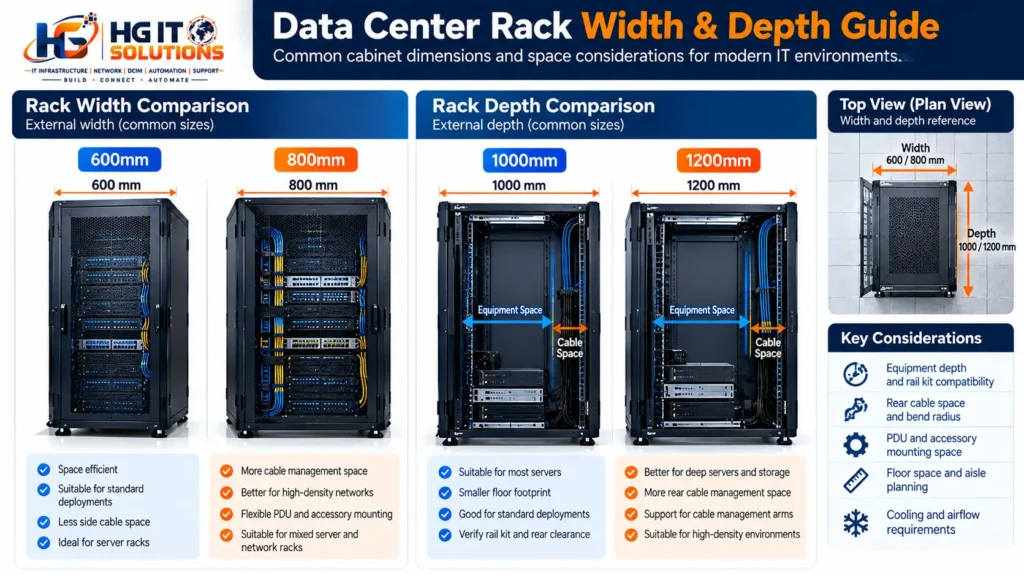
9. How to Calculate the Required Rack Depth
Consider a hypothetical server installation with the following planning dimensions:
| Component | Planning Allowance |
|---|---|
| Server chassis depth | 750mm |
| Front clearance allowance | 50mm |
| Rear cable and connector allowance | 150mm |
| Total preliminary requirement | 950mm |
This example produces a preliminary requirement of:
750mm + 50mm + 150mm = 950mm
However, this does not prove that a 1000mm external-depth cabinet is suitable.
The calculation is only an initial planning exercise.
The next step is to compare these requirements against:
- Actual usable cabinet depth
- Front and rear rail positions
- Rail-kit adjustment range
- Door and PDU interference
- Cable bend-radius requirements
- Manufacturer installation instructions
A detailed dimensional compatibility check should be completed before the rack model is approved.
10. Rack Height and Overhead Infrastructure Clearance
Before selecting a 45U or 48U cabinet, inspect the space above the planned rack location.
Data center ceilings and overhead areas may contain:
- Copper cable trays
- Fiber cable trays
- Electrical busways
- Power cable ladders
- Lighting fixtures
- Fire detection and suppression components
- Cooling infrastructure
- Aisle containment structures
A taller rack may interfere with these systems even if sufficient room appears to be available on the floor plan.
The rack height must also be evaluated during transportation into the room.
Check door openings, corridors, elevators, loading routes, and any equipment-handling limitations.
For example, a cabinet may fit in its final position but be too tall to move through a doorway while fully assembled.
This can create significant installation delays.
11. Rack Width and Depth Affect Data Center Floor Planning
Cabinet dimensions directly influence the amount of floor space required for a deployment.
Consider a row containing ten racks.
Example: 600mm vs 800mm width
Ten 600mm-wide cabinets require:
10 × 600mm = 6000mm
Ten 800mm-wide cabinets require:
10 × 800mm = 8000mm
The difference is:
2000mm of additional row length
This example does not include row-end clearance, gaps, or other project-specific requirements.
The wider cabinet may provide better cable-management flexibility, but it also increases the overall row footprint.
The same principle applies to rack depth.
A deeper cabinet affects the remaining aisle space when room boundaries and row positions are fixed.
Rack dimensions should therefore be coordinated with the approved layout before procurement.
For detailed rack positioning, row alignment, and aisle-clearance considerations, refer to our Data Center Rack Layout Planning: Location, Rows, Aisles & Clearance guide.
12. Equipment Compatibility Must Be Verified Before Rack Selection
One of the most important steps in rack procurement is confirming equipment compatibility.
Do not assume that every 19-inch server fits every 19-inch cabinet.
The mounting format may be compatible while the rail kit, chassis depth, or accessory requirements are not.
For every major equipment model, verify:
- Equipment height in U
- Equipment chassis depth
- Equipment weight
- Rail-kit compatibility
- Supported front-to-rear rail spacing
- Front and rear service clearance
- Cable-management arm requirements
- Power connector orientation
- Airflow direction
This becomes especially important when deploying equipment from multiple manufacturers in the same cabinet.
A rack that works well with one server family may create installation challenges with another.
13. Rack Load Capacity: Static vs Dynamic Ratings
Rack load capacity is another important selection criterion.
Manufacturers may specify different load ratings depending on whether the cabinet is stationary or being moved.
Static load rating
The static rating generally describes the supported load when the rack is installed under the manufacturer’s specified stationary conditions.
Dynamic load rating
The dynamic rating generally describes the supported load when the cabinet is moved under specified conditions.
The exact definitions and test conditions depend on the manufacturer.
A cabinet should not be considered safe simply because its nominal load rating exceeds the total equipment weight.
The installation team must also evaluate:
- Weight distribution
- Heavy equipment placement
- Floor loading
- Leveling and anchoring
- Movement and transportation
- Seismic requirements where applicable
Practical example
Suppose a cabinet contains:
- Eight servers weighing 25kg each
- Four storage units weighing 40kg each
- Network and security equipment totaling 60kg
- PDUs, shelves, cables, and accessories totaling 30kg
Estimated equipment and accessory weight:
(8 × 25) + (4 × 40) + 60 + 30 = 450kg
The cabinet’s own weight must also be considered when evaluating floor loading.
This example is not a substitute for the manufacturer’s approved load calculations.
14. Rack Size and Equipment Weight Distribution
Rack height and equipment weight distribution should be evaluated together.
A tall cabinet with heavy equipment installed near the top may create unnecessary stability and handling concerns.
A common practical approach is to position heavier equipment toward the lower portion of the rack, subject to manufacturer guidance and the approved rack elevation.
Examples of heavy equipment include:
- Large storage systems
- Heavy server chassis
- UPS units designed for rack mounting
- Battery modules
- High-capacity infrastructure appliances
However, the final equipment position should also consider airflow, power distribution, cable routing, and maintenance requirements.
Do not relocate equipment solely to achieve a visually balanced rack elevation.
15. Rack Size and Power Distribution Planning
Power distribution is closely connected to rack dimensions.
Before selecting a cabinet, identify the expected rack power architecture.
Questions include:
- Will the rack use A and B power feeds?
- How many rack PDUs are required?
- Will the PDUs be installed vertically or horizontally?
- Is there sufficient space for power connectors?
- Can technicians access PDU outlets after equipment installation?
- Will power cables interfere with network or fiber connections?
A wider or deeper cabinet may offer more installation flexibility for vertical PDUs, but the exact mounting options depend on the rack model.
A 48U cabinet may provide more equipment space than a 42U cabinet, but the electrical distribution system must still support the resulting equipment load.
Rack height should never be used as a substitute for electrical capacity planning.
16. Rack Size and Cable Management
Cable-management requirements often influence cabinet selection as much as server dimensions.
A rack containing only a few servers may have relatively simple cabling requirements.
A network rack with multiple high-density patch panels can require significantly more cable-management space.
Consider the following during rack selection:
- Copper cable quantities
- Fiber cable quantities
- Patch panel density
- Vertical cable-manager capacity
- Horizontal cable-management requirements
- Fiber bend-radius protection
- Cable entry positions
- Service-loop requirements
- Future cable additions
An 800mm-wide cabinet may be advantageous in cable-intensive environments.
However, the design should be evaluated based on actual cable quantities and accessory dimensions.
A larger cabinet without an organized cable-management plan can still become difficult to maintain.
Field Engineering Tip: Portable Console Access in High-Density Racks
In high-density 45U and 48U racks, cable congestion and limited maintenance clearance can make troubleshooting more challenging. When a server requires local console access, carrying a separate monitor and keyboard may not always be practical.
For compatible equipment, a portable laptop-based console capture solution can provide a more convenient alternative. Our HGIT Console Capture Tool project explores this approach for field engineers who need to access and document server console sessions.
Read the practical guide: How to Access a Server Without a Monitor or Keyboard
Watch the demonstration: Server Console Access — HGIT YouTube Tutorial
This approach does not replace proper rack cable management or permanently installed remote-management infrastructure, but it can be a useful option during supported on-site troubleshooting scenarios.
17. Rack Size, Cooling and Airflow
Rack dimensions can influence airflow management, particularly in high-density environments.
A properly designed rack should support the intended equipment airflow direction.
For conventional front-to-rear airflow equipment, cool air enters through the front and hot exhaust exits toward the rear.
However, not every device uses front-to-rear airflow.
Some network switches and specialized appliances may use side-to-side or other airflow arrangements.
The installation team must verify the airflow requirements of each device.
Important airflow considerations
- Confirm equipment intake and exhaust direction.
- Use suitable blanking panels for unused rack spaces.
- Avoid unnecessary openings that encourage air recirculation.
- Check rear cable congestion.
- Verify compatibility with containment systems.
- Coordinate rack depth and door design with cooling requirements.
A deeper cabinet does not automatically improve cooling.
Likewise, a taller cabinet does not guarantee better thermal performance.
Cooling capacity, airflow distribution, equipment orientation, and rack configuration must be evaluated together.
18. Rack Door and Side Panel Considerations
Rack doors and side panels are sometimes overlooked during cabinet selection.
However, they affect equipment accessibility, security, airflow, and maintenance.
Before approving a rack, check:
- Front door opening direction
- Rear door opening arrangement
- Door clearance within the aisle
- Door perforation and airflow compatibility
- Side panel removal access
- Locking mechanisms
- Interference with nearby walls or cabinets
A cabinet may physically fit in the designated location while still being difficult to service because its doors cannot open properly.
These checks should be completed before the rack is anchored.
19. Planning Rack Size for Future Expansion
Rack procurement should account for reasonable future growth.
Selecting a cabinet that supports only the initial equipment quantity may create limitations during subsequent deployment phases.
However, leaving excessive unused rack space without a clear expansion requirement can also increase infrastructure costs.
A practical expansion assessment should consider:
- Planned equipment additions
- Expected changes in server form factors
- Future network port requirements
- Additional patch panels
- Power capacity reservations
- Cooling capacity reservations
- Available floor space
For example, a 45U rack may provide sufficient expansion for a deployment that would otherwise nearly fill a 42U cabinet.
But if power and cooling are already near their limits, the additional rack units may provide little operational benefit.
Expansion planning must be based on the complete infrastructure capacity.
20. Practical Rack Selection Example
Consider a hypothetical data center project requiring a new cabinet for mixed IT equipment.
The planned equipment includes:
| Equipment | Quantity | U per Device | Total U |
|---|---|---|---|
| Rack servers | 8 | 2U | 16U |
| Network switches | 4 | 1U | 4U |
| Fiber patch panels | 2 | 1U | 2U |
| Copper patch panels | 2 | 1U | 2U |
| Security appliances | 2 | 1U | 2U |
| Horizontal cable managers | 4 | 1U | 4U |
| Total planned space | 30U |
This deployment requires 30U of mounting space based on the preliminary equipment schedule.
A 42U cabinet would leave:
42U − 30U = 12U
A 45U cabinet would leave:
45U − 30U = 15U
A 48U cabinet would leave:
48U − 30U = 18U
These are nominal remaining rack units, not guaranteed usable expansion capacity.
Additional mounting space may be needed for shelves, accessories, airflow-management components, or other design requirements.
The final selection should also account for the equipment’s weight, depth, power, cooling, and cable-management needs.
For this example, a 42U cabinet may be sufficient if all other requirements are satisfied.
There is no automatic requirement to select a 48U cabinet simply because it provides more space.
21. Common Data Center Rack Sizing Mistakes
Several recurring mistakes can cause problems during rack installation.
Mistake 1: Selecting a rack based only on U capacity
A cabinet may have sufficient vertical mounting space but inadequate depth, cabling space, or power distribution capacity.
Mistake 2: Confusing mounting width with cabinet width
The 19-inch mounting format does not mean the external cabinet width is 19 inches.
Mistake 3: Ignoring server rail-kit requirements
A server may fit inside the cabinet but still be incompatible with the available rail spacing or mounting configuration.
Mistake 4: Choosing a taller rack without checking overhead clearance
A 48U cabinet can create conflicts with cable trays, busways, containment structures, or equipment access.
Mistake 5: Ignoring cable-management requirements
High-density patching can consume significant space around the mounting rails.
Mistake 6: Assuming deeper racks always solve installation problems
A deeper cabinet still requires proper rail adjustment, rear clearance, and accessory compatibility.
Mistake 7: Ignoring cabinet load ratings
Rack selection must consider equipment weight, weight distribution, installation conditions, and floor capacity.
Mistake 8: Planning expansion based only on empty rack units
Unused rack space is not useful if the available power, cooling, or connectivity capacity has already been exhausted.
22. Data Center Rack Size Selection Checklist
Before approving a rack model for procurement, verify the following items.
Cabinet dimensions
- Required rack-unit capacity confirmed
- External cabinet height verified
- External cabinet width verified
- External cabinet depth verified
- Internal usable depth checked
- Front-to-rear mounting-rail range verified
Equipment compatibility
- Equipment U requirements documented
- Equipment depth checked
- Rail kits verified
- Equipment weight documented
- Equipment airflow direction confirmed
- Front and rear service requirements checked
Infrastructure coordination
- A/B power distribution requirements confirmed
- Rack PDU mounting locations checked
- Copper cable pathways coordinated
- Fiber cable pathways coordinated
- Vertical and horizontal cable management planned
- Cooling and airflow requirements reviewed
Installation and maintenance
- Floor loading evaluated
- Rack delivery route checked
- Overhead clearance verified
- Rack door operation checked
- Equipment handling requirements reviewed
- Cabinet leveling and anchoring requirements confirmed
Future expansion
- Expected equipment growth reviewed
- Spare rack units identified
- Power and cooling growth capacity verified
- Additional cabling requirements considered
- Final cabinet model approved against project requirements
This checklist can be included in the rack procurement review, technical submittal, or pre-installation verification process.

23. Industry Standards and Manufacturer References
Rack selection should be based on recognized mechanical mounting specifications, project design requirements, and the actual manufacturer’s documentation.
The EIA-310 family and IEC 60297 provide relevant guidance for standardized rack mounting dimensions.
However, they do not eliminate the need to verify cabinet-specific dimensions and equipment compatibility.
Useful references include:
Schneider Electric — How to Choose an IT Rack
This technical resource discusses rack dimensions, operational considerations, structural design, and equipment selection.
APC Rack and Power Distribution eGuide — 2026
APC Rack and Power Distribution eGuide – Global Edition | Schneider Electric
This reference explains rack-unit measurements and mounting-hole positioning.
For actual installations, also review the selected cabinet manufacturer’s dimensional drawings, installation manual, load ratings, accessory compatibility documentation, and equipment rail-kit requirements.
Final Thoughts
Selecting the right data center rack requires more than choosing between 42U, 45U, and 48U.
The correct cabinet must provide sufficient mounting capacity while supporting equipment depth, cable management, power distribution, cooling, structural requirements, and maintenance access.
A 42U cabinet may be ideal for a conventional enterprise deployment. A 45U rack may offer useful additional capacity, while a 48U rack can support more equipment within the same nominal floor footprint, provided the additional height is practical.
Similarly, 600mm and 800mm rack widths should be evaluated against actual cabling and accessory requirements.
The choice between 1000mm and 1200mm depth should be based on equipment compatibility and service clearance rather than assumptions about external cabinet dimensions.
The most reliable approach is to verify rack specifications against the equipment schedule, approved layout, infrastructure design, and manufacturer documentation before procurement.
A properly selected rack is easier to install, maintain, expand, and operate throughout its service life.
Frequently Asked Questions
1. What is the difference between 42U, 45U, and 48U racks?
The difference is the available vertical mounting space. A 45U rack provides three additional units compared with 42U, while a 48U rack provides six additional units. External cabinet heights vary by manufacturer.
2. Is a 48U rack better than a 42U rack?
Not necessarily. A 48U rack provides more mounting capacity, but it also requires sufficient overhead clearance, equipment access, and appropriate infrastructure capacity. A 42U cabinet may be more practical for some installations.
3. What does 19-inch rack mean?
It refers to the standardized nominal equipment front-panel width of 482.6mm, including mounting flanges. It does not represent the external cabinet width.
4. Is an 800mm rack better than a 600mm rack?
An 800mm rack can provide additional space for cable management and accessories, but it also requires more floor space. The correct choice depends on the equipment and cabling requirements.
5. Is a 1000mm-deep rack enough for modern servers?
It may be sufficient for many servers, but compatibility must be verified using the server’s chassis dimensions, rail-kit requirements, rear connections, and the rack’s actual usable depth.
6. Can a 42U rack support 42 individual devices?
Only if every device occupies exactly 1U and no additional rack-unit space is required for other components. Actual equipment capacity is also constrained by power, cooling, weight, and connectivity.
7. Does a taller rack require more cooling?
Not automatically. Cooling requirements depend on installed equipment heat output and airflow characteristics rather than rack height alone.
8. What is the most important factor when selecting a data center rack?
There is no single factor. The correct selection requires coordinated verification of mounting capacity, equipment compatibility, cabinet dimensions, power, cooling, cabling, structural capacity, and maintenance access.
Continue the Data Center Rack Installation Series
This article is part of the HG IT Solutions Data Center Rack Installation Series, which covers the practical stages of planning, selecting, installing, and documenting rack infrastructure.
Article #01 — Data Center Rack Installation Checklist: Complete Pre-Installation Guide
Data Center Rack Installation: 15 Essential Checks
Article #02 — Data Center Rack Layout Planning: Location, Rows, Aisles & Clearance
Data Center Rack Layout Planning: Rows, Aisles & Clearance
Article #03 — Data Center Rack Size Guide: 42U, 45U, 48U, Width & Depth
You are reading this article.
Next Article — Rack Leveling, Alignment & Anchoring: Installation Best Practices
The next guide will cover practical rack positioning, leveling, row alignment, anchoring considerations, and pre-installation verification before cabinets are permanently secured.
Published by HG IT Solutions — IT Infrastructure, Data Center, Networking & Technical Operations.
This guide is intended for technical education and installation planning. Always follow approved project drawings, manufacturer instructions, applicable codes, and site-specific safety requirements.

Pingback: A Feed vs B Feed: Data Center Rack Power Redundancy
Pingback: 6kVA UPS Installation in a 600mm Rack: Real Case Study