
A Cisco 2960-X factory reset requires more than simply erasing the startup configuration. When a switch has previously belonged to a stack, contains old configuration files, or has unknown administrative credentials, additional recovery and verification steps may be necessary.
In this hands-on HG IT Solutions guide, we demonstrate the Cisco Catalyst 2960-X recovery process using the physical MODE button, bootloader access, configuration cleanup, stack member renumbering from 3 to 1, and post-reboot startup configuration verification. The procedure is based on our real-world troubleshooting experience with Cisco IOS 15.2(4)E8.
This article explains the recovery procedure, actual CLI observations, troubleshooting challenges, and practical engineering lessons from our lab experience.
Important: Perform recovery procedures only on equipment you own or are authorized to administer. Resetting a switch may interrupt network services or remove critical settings. Back up existing configurations whenever possible.
Table of Contents
1. Lab Environment and Recovery Objective
The recovery was performed using a physical Cisco Catalyst 2960-X switch and a console connection.
| Parameter | Lab Details |
|---|---|
| Switch Platform | Cisco Catalyst 2960-X |
| IOS Version | 15.2(4)E8 |
| Initial Stack Member | 3 |
| Initial Stack Role | Master |
| Initial Stack State | Ready |
| New Hostname | TESTSW-01 |
| Target Stack Member | 1 |
| Recovery Access | Physical MODE Button + Console |
| Recovery Environment | Cisco Switch Bootloader |
| Objective | Standalone switch preparation |
Initial Stack Status
The initial stack status was checked using:
Switch# show switchActual output:
Switch/Stack Mac Address : 346f.9064.c200

                                           H/W   Current
Switch#  Role   Mac Address     Priority Version  State
----------------------------------------------------------
*3       Master 346f.9064.c200     1      4       Ready
This confirmed that the switch was operating as member 3.
Even when a Cisco Catalyst switch is no longer connected to a stack, its previously assigned member number may remain unchanged.
For our standalone lab environment, we wanted the switch to operate as member 1.
2. Understanding Factory Reset vs Password Recovery
Before beginning the procedure, it is important to understand the difference between password recovery and a factory reset.
Password Recovery
Password recovery is intended to restore administrative access while preserving the existing configuration wherever possible.
Factory Reset
A factory reset is intended to remove previous operational settings and prepare the device for a fresh configuration.
These operations are related but are not identical.
For example, renaming the startup configuration file prevents the switch from loading that configuration during the next boot. However, the original file may remain in flash storage.
Similarly, clearing the startup configuration does not necessarily remove all VLAN information, private configuration files, or stack-related settings.
In our case, the objective was to prepare the switch for standalone lab operation rather than restore the previous production configuration.
3. Cisco 2960-X Factory Reset: Accessing the Bootloader Using the MODE Button
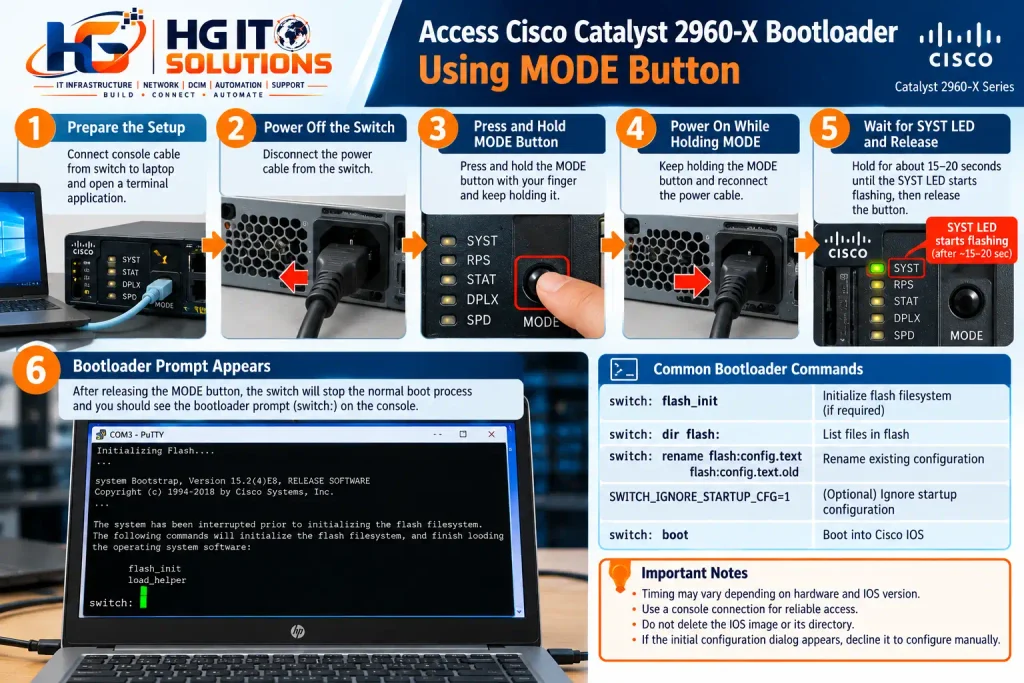
The first step was to access the switch bootloader using the physical MODE button.
This method is useful when administrative credentials are unavailable or the normal startup process needs to be interrupted.
Step-by-Step Procedure
- Disconnect power from the Cisco Catalyst 2960-X switch.
- Connect the console cable between the switch and a computer.
- Open a terminal application using the appropriate console serial settings.
- Press and hold the physical MODE button on the switch.
- While holding the MODE button, reconnect power.
- Continue holding the MODE button and observe the SYST LED.
- In our lab, the SYST LED began flashing after approximately 15–20 seconds.
- Release the MODE button when the recovery indication appears.
- Observe the console output until the bootloader prompt becomes available.
The expected prompt is:
switch:Engineering Note: The 15–20-second interval represents our observed lab experience, not a universal timing requirement. LED behavior and timing may vary depending on the hardware and bootloader version.
The switch: prompt is the Cisco Catalyst bootloader environment. Although engineers sometimes refer to it as ROMMON, bootloader is the more precise term for this platform.
4. Inspecting Flash Memory Before Recovery
After entering the bootloader, inspect the flash filesystem before changing configuration files.
On supported Catalyst 2960-X bootloader versions, flash initialization can be performed using:
switch: flash_initIf flash is already initialized, this step may not be necessary.
Next, list the flash directory:
switch: dir flash:Typical configuration-related files include:
| File | Purpose |
|---|---|
| config.text | Saved switch configuration |
| private-config.text | Private configuration information |
| vlan.dat | VLAN database |
| config.text.old | Renamed configuration backup, if created |
| IOS .bin file | Cisco IOS system image |
The actual filenames may vary.
Important: Do not delete the IOS image or its directory. Removing the bootable system image may prevent the switch from starting normally.
If the existing configuration must be preserved, make an appropriate backup before proceeding.
5. Bypassing the Previous Startup Configuration
During the recovery, the previous startup configuration was bypassed so that the switch could boot without applying its old settings.
One documented Cisco Catalyst recovery method is to rename the configuration file.
For example:
switch: rename flash:config.text flash:config.text.oldThis preserves the previous configuration under a different filename rather than immediately deleting it.
The renamed file is no longer loaded through the normal config.text path.
In our troubleshooting session, the old configuration had been renamed to config.text.old.
We also used the following startup-ignore variable during the bootloader recovery:
SWITCH_IGNORE_STARTUP_CFG=1This variable was part of our actual troubleshooting process. However, its persistence and exact behavior were not conclusively verified in the captured bootloader output.
Therefore, it should not be treated as a universally required recovery command for every Catalyst 2960-X software version.
Use the recovery procedure supported by the installed hardware and bootloader.
Once the old configuration has been safely bypassed, the switch can be booted using:
switch: bootIf the initial configuration dialog appears, decline it when the intention is to configure the switch manually.
6. Verifying That the Previous Startup Configuration Is Not Active
After the switch booted into Cisco IOS, we checked the startup configuration.
Command:
Switch# show startup-configActual output:
startup-config is not presentThis was an important verification result.
It confirmed that the switch did not currently have an accessible startup configuration through the normal IOS startup-config mechanism.
However, it did not prove that every old configuration file had been permanently removed from flash.
The renamed config.text.old file could still remain available as a backup.
At this stage, the switch was ready for a fresh configuration.
7. Verifying Cisco IOS Boot Settings
Before saving the new configuration, we inspected the boot environment.
Command:
TESTSW-01# show bootThe recorded output included:
BOOT path-list      : flash:/c2960x-universalk9-mz.152-4.E8/c2960x-universalk9-mz.152-4.E8.bin
Config file         : flash:/config.text
Private Config file : flash:/private-config.text
Enable Break        : yes
Manual Boot         : no
Allow Dev Key       : yes
HELPER path-list    :
Auto upgrade        : yes
Auto upgrade path   :
Boot optimization   : disabled
NVRAM/Config file
      buffer size:   524288
Timeout for Config
          Download:    0 seconds
Config Download
       via DHCP:       disabled (next boot: disabled)
What Did We Verify?
IOS Boot Path
The switch was configured to load the installed Cisco IOS image:
flash:/c2960x-universalk9-mz.152-4.E8/c2960x-universalk9-mz.152-4.E8.binManual Boot
The output showed:
Manual Boot : noThis was consistent with automatic boot operation.
Configuration File Path
The switch referenced:
flash:/config.textHowever, the output did not explicitly show whether the previously used startup-ignore variable was still active.
Therefore, we did not assume that the variable had been permanently cleared.
Instead, we planned to verify the actual configuration-loading behavior after reboot.
8. Changing the Switch Hostname
After confirming that the old startup configuration was not active, we assigned a new hostname.
Commands:
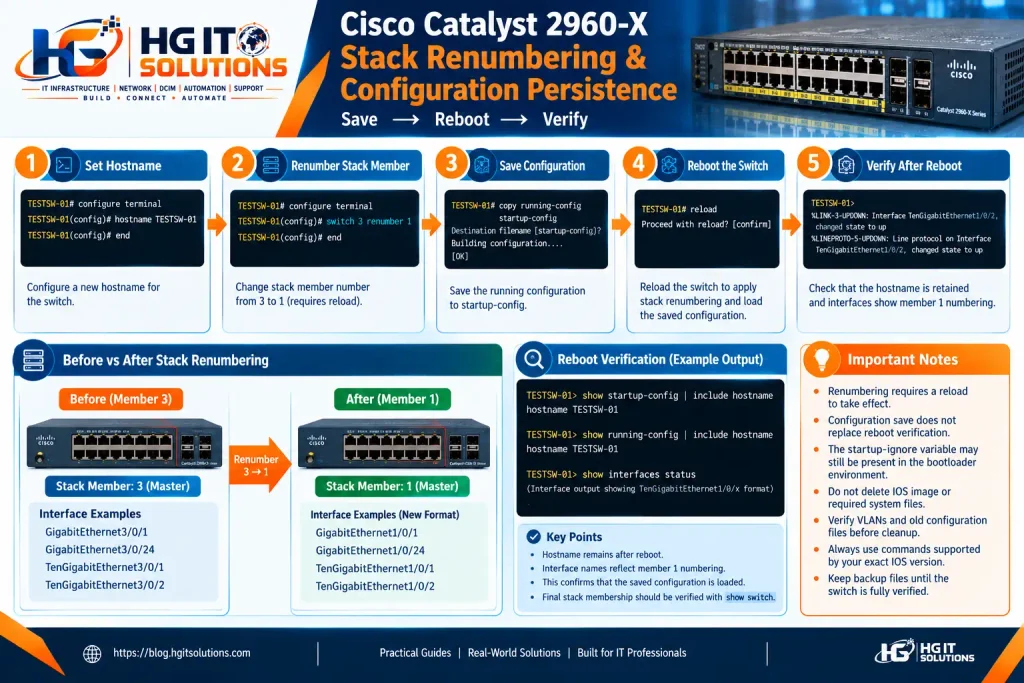
Switch# configure terminal
Switch(config)# hostname TESTSW-01
TESTSW-01(config)# end
The new hostname appeared immediately in the CLI prompt.
However, changing the running configuration does not automatically guarantee that the hostname will survive a reboot.
The configuration must be saved and verified.
9. Renumbering the Switch from Member 3 to Member 1
The switch was previously identified as stack member 3.
For standalone operation, we wanted it to become member 1.
The relevant configuration command is:
TESTSW-01# configure terminal
TESTSW-01(config)# switch 3 renumber 1
TESTSW-01(config)# end
Important: Stack Renumbering Requires a Reload
On the Cisco Catalyst 2960-X, the new stack member number takes effect after the required reload.
The switch does not immediately change its active interface numbering when the renumber command is entered.
For example, after the renumbering takes effect:
| Before Renumbering | After Renumbering |
|---|---|
| GigabitEthernet3/0/1 | GigabitEthernet1/0/1 |
| GigabitEthernet3/0/24 | GigabitEthernet1/0/24 |
| TenGigabitEthernet3/0/1 | TenGigabitEthernet1/0/1 |
| TenGigabitEthernet3/0/2 | TenGigabitEthernet1/0/2 |
These mappings illustrate the expected numbering change for corresponding interfaces.
Engineering Warning: Renumbering a configured production switch can affect interface-specific configurations. Review stack membership, interface mappings, and existing configuration before performing this operation.
10. Saving the New Configuration
After configuring the hostname and preparing the stack member renumbering, we saved the running configuration.
Command:
TESTSW-01# copy running-config startup-configActual output:
Destination filename [startup-config]?
Building configuration...
[OK]
We then verified that the hostname was present in the saved startup configuration.
Command:
TESTSW-01# show startup-config | include hostnameActual output:
hostname TESTSW-01This confirmed that the new hostname had been successfully saved.
However, an additional verification was still necessary.
Earlier in the recovery process, we had used a startup-ignore variable, and we wanted to ensure that the switch would not continue bypassing its saved configuration during subsequent boots.
11. Troubleshooting the Startup-Ignore Setting
During the recovery, we attempted to disable the startup-ignore behavior using the following command:
TESTSW-01(config)# no system ignore startupconfig switch allThe switch rejected it.
Actual output:
TESTSW-01(config)# no system ignore startupconfig switch all
                            ^
% Invalid input detected at '^' marker.
This demonstrated that the command was not recognized in the tested Cisco Catalyst 2960-X IOS environment.
We also attempted to inspect ROM variables using:
TESTSW-01# show romvarThe result was:
                 ^
% Invalid input detected at '^' marker.
Why Is This Important?
Cisco IOS commands are not always interchangeable across Catalyst switch families.
A command supported on one platform or software release may not be supported on another.
Rather than guessing alternative commands, we continued with the available verification methods.
The show boot output did not conclusively establish the status of the startup-ignore variable.
Therefore, we decided to test whether the saved configuration would actually load after reboot.
12. Intentional Reboot to Verify Startup Configuration Persistence
This was one of the most important troubleshooting steps in our recovery.
Earlier, the bootloader variable had been used to bypass the previous startup configuration:
SWITCH_IGNORE_STARTUP_CFG=1Our concern was that the switch might continue ignoring the startup configuration on subsequent boots.
If that happened, a newly configured hostname and other saved settings might not load after a restart.
Instead of assuming that the setting was disabled, we performed a controlled reboot test.
Step 1: Confirm the New Hostname
The switch hostname was configured as:
TESTSW-01Step 2: Prepare Stack Member Renumbering
The stack member was configured to change from 3 to 1.
TESTSW-01(config)# switch 3 renumber 1Step 3: Save the Running Configuration
TESTSW-01# copy running-config startup-configActual result:
Building configuration...
[OK]
Step 4: Verify the Saved Hostname
TESTSW-01# show startup-config | include hostnameActual output:
hostname TESTSW-01Step 5: Reboot the Switch
After saving the configuration, we intentionally rebooted the switch.
TESTSW-01# reloadThe objective was to verify two important behaviors:
- Whether the saved startup configuration would load normally.
- Whether the stack member renumbering would take effect after reload.
Step 6: Observe the Switch After Reboot
After the switch restarted, the console displayed:
TESTSW-01>This confirmed that the configured hostname had survived the reboot.
The console also displayed interface events using the new member number:
Oct 22 15:46:17.383: %LINK-3-UPDOWN: Interface TenGigabitEthernet1/0/2, changed state to up
Oct 22 15:46:18.386: %LINEPROTO-5-UPDOWN: Line protocol on Interface TenGigabitEthernet1/0/2, changed state to up
Oct 22 15:46:32.500: %LINK-3-UPDOWN: Interface TenGigabitEthernet1/0/1, changed state to up
Oct 22 15:46:33.503: %LINEPROTO-5-UPDOWN: Line protocol on Interface TenGigabitEthernet1/0/1, changed state to up
What Did This Reboot Test Confirm?
Hostname Persistence
The hostname remained TESTSW-01, indicating that the saved configuration was applied during the reboot.
Startup Configuration Loading
The successful retention of the hostname provided strong evidence that the earlier startup-ignore behavior was not preventing normal configuration loading during this reboot.
Stack Member Renumbering
The interface names were consistent with the requested change from member 3 to member 1.
However, a final show switch output is still the preferred way to conclusively verify stack membership.
Important Technical Distinction: This reboot test verified that the saved configuration was loaded successfully. It did not independently prove that the bootloader variable had been permanently deleted from the boot environment.
Engineering Lesson
After using a startup-configuration bypass during recovery, do not rely only on the configuration save message.
Save a recognizable configuration change, perform a controlled reboot, and verify that the change survives.
This practical test can reveal problems that are not obvious from the show boot output alone.
13. Cleaning Up Old Configuration Backup Files
After the recovery, old backup files may still exist in flash memory.
Before deleting anything, inspect the flash directory.
TESTSW-01# dir flash:Possible old backup filenames include:
config.text.old
private-config.text.old
vlan.dat.old
These are examples and should not be assumed to exist on every switch.
If an obsolete backup file is present and is no longer required, it can be deleted using the appropriate IOS command.
For example:
TESTSW-01# delete flash:/config.text.oldReview the confirmation prompt before proceeding.
Do not delete backup files until the switch has successfully rebooted and the new configuration has been verified.
Files That Require Special Attention
config.text
This may be the active saved configuration file. Do not delete it while preparing the new configuration unless a deliberate reset procedure requires it.
private-config.text
This file may contain private configuration information. Do not remove it without understanding the consequences.
vlan.dat
This file is associated with VLAN database information. Its presence alone does not indicate that the recovery failed.
IOS Image
Never delete the active Cisco IOS image or its directory during routine configuration cleanup.
In our recorded troubleshooting conversation, cleanup commands were discussed, but the final flash directory output was not captured. Therefore, deletion of all old backup files is not presented as a confirmed result.
14. Verifying and Cleaning Up Old VLAN Information
After a switch has been reset, old VLAN information may still require attention.
The first step is to inspect the VLAN database.
TESTSW-01# show vlan briefOn a default-style Catalyst VLAN database, the standard VLANs generally include:
- VLAN 1
- VLAN 1002
- VLAN 1003
- VLAN 1004
- VLAN 1005
If additional VLANs are present, investigate their source before removing them.
Possible sources include saved configuration, VLAN database files, or VTP-related settings.
Do not assume that deleting a single file will remove every VLAN-related setting.
For a switch being prepared for a new environment, verify that only the intended VLANs remain.
The final VLAN output was not included in our recorded session, so complete VLAN cleanup remains a recommended verification task rather than a documented result.
15. Final Post-Recovery Verification Checklist
Before placing the switch into service, perform a complete verification.
Verify IOS Version
TESTSW-01# show versionConfirm the expected Cisco IOS version and hardware platform.
Verify Stack Membership
TESTSW-01# show switchFor the intended standalone configuration, the expected result is member 1 in the Ready state.
Verify Running Hostname
TESTSW-01# show running-config | include hostnameExpected:
hostname TESTSW-01Verify Startup Hostname
TESTSW-01# show startup-config | include hostnameExpected:
hostname TESTSW-01Verify Boot Configuration
TESTSW-01# show bootConfirm that the IOS boot path is valid and the switch is configured for normal boot operation.
Verify VLANs
TESTSW-01# show vlan briefConfirm that only the intended VLANs remain.
Verify Interface Status
TESTSW-01# show interfaces statusCheck interface numbering, link status, and expected physical connections.
Verify Flash Files
TESTSW-01# dir flash:Review the configuration files, backup files, and installed IOS image.
Verification Summary
| Check | Expected Result |
|---|---|
| IOS Image | Valid and bootable |
| Stack Member | 1 |
| Stack State | Ready |
| Hostname | TESTSW-01 |
| Startup Configuration | Present |
| Saved Hostname | Matches running hostname |
| Configuration After Reboot | Retained |
| VLAN Database | Only intended VLANs |
| Old Backup Files | Reviewed |
| Interface Numbering | Member 1 format |
The recorded reboot confirmed hostname retention and interface numbering consistent with member 1. The remaining checks should be completed before production deployment.
16. Common Cisco Catalyst 2960-X Recovery Problems
Problem 1: MODE Button Does Not Enter the Bootloader
Possible causes include incorrect timing, an inactive console connection, or releasing the MODE button too early.
Recommended approach:
Verify the console connection, repeat the power-cycle procedure carefully, and observe the SYST LED and console messages.
Do not depend entirely on a fixed button-hold duration.
Problem 2: The Switch Loads Its Previous Configuration
The previous startup configuration may still be available or loaded.
Inspect the startup configuration and flash files before overwriting anything.
Problem 3: The Hostname Disappears After Reboot
Verify that the configuration was saved:
show startup-config | include hostnameIf the saved hostname is present but does not load after reboot, investigate the startup configuration loading behavior and supported bootloader settings.
Problem 4: The Switch Remains Stack Member 3
Verify whether the renumber command was accepted and whether the required reload occurred.
show switchAlso check for existing stack-member configuration that could conflict with the requested numbering.
Problem 5: A Command Returns Invalid Input
Check the switch model, IOS version, command mode, and supported syntax.
A command documented for a different Cisco Catalyst family may not work on the 2960-X.
Problem 6: Old VLANs Remain After Reset
Check:
show vlan briefInvestigate the VLAN database and VTP settings before removing files or changing VLAN configuration.
17. Key Engineering Lessons from Our Recovery
This practical recovery highlighted several important lessons for network engineers.
1. Configuration Reset and Stack Renumbering Are Separate Operations
Bypassing or removing the startup configuration does not guarantee that the stack member number will automatically revert to 1.
2. Configuration Save Does Not Replace Reboot Verification
A successful configuration save confirms that the save operation completed.
A controlled reboot provides additional evidence that the configuration can be loaded successfully.
3. Startup-Ignore Settings Require Careful Verification
When a bootloader startup-ignore variable has been used, engineers should verify actual configuration persistence rather than assume that the setting has been cleared.
4. Cisco Commands Are Platform-Specific
Commands supported on one Cisco switch family may not be supported on another.
Always validate command compatibility with the installed hardware and software.
5. Preserve Recovery Files Until Verification Is Complete
Renaming configuration files can provide a recovery path while troubleshooting.
Deleting them too early may remove valuable rollback options.
6. Document Actual Observations
Reliable troubleshooting documentation should clearly distinguish between commands executed, results observed, and verification steps that remain pending.
This helps other engineers reproduce the procedure without relying on assumptions.
18. Watch Our Cisco Catalyst 2960-X Recovery Video
At HG IT Solutions, we believe practical demonstrations are an important part of technical learning.
We recorded the physical recovery process on the Cisco Catalyst 2960-X, including MODE-button operation and console-based troubleshooting.
The video complements this written guide by demonstrating the recovery workflow on actual hardware.
YouTube Video: Coming Soon
The hands-on recovery video will be embedded here after publication on the HG IT Solutions YouTube channel.
The video will help readers understand the physical recovery process, particularly the MODE-button sequence and bootloader access.
19. Frequently Asked Questions
Q1. How do I factory reset a Cisco Catalyst 2960-X switch?
A factory-style reset may involve accessing the bootloader, bypassing or removing the previous startup configuration, reviewing VLAN information, and verifying the switch after reboot. The exact procedure depends on the desired outcome and installed software.
Q2. How long should I hold the MODE button on a Cisco 2960-X?
In our lab, the SYST LED began flashing after approximately 15–20 seconds. Actual timing may vary depending on the hardware and bootloader version.
Q3. What does the switch: prompt mean?
The switch: prompt indicates that the device is in its bootloader environment rather than the normal Cisco IOS CLI.
Q4. Why was my standalone Cisco switch numbered 3?
A switch that was previously part of a stack can retain its assigned member number, even when operating alone.
Q5. Does switch renumber require a reboot?
Yes. The new stack member number takes effect after the required reload.
Q6. What does SWITCH_IGNORE_STARTUP_CFG=1 do?
It is associated with bypassing startup configuration loading in supported recovery environments. Its availability, syntax, and persistence should be verified for the specific platform and bootloader.
Q7. How can I verify that the startup configuration loads after reboot?
Save a recognizable configuration change, such as a hostname, reboot the switch, and verify that the change remains active.
Also compare the running and startup configurations.
Q8. Can I delete config.text.old?
If it is an obsolete backup and no longer required, it may be deleted after successful recovery and verification.
Q9. Does clearing the startup configuration remove all VLANs?
Not necessarily. VLAN database information and other stored settings may require separate verification.
Q10. Is a factory reset the same as secure data erasure?
No. A factory-style reset does not necessarily sanitize every stored file or sensitive configuration element. Equipment being transferred or disposed of may require additional approved sanitization procedures.
20. Conclusion
Recovering a Cisco Catalyst 2960-X switch requires more than simply erasing its startup configuration.
In this HG IT Solutions lab exercise, we accessed the bootloader through the physical MODE button, bypassed the previous startup configuration, inspected the boot environment, assigned a new hostname, and prepared the switch for standalone operation as member 1.
The most important verification was our intentional reboot after saving the new configuration.
Because the startup-ignore variable had been used earlier in the recovery, we wanted to ensure that the switch would not continue ignoring its saved configuration.
After reboot, the hostname remained TESTSW-01, and the console reported interfaces using member number 1.
These observations provided strong evidence that the new configuration was loading correctly and that the stack renumbering had taken effect.
The experience reinforced the importance of validating bootloader behavior, checking IOS command compatibility, preserving configuration backups, and performing post-reboot verification.
For network engineers working with previously deployed Cisco Catalyst switches, these practices can make recovery safer, more predictable, and easier to document.
About HG IT Solutions
HG IT Solutions shares hands-on technical guides, infrastructure troubleshooting experiences, and practical engineering insights covering enterprise networking, data centers, structured cabling, virtualization, security, and IT infrastructure operations.
Explore more technical articles at HG IT Solutions Blog.
Official Cisco Technical Reference
Cisco Catalyst 2960-X Series Switches — Cisco Support and Documentation
This article documents a practical lab recovery. Actual console outputs are distinguished from illustrative commands and recommended verification procedures.

Pingback: Cisco Nexus 93180YC-FX3 NX-OS Upgrade: Complete Guide