
1. Introduction
When designing a data center network, one of the most important decisions is selecting the right optical fiber infrastructure.
Should we install single-mode fiber or multimode fiber?
At first, the answer may appear simple.
Multimode fiber is commonly associated with shorter distances and lower-cost short-reach optical transceivers. Single-mode fiber is generally associated with longer distances, greater optical reach, and broader options for future network expansion.
However, a real data center design involves much more than distance.
Consider a new data center project with 20 cabinets, two core or spine network locations, multiple leaf switches, storage systems, and a dedicated fiber patching area.
The initial network may operate at 10GbE and 25GbE, with selected uplinks running at 100GbE.
The infrastructure team expects a future migration to 400GbE, but the exact timing and transceiver architecture have not yet been finalized.
The longest fiber connection inside the data hall may be only 120 meters.
Would multimode fiber be sufficient?
Should the design use OM4 or OM5?
Would OS2 single-mode fiber provide better long-term flexibility?
What happens if a future 400G optical interface requires eight or sixteen fibers instead of two?
And most importantly, what happens if the installed fiber infrastructure cannot support the selected migration path?
These are the questions that should guide the design.
The objective is not simply to install fiber that works today. It is to create an infrastructure that can support future network requirements without unnecessary replacement, excessive patching complexity, or avoidable downtime.
In this guide, we will examine single-mode vs multimode fiber from a practical data center engineering perspective, including optical characteristics, transceiver compatibility, fiber strand requirements, loss budgets, topology, cost, testing, and migration planning.
Table of Contents
2. Understanding Single-Mode and Multimode Fiber
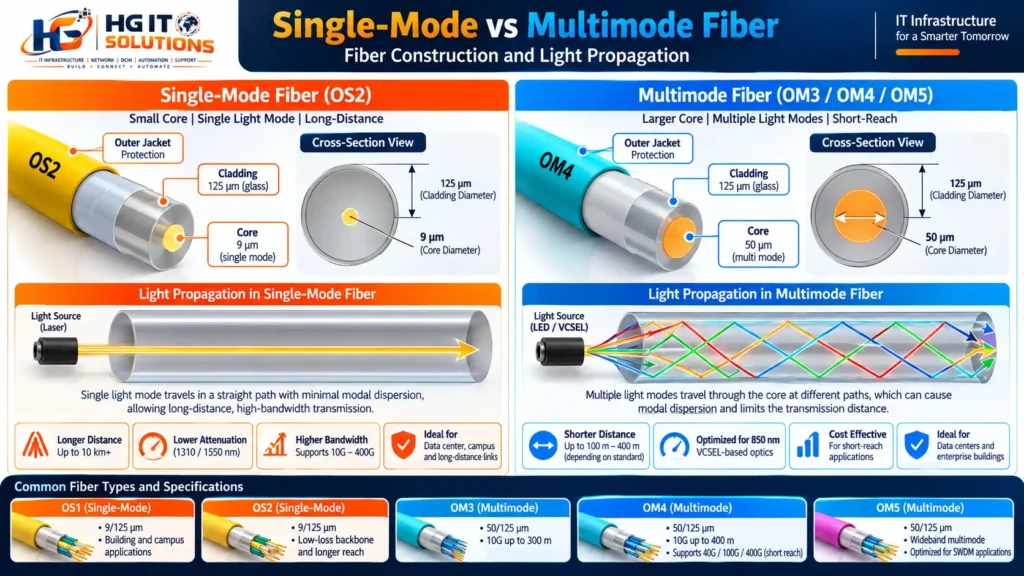
Both single-mode and multimode fiber transmit information using light through an optical fiber core.
The fundamental difference is how light propagates through that core.
What is single-mode fiber?
Single-mode fiber (SMF) has a relatively small core, typically around 9 micrometers in nominal mode-field size, depending on wavelength and fiber design.
It supports propagation of the fundamental spatial mode at its operating wavelengths.
Because it does not experience intermodal dispersion in the same way as multimode fiber, single-mode fiber can support long-distance and high-capacity optical communication systems.
Common operating wavelengths include 1310 nm and 1550 nm, although other wavelengths are used in specialized systems.
Single-mode fiber is widely deployed in:
- Data center interconnects
- Campus backbone networks
- Telecommunications infrastructure
- Long-distance optical networks
- High-speed data center switching fabrics
- Enterprise backbone systems
For structured cabling, OS2 is a common single-mode fiber designation.
What is multimode fiber?
Multimode fiber (MMF) has a larger core, commonly 50 micrometers in modern OM3, OM4, and OM5 installations.
It supports multiple spatial propagation modes.
These modes can travel with different group delays, creating modal dispersion that limits the available bandwidth-distance product.
Modern laser-optimized multimode fibers are designed to support high-speed transmission over defined distances.
They are commonly used for short-reach connections inside data centers and enterprise buildings.
Typical multimode fiber categories include OM3, OM4, and OM5.
OM1 and OM2 may still exist in older installations, but they are generally not preferred for new high-speed data center backbone designs.
Why the difference matters
The larger multimode core can simplify optical coupling for certain transmitter technologies, particularly VCSEL-based short-reach optics.
Single-mode systems typically use different optical transmitter and receiver technologies and can support much longer reach.
But the practical reach of an Ethernet link is determined by the complete optical interface specification, not simply by the fiber’s core diameter.
For example, a single-mode fiber cable does not automatically turn a 500-meter DR4 transceiver into a 10-kilometer transceiver.
The optical module, wavelength, signaling technology, receiver capability, dispersion limits, and supported channel loss all matter.
3. Single-Mode vs Multimode Fiber: Technical Comparison
| Parameter | Single-Mode Fiber | Multimode Fiber |
|---|---|---|
| Common structured cabling designation | OS2 | OM3, OM4, OM5 |
| Nominal core size | Approximately 9 µm | 50 µm |
| Typical wavelengths | 1310 / 1550 nm | 850 nm; other wavelengths for selected optics |
| Spatial propagation | Fundamental mode | Multiple modes |
| Modal dispersion | Not the primary limitation | Important limitation |
| Common optical transmitters | Various laser technologies | Often VCSEL-based |
| Typical application | Short to long reach | Short-reach links |
| Common connectors | LC, MPO and others | LC, MPO and others |
| Duplex transmission | Supported | Supported |
| Parallel optics | Supported | Supported |
| WDM options | Extensive | Available for selected technologies |
| Long-distance flexibility | Strong | More limited |
| Transceiver cost | Application-dependent | Often favorable for some short-reach applications |
| Future migration | Broad optical ecosystem | Depends on reach and supported optics |
One important point is that neither fiber type has an inherent fixed Ethernet speed.
Both can support high-speed Ethernet when used with compatible optical transceivers.
For example, 400GbE can operate over either single-mode or multimode fiber using different optical interfaces.
However, the required fiber count, connector configuration, optical reach, and transceiver cost may differ considerably.
4. Understanding OS1, OS2, OM3, OM4 and OM5
The comparison between single-mode and multimode becomes more useful when we look at the actual fiber categories.
OS1 and OS2 single-mode fiber
OS1 and OS2 are structured cabling designations for single-mode fiber performance and applications.
OS2 is commonly specified for modern single-mode backbone infrastructure, particularly where low attenuation and longer optical reach are important.
A typical OS2 fiber has a nominal 9/125 µm construction.
However, OS2 is not a guarantee that every installed link supports any desired distance or transceiver.
The optical interface and channel loss requirements still determine the usable link.
OM3 multimode fiber
OM3 is laser-optimized 50/125 µm multimode fiber.
It is widely associated with 850 nm short-reach Ethernet applications.
For example, a common 10GBASE-SR interface supports up to 300 meters over compliant OM3 fiber.
OM3 remains useful in existing data center environments, particularly where the current link lengths and optical interfaces are within its supported limits.
OM4 multimode fiber
OM4 is also laser-optimized 50/125 µm fiber but offers higher specified effective modal bandwidth than OM3 at 850 nm.
For 10GBASE-SR, the commonly specified reach is up to 400 meters over OM4.
OM4 can also support many 40G, 100G, and 400G short-reach applications, depending on the selected optical interface.
OM5 multimode fiber
OM5 is wideband multimode fiber designed to support specified performance across a broader wavelength range.
It can provide advantages with compatible shortwave wavelength-division multiplexing technologies.
However, OM5 does not automatically provide longer reach than OM4 for every optical interface.
Some technologies benefit from its wideband characteristics, while others provide the same specified reach on OM4 and OM5.
For a more detailed comparison, read our existing HGIT guide: OM3 vs OM4 vs OM5 Fiber: Which One Should You Use in a Data Center?.
Fiber category comparison
| Fiber | Type | Core | Common design consideration |
|---|---|---|---|
| OS1 | Single-mode | ~9 µm | Application and cable construction dependent |
| OS2 | Single-mode | ~9 µm | Low-loss backbone and longer-reach systems |
| OM3 | Multimode | 50 µm | Laser-optimized short-reach links |
| OM4 | Multimode | 50 µm | Higher bandwidth-distance capability |
| OM5 | Multimode | 50 µm | Wideband multimode applications |
Engineering recommendation: For a new data center, compare OS2 and OM4 first, then evaluate OM5 where compatible wideband optics provide a documented advantage.
This is a useful starting approach, not a universal specification.
5. Fiber Distance: Why Cable Length Alone Is Not Enough
Distance is one of the first parameters considered when selecting fiber.
However, the physical cable route is not always equal to the optical channel length.
Imagine two racks positioned 60 meters apart.
The fiber may travel from the first rack to an overhead tray, through a central patching area, across another pathway, and finally into the destination rack.
The actual installed cable length may be significantly greater than the straight-line distance.
Additional patching connections also introduce optical insertion loss.
Therefore, fiber design should consider:
Actual routed length + optical connector losses + splice losses + fiber attenuation + transceiver specifications.
Common Ethernet optical reach examples
| Ethernet Interface | Fiber Type | Typical Specified Reach | Common Connector |
|---|---|---|---|
| 10GBASE-SR | OM3 | 300 m | Duplex LC |
| 10GBASE-SR | OM4 | 400 m | Duplex LC |
| 10GBASE-LR | SMF | 10 km | Duplex LC |
| 40GBASE-SR4 | OM3 | 100 m | MPO |
| 40GBASE-SR4 | OM4 | 150 m | MPO |
| 100GBASE-SR4 | OM3 | 70 m | MPO |
| 100GBASE-SR4 | OM4 | 100 m | MPO |
| 100GBASE-DR | SMF | 500 m | Duplex LC |
| 100GBASE-LR4 | SMF | 10 km | Duplex LC |
| 400GBASE-DR4 | SMF | 500 m | Parallel MPO |
| 400GBASE-FR4 | SMF | 2 km | Duplex LC |
| 400GBASE-SR8 | OM4 | 100 m | Parallel MPO |
These examples apply to the named optical interfaces. They must not be interpreted as maximum limits of the fiber itself.
Actual compatibility and reach must be checked against the relevant IEEE specification, manufacturer datasheet, and optical channel budget. Cisco documents these 400G interface differences in its transceiver specifications.

Practical lesson
Suppose the data center backbone is 180 meters long.
A designer might assume multimode fiber is suitable because 10GBASE-SR supports several hundred meters.
But if the planned future interface is 100GBASE-SR4, the supported reach may be much shorter.
The same installed fiber route could be suitable for the initial 10G application but unsuitable for the planned 100G optical standard.
This is why fiber selection must consider the future optical interface, not only the initial network speed.
6. Why Transceiver Selection Can Be More Important Than Fiber Type
In data center projects, the optical transceiver is often the component that determines the practical cabling architecture.
Consider two 400G interfaces.
One uses 400GBASE-DR4 over parallel single-mode fiber.
Another uses 400GBASE-FR4 over duplex single-mode fiber.
Both use single-mode fiber, but their physical connectivity requirements are very different.
400GBASE-DR4
400GBASE-DR4 uses four optical lanes in each direction over parallel single-mode fibers.
A typical implementation requires eight active fiber strands: four transmit and four receive.
It commonly uses MPO connectivity.
The specified reach is up to 500 meters.
400GBASE-FR4
400GBASE-FR4 uses wavelength multiplexing to carry four optical lanes over a duplex single-mode fiber pair.
It requires two fiber strands for the link.
The specified reach is up to 2 kilometers.
Why this matters for infrastructure planning
Imagine a project with 100 planned 400G connections.
If the design uses eight active fibers per connection, the total active fiber requirement is:
100 × 8 = 800 fiber strands.
If the design uses duplex connectivity:
100 × 2 = 200 fiber strands.
This is a major difference.
However, the duplex solution may use different optics with different purchase costs, power consumption, thermal requirements, and operational characteristics.
Therefore, selecting the solution with the fewest fibers is not automatically the most economical.
The correct comparison includes the complete system.
| Design Factor | 400GBASE-DR4 | 400GBASE-FR4 |
|---|---|---|
| Fiber | Single-mode | Single-mode |
| Active fibers per link | 8 | 2 |
| Optical architecture | Parallel | Wavelength multiplexed |
| Common connector | MPO | Duplex LC |
| Specified reach | 500 m | 2 km |
| Cabling density | Higher strand requirement | Lower strand requirement |
| Optics characteristics | Product-dependent | Product-dependent |
| Best selection criterion | Total architecture requirements | Total architecture requirements |
For technical details, see Cisco 400G QSFP Transceiver Modules Data Sheet.
7. LC vs MPO/MTP: Understanding the Connector Architecture
A fiber type cannot be selected independently of its connector and patching architecture.
Duplex LC connectivity
Duplex LC connections commonly use two fibers.
One fiber transmits in one direction, and the other transmits in the opposite direction.
Duplex LC connectivity is common for many single-mode and multimode optical interfaces.
Its advantages can include straightforward port identification, relatively simple polarity management, and lower active fiber counts for compatible duplex optical technologies.
However, duplex connectivity is not inherently better than parallel connectivity.
The correct choice depends on the optical interface.
MPO/MTP connectivity
MPO is a multi-fiber connector format.
MTP is a branded high-performance MPO connector system.
MPO-based infrastructure can support parallel optical transmission, high-density fiber patching, and pre-terminated trunk systems.
Common connector arrangements include MPO-8, MPO-12, MPO-16, and higher fiber-count designs.
However, connector position count does not necessarily equal the number of active fibers.
For example, a parallel optical interface using an MPO-12 connector may use only eight fibers.
Why polarity matters
A parallel optical link requires correct transmit-to-receive fiber mapping.
Incorrect polarity can prevent the link from operating even when the cable passes basic insertion-loss testing.
MPO polarity methods, connector keying, male/female interface requirements, and transceiver connector specifications must be verified before procurement.
Do not assume that two MPO connectors are compatible simply because they have the same number of positions.
Connector polish, fiber type, pin configuration, key orientation, and optical interface requirements can all affect compatibility.
8. Fiber Loss Budget: A Practical Engineering Calculation
A fiber link should not be approved only because its physical length is within the nominal reach of the transceiver.
The complete channel must also meet the optical loss requirements.
What is an optical loss budget?
An optical loss budget represents the maximum optical attenuation a link can tolerate while maintaining the required receiver performance.
To estimate the total passive fiber channel loss, use the following formula:
Total Link Loss (dB) = Fiber Loss (dB) + Connector Loss (dB) + Splice Loss (dB)
Where:
- Fiber Loss: Total optical attenuation along the installed fiber cable.
- Connector Loss: Combined insertion loss of all mated connector pairs in the channel.
- Splice Loss: Combined insertion loss of all fusion or mechanical splices.
The calculated channel loss must be compared against the maximum permitted channel insertion loss of the selected optical interface.
Important: A link with acceptable insertion loss is not automatically compliant. The selected optical interface must also support the required distance, fiber type, and other transmission characteristics.
Example: 150-Meter OM4 Multimode Fiber Link
Assume the following illustrative project values:
- Fiber length: 150 meters (0.150 km)
- Fiber attenuation: 3.0 dB/km
- Mated connector pairs: 4
- Loss allowance per connector pair: 0.30 dB
- Splices: 0
Step 1 — Calculate Fiber Loss
Fiber Loss = 0.150 km × 3.0 dB/km
Fiber Loss = 0.45 dB
Step 2 — Calculate Connector Loss
Connector Loss = 4 × 0.30 dB
Connector Loss = 1.20 dB
Step 3 — Calculate Total Link Loss
Total Link Loss = 0.45 + 1.20 + 0
Total Estimated Link Loss = 1.65 dB
This calculated loss must be checked against the selected optical transceiver’s permitted channel loss and supported transmission distance.
For example, a 100GBASE-SR4 interface with a nominal maximum reach of 100 meters over OM4 should not be approved for this 150-meter link simply because the estimated insertion loss appears acceptable.
Example: 500-meter OS2 single-mode link
Assume:
| Parameter | Assumption |
|---|---|
| Fiber length | 500 m |
| Fiber attenuation coefficient | 0.35 dB/km |
| Mated connector pairs | 4 |
| Design allowance per pair | 0.30 dB |
| Splices | 2 |
| Design allowance per splice | 0.10 dB |
Step 1 — Calculate Fiber Loss
Fiber Loss = 0.500 km × 0.35 dB/km
Fiber Loss = 0.175 dB
Step 2 — Calculate Connector Loss
Connector Loss = 4 × 0.30 dB
Connector Loss = 1.20 dB
Step 3 — Calculate Splice Loss
Splice Loss = 2 × 0.10 dB
Splice Loss = 0.20 dB
Step 4 — Calculate Total Link Loss
Total Link Loss = 0.175 + 1.20 + 0.20
Total Estimated Link Loss = 1.575 dB ≈ 1.58 dB
The calculated loss must be compared with the maximum permitted channel loss and reach specifications of the selected single-mode optical interface.
These are illustrative engineering calculations, not universal acceptance limits.

Engineering recommendation
For every important fiber link, document the routed length, connector count, splice count, optical interface, permitted channel loss, calculated design loss, and actual measured loss.
This creates a useful engineering record for troubleshooting and future upgrades.
9. Real-World Data Center Scenario: 20 Cabinets with Centralized Fiber Patching
Consider a data center containing 20 cabinets.
Ten cabinets are installed in Row A, and ten are installed in Row B.
Each cabinet has fiber connections routed through overhead cable pathways to a centralized fiber distribution area.
The infrastructure is designed to support future network equipment changes without repeatedly pulling new backbone cables.
Proposed architecture
Each cabinet has a local fiber patch panel.
Fiber trunks connect the cabinet patch panels to the central distribution area.
Network equipment is connected to the local patch panel using suitable patch cords.
The central patching area provides cross-connect flexibility between cabinets and network zones.
This creates a separation between the permanent passive cabling infrastructure and the active network equipment.

Option A: OM4 multimode backbone
OM4 can be appropriate when the expected optical interfaces are compatible with the route distances.
The design may support short-reach optics and provide operational advantages where the organization already uses multimode infrastructure.
However, future high-speed upgrades must be checked against the selected optical standards.
The project must also account for the number of fibers needed by parallel optical interfaces.
Option B: OS2 single-mode backbone
OS2 can provide broader reach options and support a wide range of duplex and parallel single-mode optical technologies.
It can be particularly attractive where future optical requirements are uncertain or where links may extend beyond the data hall.
However, the selected single-mode transceivers, fiber termination system, and lifecycle costs must still be evaluated.
Option C: Hybrid backbone
A hybrid design can include both OS2 and OM4 infrastructure.
For example, the project might reserve OS2 for long-term backbone flexibility while using OM4 for specific short-reach systems with defined requirements.
This can be useful in some environments, but it also introduces additional inventory, documentation, and maintenance complexity.
Engineering decision
The correct design should be based on a documented connectivity matrix.
| Requirement | Information to Record |
|---|---|
| Source cabinet | Rack and patch panel |
| Destination cabinet | Rack and patch panel |
| Current speed | 10G, 25G, 100G, etc. |
| Future speed | Planned upgrade |
| Optical interface | SR, DR, FR, LR, etc. |
| Fiber type | OS2, OM4, OM5 |
| Active fiber count | 2, 8, 16, etc. |
| Route length | Actual installed route |
| Connector type | LC, MPO, etc. |
| Redundancy | A path / B path |
| Spare capacity | Reserved strands |
| Testing | Certification requirements |
The design should also identify the expected optical breakout requirements and whether those requirements are supported by the switching platform.
A future 400G breakout should never be assumed to work solely because the physical fiber count is sufficient.
10. Why Fiber Strand Count Matters More Than Many Teams Expect
Fiber strand planning is one of the most important parts of passive infrastructure design.
A common approach is to estimate the current number of connections and add a small percentage of spare capacity.
However, this can be insufficient when the future optical architecture is unknown.
Consider a cabinet requiring:
- Four duplex management or infrastructure links.
- Four duplex high-speed links.
- Two parallel optical links using eight active fibers each.
The initial active strand requirement is:
(4 × 2) + (4 × 2) + (2 × 8) = 32 active fiber strandsThe cabinet requires 32 active strands for these assumed connections.
If the design also requires an independent redundant path, that redundancy must be planned separately.
It would be a mistake to assume that a 24-fiber trunk provides enough capacity simply because the cabinet has only ten logical links.
Spare fiber planning
Spare fiber capacity can support future connections, damaged-strand recovery, and migration flexibility.
However, there is no universal spare percentage suitable for every project.
A better method is to calculate the planned active demand, migration demand, maintenance reserves, and expected growth.
Then select an appropriate trunk configuration.
For critical installations, consider how much spare capacity remains available if one trunk or pathway becomes unavailable.
11. Single-Mode vs Multimode Fiber for 10G, 25G, 100G and 400G
Network speed is a major driver of fiber infrastructure planning.
10GbE
At 10GbE, multimode fiber can be highly practical for short data center connections.
10GBASE-SR supports common OM3 and OM4 deployments within their specified reach limits.
Single-mode 10GBASE-LR provides much longer reach.
If the project only requires short-distance 10GbE, multimode may offer a cost-effective solution.
But if future network speeds are expected to increase, evaluate the migration path before selecting the permanent backbone.
25GbE
25GbE is widely used for server access connectivity.
Short-reach multimode and single-mode optical options exist.
The correct selection depends on port compatibility, reach, transceiver cost, and infrastructure design.
For very short server-to-switch links, direct attach copper or active optical cables may also be alternatives, depending on the equipment and physical layout.
100GbE
At 100GbE, the selection becomes more complex.
Some optical interfaces use parallel multimode fiber.
Others use duplex single-mode fiber.
The same logical 100G connection can therefore require very different physical cabling.
For example, 100GBASE-SR4 uses parallel multimode connectivity, while 100GBASE-DR uses duplex single-mode connectivity.
This can significantly affect fiber count and patch panel density.
400GbE
At 400GbE, multiple optical architectures are available.
Examples include:
- 400GBASE-SR8 over parallel multimode fiber.
- 400GBASE-DR4 over parallel single-mode fiber.
- 400GBASE-FR4 over duplex single-mode fiber.
- Other short-reach and extended-reach technologies depending on platform support.
Some newer multimode solutions also provide different lane counts and connector arrangements.
The engineer should not assume that every 400G multimode interface uses 16 active fibers or that every 400G single-mode interface uses two.
The specific optical standard determines the physical requirements.
The migration challenge
Suppose a data center initially deploys 10GbE using duplex LC connections.
Several years later, the network team plans to upgrade to 400GbE.
If the selected 400G optics require parallel fiber, the existing duplex infrastructure may not provide enough strands for a direct migration.
If compatible duplex 400G optics are selected, the same physical fiber pair may be reusable, subject to fiber performance, loss, connector compatibility, and transceiver support.
This is one reason to plan the optical architecture before finalizing the passive cabling infrastructure.
12. Understanding Fiber Dispersion: Why Multimode Reach Is Limited
Optical signal attenuation is only one factor that limits transmission distance.
Dispersion is equally important.
Dispersion causes optical pulses to spread as they travel through fiber.
If pulses spread excessively, the receiver may struggle to distinguish the transmitted information reliably.
Modal dispersion in multimode fiber
Multimode fiber supports multiple propagation modes.
Different modes can experience different propagation delays.
As the signal travels through the fiber, these timing differences contribute to pulse spreading.
This is why multimode systems have bandwidth-distance limitations.
OM3, OM4, and OM5 are engineered to support high-speed transmission, but their usable reach remains dependent on the optical interface.
Chromatic dispersion in single-mode fiber
Single-mode fiber avoids intermodal dispersion, but it still experiences chromatic dispersion.
Different optical wavelengths travel at slightly different group velocities.
The impact depends on wavelength, fiber characteristics, transmitter spectral properties, and transmission distance.
At high speeds and longer distances, chromatic dispersion becomes an important system design parameter.
Polarization mode dispersion
Polarization mode dispersion can also affect optical transmission, particularly in certain high-speed, long-distance systems.
Its importance depends on the optical architecture and fiber characteristics.
Why this matters to data center engineers
For a short data center link, the engineer may not need to calculate dispersion independently if using a standardized optical interface within its specified reach and channel requirements.
However, when evaluating nonstandard distances, specialized optics, or long-distance systems, dispersion and other optical impairments must be considered.
A low-loss fiber link is not automatically a compliant high-speed optical link.
13. Single-Mode vs Multimode Fiber: Total Cost of Ownership
A common assumption is that multimode fiber is cheaper than single-mode fiber.
That statement is incomplete.
In many projects, the passive single-mode cable itself can be competitively priced.
The larger cost difference may come from the optical transceivers, connector architecture, installation, testing, and operational requirements.
Initial installation cost
A proper comparison should include:
| Cost Component | Single-Mode | Multimode |
|---|---|---|
| Fiber cable | Supplier and construction dependent | Supplier and construction dependent |
| Optical transceivers | Interface-dependent | Interface-dependent |
| Patch panels | Density and system dependent | Density and system dependent |
| Connectors | LC/MPO options | LC/MPO options |
| Splicing and termination | Required as applicable | Required as applicable |
| Testing | SMF test configuration | MMF test configuration |
| Fiber strand requirements | Depends on optics | Depends on optics |
| Migration flexibility | Broad range of options | Application-dependent |
Example: 100 data center links
Consider two proposed designs with 100 optical connections.
Option A: OM4 multimode with compatible short-reach optics.
Option B: OS2 single-mode with compatible single-mode optics.
A simplified cost model is:
Total Cost of Ownership = Fiber Cost + Optics Cost + Installation Cost + Operations Cost + Migration CostThe project should calculate both initial capital cost and expected lifecycle cost.
Illustrative cost scenario
The following figures are hypothetical, not supplier quotations.
| Cost Item | OM4 Design | OS2 Design |
|---|---|---|
| Passive cabling and connectivity | $12,000 | $11,000 |
| Optical modules | $8,000 | $14,000 |
| Installation and testing | $6,000 | $6,000 |
| Initial total | $26,000 | $31,000 |
In this simplified example, the OM4 solution has a lower initial cost.
But imagine that a future migration requires replacing a portion of the multimode infrastructure.
If the replacement and associated migration activities cost $15,000, the initial savings could disappear.
Conversely, if the existing OM4 infrastructure already supports the future optical requirements, replacing it with OS2 today may provide no meaningful financial advantage.
Engineering recommendation
Compare at least three scenarios:
- Current network requirements.
- Planned medium-term upgrade.
- Long-term infrastructure replacement or migration.
The best solution is the one that provides the required performance and flexibility at an acceptable total lifecycle cost.
14. Centralized Fiber Patching vs Direct Fiber Connections
Fiber architecture has a major impact on maintenance and future expansion.
Direct connection architecture
In a direct architecture, a fiber link connects one network location to another without intermediate cross-connect patching.
This can reduce the number of mated connector pairs.
It may also simplify some installations.
However, changing connectivity may require physical access to equipment locations or more complex cable changes.
Centralized cross-connect architecture
In a centralized cross-connect design, permanent fiber trunks terminate in dedicated patching areas.
Network connections are established using patch cords.
This approach can provide operational flexibility.
For example, when a new leaf switch is installed, the team may be able to change the logical connectivity by modifying patching arrangements rather than installing new backbone fiber.
The trade-off
Each additional mated connector pair introduces insertion loss and a potential maintenance point.
Therefore, centralized patching must be designed with an appropriate optical loss budget.
The engineer should not assume that unlimited patching stages can be added without affecting the optical channel.
Practical example
Consider this conceptual connection:
Server Rack → Local Fiber Panel → Central Fiber Distribution → Destination Fiber Panel → Network Switch
This architecture may be useful where infrastructure changes are frequent.
But it requires accurate port mapping, cable identification, polarity management, and documentation.
The permanent fiber infrastructure should be recorded separately from the active patching configuration.
That distinction becomes particularly important in large data centers with multiple tenants, redundant network fabrics, and frequent equipment changes.
15. Redundancy: A/B Fiber Paths and Physical Route Diversity
Fiber redundancy is not simply a matter of installing two cables.
Imagine a critical server cabinet with two independent uplinks.
One uplink connects to Network Fabric A.
The other connects to Network Fabric B.
At the network layer, this may appear redundant.
But what happens if both fiber trunks travel through the same cable tray, enter the same fiber enclosure, or pass through the same physical bottleneck?
A single physical incident could affect both connections.
Logical redundancy vs physical redundancy
Logical redundancy provides alternate network connectivity.
Physical redundancy provides separation between infrastructure paths.
A resilient data center design should evaluate both.
Example: A/B fiber design
Path A: Cabinet → Overhead Route A → Fiber Distribution A → Network Fabric A
Path B: Cabinet → Independent Route B → Fiber Distribution B → Network Fabric B
The degree of physical independence should match the business availability requirements.
For critical infrastructure, engineers should evaluate shared conduits, trays, enclosures, entry points, and other potential common failure points.
Does single-mode or multimode improve redundancy?
Neither fiber type automatically provides better redundancy.
Redundancy depends primarily on topology, pathway diversity, equipment architecture, and operational practices.
However, single-mode fiber may provide additional flexibility where the redundant route is significantly longer.
The optical interface and channel loss budget must still support the route.
16. Fiber Testing and Certification Before Handover
A properly designed fiber network must be tested before it is accepted for production use.
Testing should verify that the installed infrastructure meets the specified requirements.
Tier 1 fiber testing
Tier 1 testing generally includes insertion loss testing using an optical loss test set (OLTS), with polarity and length verification as required by the applicable standard and project specification.
The correct reference method and test cords must be used.
Multimode testing should also follow applicable launch-condition requirements, including encircled flux where specified.
Tier 2 fiber testing
Tier 2 testing adds optical time-domain reflectometer (OTDR) characterization.
OTDR testing can help identify and locate events such as:
- Connector losses
- Splice losses
- Reflections
- Fiber bends
- Unexpected attenuation events
- Fiber breaks
However, OTDR testing should not automatically replace the required Tier 1 insertion-loss certification.
Both methods serve different purposes.
Single-mode testing wavelengths
Common single-mode infrastructure test wavelengths include 1310 nm and 1550 nm.
Other wavelengths may be used for particular applications or troubleshooting.
Multimode testing wavelengths
Common multimode infrastructure test wavelengths include 850 nm and 1300 nm.
The exact test requirements depend on the applicable standards and project specification.
Fiber end-face inspection
Connector contamination is a common cause of optical problems.
A professional workflow should include inspection, cleaning where necessary, and reinspection before mating connectors.
Applicable inspection criteria, such as IEC 61300-3-35, should be considered.
Never inspect a fiber end face with an optical instrument that is not designed and verified for safe use with potentially active fibers.
Recommended handover documentation
| Document | Purpose |
|---|---|
| Fiber cable schedule | Identifies installed trunks and routes |
| Strand allocation schedule | Maps individual fibers |
| Patch panel schedule | Records ports and termination points |
| As-built drawings | Documents actual infrastructure |
| OLTS results | Confirms measured insertion loss |
| OTDR traces | Provides event characterization |
| Connector inspection results | Records end-face condition |
| Optical loss budget | Validates channel design assumptions |
| Redundancy map | Identifies A/B pathways |
| Spare fiber register | Records available capacity |
For a large data center, these records should be maintained in a structured infrastructure management system rather than relying exclusively on manually updated spreadsheets.
17. Common Fiber Design Mistakes in Data Centers
Even experienced infrastructure teams can encounter problems when passive fiber planning is separated from active network design.
Mistake 1: Selecting fiber based only on distance
Distance is important, but the future optical interface, connector type, fiber count, and loss budget are equally important.
Mistake 2: Assuming all 100G or 400G optics use the same connector
Different optical standards use different connector arrangements and fiber counts.
A 400G DR4 link and a 400G FR4 link do not have identical physical connectivity requirements.
Mistake 3: Installing insufficient fiber strands
A trunk sized only for current duplex connections may not support a future parallel optical architecture.
Mistake 4: Ignoring MPO polarity
Incorrect polarity can prevent parallel optical links from operating.
Mistake 5: Mixing incompatible fiber or connector components
Fiber type, connector polish, keying, gender, and transceiver interface requirements must be verified.
In particular, APC and UPC interfaces should not be directly mated unless the equipment and connector system explicitly support the intended configuration.
Mistake 6: Assuming low insertion loss guarantees compatibility
Optical reach also depends on dispersion, transmitter and receiver characteristics, and the selected standard.
Mistake 7: Designing redundant links through one physical pathway
Logical redundancy cannot eliminate a common physical failure point.
Mistake 8: Ignoring transceiver platform compatibility
An optical module may fit mechanically but still be unsupported by the network platform.
Check port type, firmware, speed, breakout capabilities, FEC requirements, and manufacturer compatibility.
Mistake 9: Skipping connector inspection
Contamination can increase insertion loss and reflectance.
Mistake 10: Failing to document passive and active connections separately
Poor documentation makes troubleshooting and future migrations unnecessarily difficult.
18. Practical Engineering Selection Matrix
The following matrix provides a starting point for common data center scenarios.
| Scenario | Initial Fiber Recommendation | Key Consideration |
|---|---|---|
| Short rack-to-rack link, defined SR optics | OM4 | Confirm reach and connector requirements |
| Existing OM3 infrastructure | Evaluate reuse | Verify optical interface and test results |
| New backbone with uncertain future speeds | OS2 | Compare lifecycle costs and optical options |
| 100G short-reach parallel optics | OM4 or compatible SMF | Match exact optical standard |
| 400G DR4 deployment | OS2 | Parallel SMF strand allocation |
| 400G FR4 deployment | OS2 | Duplex SMF and WDM optics |
| Long data hall connection | OS2 or suitable MMF | Check exact speed and reach |
| Campus connection | OS2 | Reach, route and optical budget |
| Data center interconnect | OS2 / appropriate SMF system | Distance and transport architecture |
| Existing OM5 infrastructure | Evaluate reuse | Identify compatible optics and benefits |
These are initial engineering recommendations, not mandatory rules.
Example A: 30-meter rack-to-rack connection
A 30-meter link may be suitable for OM4 short-reach optics, OS2 optics, or another compatible connectivity option.
The decision should consider the installed infrastructure, equipment support, transceiver pricing, and migration plan.
For very short connections, direct attach copper or active optical cables may also be evaluated.
Example B: 150-meter data hall connection
A 150-meter link may work with some multimode optical interfaces but not others.
For example, the reach of 100GBASE-SR4 over OM4 is generally shorter than 150 meters.
Therefore, selecting OM4 simply because the route is inside a data center is not sufficient.
The exact optical interface must be confirmed.
Example C: 500-meter campus backbone
OS2 single-mode fiber is a strong starting point for this application.
The design should evaluate outdoor cable construction, pathway protection, optical loss, building entry requirements, and route diversity.
Example D: Future 400G leaf-spine architecture
If the future network may use 400G DR4, FR4, SR8, or another optical architecture, the project should compare the corresponding fiber counts and connectivity requirements before installing the permanent backbone.
This is especially important when the passive infrastructure is expected to remain in service for many years.
19. A Practical Fiber Selection Workflow
Instead of beginning with a preferred fiber category, use the following engineering process.
Step 1 — Define current applications
Document the required network speeds, source and destination devices, port types, and expected traffic architecture.
Step 2 — Identify future migration requirements
Determine whether the network is likely to migrate to 100G, 200G, 400G, or higher speeds.
Step 3 — Select candidate optical interfaces
Identify the supported transceiver types, their reach, connector requirements, and active fiber counts.
Step 4 — Calculate actual routed distances
Use realistic cable pathways rather than straight-line cabinet distances.
Step 5 — Define the fiber and patching architecture
Evaluate duplex versus parallel optics, centralized patching, local patch panels, and trunk strand counts.
Step 6 — Calculate optical loss budgets
Include fiber attenuation, connector losses, splice losses, and the relevant optical interface limits.
Step 7 — Plan redundancy and spare capacity
Account for independent pathways, future expansion, and maintenance requirements.
Step 8 — Compare total lifecycle costs
Include optics, passive infrastructure, installation, testing, operations, and future migration.
Step 9 — Define testing and acceptance criteria
Specify the applicable standards, test wavelengths, reference methods, and documentation requirements.
Step 10 — Approve the design before procurement
Confirm that the passive fiber system and active network architecture are compatible.
This workflow reduces the risk of discovering major infrastructure limitations after installation.
20. Final Recommendation: Single-Mode or Multimode for a Modern Data Center?
The correct answer depends on the infrastructure strategy.
For short-reach connections with defined optical requirements, multimode fiber can remain a practical and economical choice.
OM4 is especially relevant where the selected transceivers support the required distances and the organization already operates a multimode environment.
OM5 can be useful where compatible wideband optical technologies provide a measurable benefit.
However, for new backbone installations with uncertain future optical requirements, OS2 single-mode fiber deserves serious consideration.
Its broad optical ecosystem and support for a wide range of short- and long-reach interfaces can provide valuable design flexibility.
That does not mean every data center should replace existing multimode fiber.
If an installed OM4 system supports the planned optical migration and passes the required certification tests, retaining it may be the most sensible engineering decision.
Likewise, selecting OS2 without considering transceiver costs, port compatibility, and operational requirements may lead to unnecessary expenditure.
The best fiber design is not the one with the highest theoretical capability. It is the one that meets current requirements, supports realistic future migration paths, and remains manageable throughout its operational life.
For data center infrastructure planning, the final decision should consider:
Network Architecture + Optical Interfaces + Distance + Fiber Count + Loss Budget + Redundancy + Migration + Lifecycle Cost
That combination provides a more reliable basis for selecting single-mode or multimode fiber than distance or cable price alone.
Frequently Asked Questions
1. Is single-mode fiber better than multimode fiber for data centers?
Single-mode fiber provides broader reach and optical interface options, but multimode fiber can be more economical for some short-reach applications. The correct choice depends on transceivers, distance, fiber count, and lifecycle cost.
2. Can multimode fiber support 400GbE?
Yes. Compatible 400GbE optical interfaces support multimode fiber, including technologies such as 400GBASE-SR8. Supported reach and fiber count depend on the specific interface.
3. Is OS2 fiber future-proof?
OS2 offers broad migration flexibility, but no passive fiber installation guarantees compatibility with every future technology. Connector architecture, strand count, loss budget, and transceiver support still matter.
4. Is OM5 better than OM4?
Not for every application. OM5 offers wideband multimode capabilities that benefit selected optical technologies. Many conventional short-reach interfaces provide similar specified performance on OM4 and OM5.
5. Can single-mode and multimode fiber be connected together?
They are not generally interchangeable within a standard optical channel. Mixing them can introduce severe optical coupling and performance problems. Use compatible optics and fiber types, or appropriate active conversion equipment.
6. Which fiber is best for a 100G network?
Both single-mode and multimode solutions exist. Select the appropriate optical interface first, then verify fiber type, reach, connector arrangement, and channel loss.
7. Does 400G require MPO connectors?
No. Some 400G interfaces use parallel MPO connectivity, while others use duplex LC connections.
8. Is single-mode fiber more expensive?
Not necessarily at the passive cable level. Total installed cost depends on the optical modules, connectors, installation, testing, and migration requirements.
9. How many fibers are required for 400G?
It depends on the optical interface. For example, 400GBASE-DR4 uses eight active fibers, while 400GBASE-FR4 uses two.
10. Which fiber should be installed between buildings?
Single-mode fiber is generally a strong starting point for campus backbone and building-to-building links, subject to distance, outdoor cable construction, optical requirements, and project specifications.
11. Can existing OM3 fiber be reused for 100G?
Possibly. Reuse depends on the selected 100G optical interface, actual route length, connector arrangement, channel loss, and condition of the installed infrastructure.
12. Does fiber color determine its performance?
No. Jacket colors can help identify fiber categories, but they are not sufficient proof of fiber performance. Always verify the cable marking, manufacturer documentation, and test results.
21. Related Articles from HG IT Solutions
Continue exploring practical data center infrastructure, fiber optic cabling, and network design with these technical guides from HG IT Solutions.
1. OM3 vs OM4 vs OM5 Fiber: Which One Should You Choose?
Understanding the differences between multimode fiber categories is essential when planning high-speed data center connectivity. This guide compares OM3, OM4, and OM5 fiber performance, bandwidth, transmission distances, and application requirements.
Read More: OM3 vs OM4 vs OM5 Fiber Comparison
2. Data Center Rack Layout Planning: Best Practices
A well-designed rack layout helps improve cable management, equipment accessibility, airflow, and future infrastructure expansion. Explore practical rack planning considerations for reliable data center operations.
Read More: Data Center Rack Layout Planning
3. Cat6 vs Cat6A Ethernet Cable: Which One Should You Choose?
Fiber optics are important for backbone connectivity, but copper Ethernet cabling remains essential for many network applications. Learn how Cat6 and Cat6A compare in terms of bandwidth, distance, installation requirements, and 10GbE support.
Read More: Cat6 vs Cat6A Ethernet Cable
22. Technical References and Further Reading
The following resources support further technical research and optical interface verification.
- Cisco — 400G QSFP Transceiver Modules Data Sheet — 400G DR4, FR4 and VR4 fiber requirements, reach, connector types and optical specifications.
 Cisco
Cisco - Cisco — 400G QSFP-DD Cable and Transceiver Modules — 400G multimode and single-mode optical interface comparisons, including SR8, DR4 and FR4. Cisco
- Telecommunications Industry Association — Structured cabling standards and infrastructure design resources.
- Fluke Networks — Fiber certification, optical loss testing, OTDR and connector inspection resources.
- Fiber Optic Association — Fiber optic fundamentals, installation and testing education.
Relevant standards include ISO/IEC 11801, ANSI/TIA-568.3, IEC 60793, IEC 61300-3-35, and the applicable IEEE 802.3 optical interface specifications. Use the relevant current editions and project-specific requirements.
