
Introduction
Choosing an Ethernet cable for a network installation may appear straightforward until the project involves 10 Gigabit Ethernet, high-power PoE devices, long cable runs, or a demanding installation environment.
Two commonly considered options are Category 6 (Cat6) and Category 6A (Cat6A). Both are widely used in structured cabling systems, but their performance requirements, installation characteristics, and suitability for particular applications are different.
In my work around IT infrastructure, networking, structured cabling, and data center environments, I consider cable selection an important part of infrastructure planning. The choice affects not only initial connectivity but also troubleshooting, future upgrades, cable management, and maintenance.
A cable that works perfectly for a standard office computer may not provide the same performance margin for a longer 10GbE connection. Similarly, selecting a higher cable category does not automatically protect an installation from damaged jackets, poor terminations, unsuitable connectors, or environmental exposure.
In this HG IT Solutions guide, we will examine the Cat6 vs Cat6A Ethernet Cable comparison from a practical engineering perspective, including:
- Bandwidth and Ethernet speed
- Maximum supported distances
- Power over Ethernet (PoE)
- Shielding and interference
- Outdoor cable selection
- Installation and termination practices
- Testing and certification
- Troubleshooting intermittent network connections
- Choosing cabling for offices, wireless access points, and data centers
The objective is to help readers understand not only the specifications but also how those specifications affect real installations.
Table of Contents
What Is a Cat6 Ethernet Cable?
Category 6, commonly called Cat6, is a standardized twisted-pair copper cabling category used in Ethernet networking.
A typical four-pair Cat6 cable contains eight insulated copper conductors arranged into four twisted pairs. The twisting helps reduce electromagnetic coupling and interference between pairs.
Cat6 cabling is specified for transmission performance up to 250 MHz.
It is commonly used for:
- Desktop computers and office workstations
- Network printers
- IP telephones
- Wireless access points
- IP surveillance cameras
- Network switches
- General enterprise LAN connections
Cat6 supports 1000BASE-T Ethernet over a compliant channel up to 100 meters.
It can also support 10GBASE-T under suitable conditions over shorter distances. However, Cat6 is not the standard choice for guaranteeing 10GbE performance across a full 100-meter channel.
For existing Cat6 installations, the suitability of a 10GbE connection depends on factors such as channel length, alien crosstalk, cabling quality, and installation conditions.
Why Cat6 remains relevant
Not every device requires a 10Gbps connection.
Many office workstations, printers, access control systems, and building-management devices operate at 1Gbps or below.
For these environments, a correctly installed and tested Cat6 system may meet the project’s technical requirements without the additional installation considerations associated with Cat6A.
The important distinction is between selecting a cable for a documented requirement and selecting a category simply because its number is higher.
2. What Is a Cat6A Ethernet Cable?
Cat6A stands for Category 6 Augmented.
It was developed to provide enhanced performance characteristics, particularly for 10GBASE-T applications over standard structured cabling distances.
Cat6A is specified for frequencies up to 500 MHz, compared with 250 MHz for Cat6.
A properly designed and installed Cat6A channel supports 10GBASE-T at 10Gbps over distances up to 100 meters.
Cat6A systems also have defined alien crosstalk performance requirements, which are important when multiple high-speed cables run close together.
Cat6A is frequently considered for:
- Enterprise networks requiring 10GbE
- High-performance workstations
- Network infrastructure upgrades
- Wireless access point deployments with multigigabit uplinks
- Data center copper connections
- High-density structured cabling
- Projects requiring predictable 10GbE capability across longer channels
Cat6A products are available in both unshielded and shielded constructions. Shielding is not automatically required simply because a cable is Cat6A.
Does Cat6A automatically improve internet speed?
No.
If your internet service is 500Mbps and your computer has a 1Gbps Ethernet interface, replacing a compliant Cat6 connection with Cat6A will not automatically increase internet speed.
Actual network throughput depends on the connected interfaces, negotiated link speed, switching infrastructure, traffic conditions, and other system limitations.
Cat6A provides additional cabling performance capability; it does not upgrade the speed of the connected equipment.
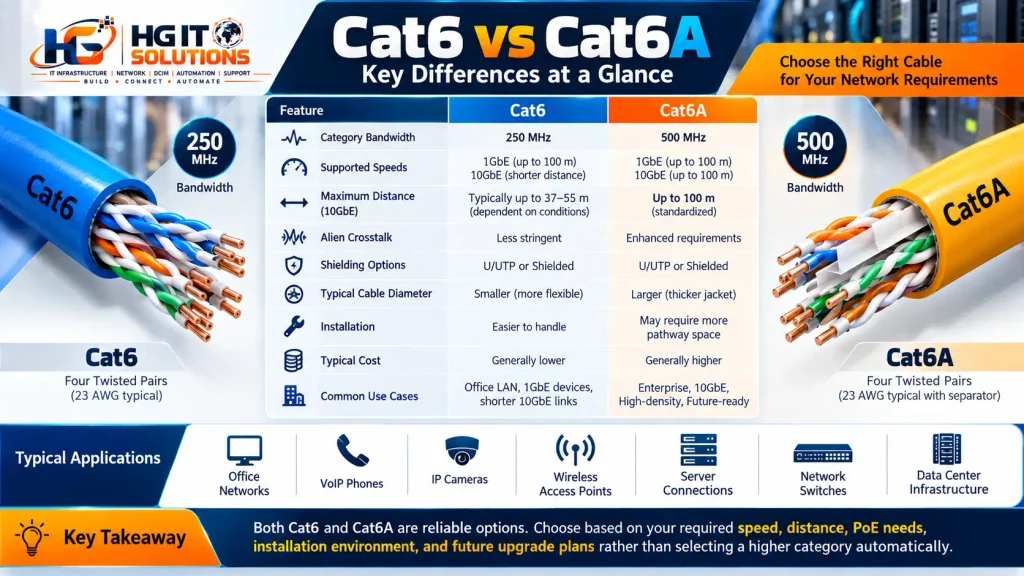
3. Cat6 vs Cat6A Ethernet Cable: Technical Comparison
The following table summarizes the main differences.
| Feature | Cat6 | Cat6A |
|---|---|---|
| Category bandwidth | 250 MHz | 500 MHz |
| 1GbE support | Up to 100 m | Up to 100 m |
| 10GbE support | Distance and conditions dependent | Up to 100 m |
| Alien crosstalk requirements | Less stringent than Cat6A | Defined enhanced requirements |
| Shielding | Shielded or unshielded | Shielded or unshielded |
| Cable diameter | Often smaller | Often larger |
| Installation flexibility | Often easier to handle | May require more pathway space |
| Typical material cost | Often lower | Often higher |
| Common applications | General LAN and shorter high-speed links | Full-distance 10GbE infrastructure |
Important: These values describe cabling categories and typical implementations. Actual performance depends on the complete channel, including cable, patch panels, outlets, patch cords, termination quality, and installation conditions.
Understanding MHz versus Mbps
One common misunderstanding is that the MHz rating represents the actual Ethernet data speed.
It does not.
MHz describes a frequency range over which cabling performance is specified, while Mbps or Gbps describes digital data transmission rates.
For example, Cat6A has a 500 MHz category specification but supports 10Gbps Ethernet through the signaling techniques used by 10GBASE-T equipment.
Therefore, it is incorrect to interpret a 500 MHz cable as having a maximum network speed of 500Mbps.
4. Maximum Cable Distance: What Does 100 Meters Really Mean?
In structured cabling, the commonly referenced 100-meter Ethernet distance normally describes the complete channel.
A conventional channel design allows:
- Up to 90 meters of permanent horizontal cabling
- Up to 10 meters of combined patch cords and equipment cords
This arrangement is commonly referred to as the 90-meter permanent link and 100-meter channel model.
The actual allowable lengths can be affected by cable type, patch cord construction, operating temperature, and applicable standards.
Cat6 at 10Gbps
For existing Cat6 cabling, 10GBASE-T operation may be possible at shorter distances.
Industry guidance describes operation up to approximately 37 meters as generally expected under specified conditions, with operation between 37 and 55 meters dependent on alien crosstalk conditions. Longer links may require additional mitigation or qualification.
This should not be interpreted as a universal guarantee that every Cat6 cable will support 10Gbps at 55 meters.
A properly conducted cabling assessment is necessary when the existing infrastructure must support 10GBASE-T.
Cat6A at 10Gbps
Cat6A is specified to support 10GBASE-T across a compliant 100-meter channel.
This makes it relevant for new installations where full-distance 10GbE capability is an explicit design requirement.

Example: Office network expansion
Imagine an office where a network cabinet is installed in a central communications room.
The longest horizontal cable run is approximately 75 meters.
If the network is designed exclusively for 1Gbps access, Cat6 may satisfy the current requirement.
If the same project requires 10Gbps connections across those 75-meter runs, a complete Cat6A cabling system provides the standardized 100-meter 10GBASE-T capability.
The decision should be based on network requirements rather than cable category alone.
5. Understanding Crosstalk and Signal Interference
Crosstalk occurs when electrical signals in one conductor pair or cable influence signals in another.
Copper Ethernet cabling uses differential signaling and twisted pairs to reduce unwanted interference.
Several performance measurements help engineers evaluate cabling quality.
Near-End Crosstalk (NEXT)
NEXT measures unwanted signal coupling between pairs near the transmitting end of a connection.
Poor termination, excessive pair untwisting, and unsuitable components can negatively affect NEXT performance.
Return Loss
Return loss measures signal reflections caused by impedance mismatches along the cabling channel.
Problems can arise from poor terminations, damaged cable, unsuitable connectors, or physical deformation.
Insertion Loss
Insertion loss describes signal attenuation as it travels through the cabling channel.
Longer distances, higher frequencies, conductor characteristics, and temperature can influence attenuation.
Alien Crosstalk
Alien crosstalk refers to interference between separate cables rather than between pairs inside the same cable.
It becomes particularly important for high-speed Ethernet installations where multiple cables are installed close together.
Cat6A cabling systems include enhanced requirements intended to control alien crosstalk.
Practical installation lesson: Cable category does not compensate for poor workmanship. Even an expensive Cat6A cable can produce unreliable results if the installer damages the cable or terminates it incorrectly.
6. Shielded vs Unshielded Ethernet Cables
Both Cat6 and Cat6A cables can be manufactured in different shielding configurations.
Common designations include:
| Designation | Construction |
|---|---|
| U/UTP | No overall shield and no individual pair shields |
| F/UTP | Overall foil shield, unshielded pairs |
| U/FTP | Individually foil-shielded pairs, no overall shield |
| S/FTP | Overall braid shield and individually foil-shielded pairs |
When is shielding useful?
Shielding may be considered in environments with significant electromagnetic interference or where the selected cabling design requires screened components.
Examples include certain industrial installations, equipment areas, and pathways with elevated electrical noise.
However, shielded cable is not automatically necessary for every data center or office.
A shielded cabling system requires appropriate compatible components, termination practices, bonding, and grounding arrangements.
Using shielded cable without following the relevant installation requirements can undermine the intended benefits.
Installation recommendation
Before selecting shielding, evaluate the electrical environment, cable pathway, applicable standards, and manufacturer’s complete cabling system requirements.
Do not mix components randomly and assume the channel will achieve the category rating printed on the cable jacket.
7. Cat6 vs Cat6A for Power over Ethernet (PoE)
Power over Ethernet allows compatible network equipment to transmit electrical power and data over twisted-pair Ethernet cabling.
Common PoE applications include:
- Wireless access points
- IP cameras
- VoIP phones
- Access control equipment
- Sensors and building automation devices
Modern IEEE PoE implementations include:
| IEEE standard | Common designation | Maximum PSE power |
|---|---|---|
| IEEE 802.3af | PoE / Type 1 | 15.4 W |
| IEEE 802.3at | PoE+ / Type 2 | 30 W |
| IEEE 802.3bt | Type 3 | 60 W |
| IEEE 802.3bt | Type 4 | 90 W |
PSE means Power Sourcing Equipment, such as a compatible PoE switch or injector.
These figures represent maximum power at the sourcing equipment for the respective types. Power available at the powered device is lower because of cable losses.
Is Cat6A required for PoE++?
Not universally.
Properly specified Cat6 and Cat6A cabling systems can support IEEE PoE applications, subject to conductor characteristics, temperature ratings, cable bundling, installation conditions, and equipment requirements.
Cat6A products often use relatively larger conductors, which may help reduce resistance and associated heating, but conductor size must be verified from the actual product specification.
Cable category by itself is not enough to determine safe PoE capacity.

Why PoE cable heating matters
Electrical current flowing through copper conductors generates heat.
In large cable bundles, heat may accumulate because cables in the center have less opportunity to dissipate it.
Temperature increases can affect insertion loss and the long-term performance of the cabling system.
Engineers should consider:
- Conductor gauge and material
- Cable temperature rating
- Number of cables in a bundle
- Ambient temperature
- PoE load and duty cycle
- Pathway ventilation
- Applicable electrical and cabling requirements
For large, high-power PoE deployments, the cable manufacturer’s installation guidance and relevant standards should be reviewed during design.
8. Solid Copper vs Copper-Clad Aluminum (CCA)
Another important consideration is conductor material.
A genuine solid-copper conductor is different from copper-clad aluminum, commonly abbreviated CCA.
CCA uses an aluminum core covered by a layer of copper.
Because aluminum has higher electrical resistance than copper of comparable dimensions, CCA conductors can introduce additional voltage drop and heating concerns, especially in PoE applications.
CCA also has different mechanical properties, which can affect termination reliability.
For standards-compliant structured Ethernet cabling, specify suitable copper conductors and verify the manufacturer’s product documentation.
How to identify cable quality
Before installation, check:
- Manufacturer and part number
- Declared cabling category
- Conductor material
- Conductor gauge
- Jacket and fire-performance ratings
- Indoor or outdoor suitability
- Applicable compliance documentation
- Compatibility with the selected connectivity system
Do not rely only on a seller’s description such as “high speed,” “premium,” or “gaming Ethernet cable.”
The technical datasheet is more useful than marketing terminology.
9. Indoor vs Outdoor Cat6 and Cat6A Cabling
An Ethernet cable designed for indoor installation is not necessarily suitable for direct sunlight, rain, or outdoor temperature exposure.
Outdoor environments introduce additional risks, including:
- Ultraviolet radiation
- Water ingress
- Temperature changes
- Mechanical abrasion
- Wind-induced movement
- Moisture accumulation
- Insect or rodent damage
Why jacket selection matters
The cable jacket provides mechanical and environmental protection.
A jacket that deteriorates under sunlight may crack or split, exposing the underlying cable structure to moisture and mechanical damage.
Once the protective jacket is compromised, the cable should be assessed for replacement rather than assumed to remain suitable simply because connectivity still works.
Outdoor-rated cables may include UV-resistant jackets and water-blocking construction, depending on their intended application.
Can outdoor-rated cable be installed indoors?
That depends on its complete listing, fire rating, local regulations, and the installation route.
Outdoor suitability alone does not establish compliance with indoor building requirements.
Where a cable enters a building, additional considerations may include surge protection, bonding, pathway design, and transition to an appropriately rated indoor cabling system.
Always evaluate local electrical and building requirements before finalizing the installation.

10. Practical Troubleshooting Scenario: Intermittent Wireless Access Point Connectivity
Consider a wireless access point connected to a network router through a copper Ethernet cable, with power supplied by a compatible PoE injector.
The wireless service occasionally becomes unavailable, and the router may intermittently report that its LAN interface is disconnected.
Several possible causes must be investigated before concluding that the cable is defective.
Possible causes
1. Damaged cable jacket
Outdoor exposure and mechanical damage can affect cable reliability, particularly if moisture reaches the cable structure.
2. Poor RJ45 termination
An unreliable contact or damaged connector may cause intermittent link loss.
3. PoE power instability
An incompatible or malfunctioning injector, insufficient power delivery, or poor electrical connections may interrupt device operation.
4. Router or switch port problems
A failing interface or negotiation issue may cause the link to drop even when the cable is functional.
5. Access point configuration or firmware
Wireless radio interruptions can occur independently of physical Ethernet connectivity.
Step-by-step troubleshooting approach
Step 1: Observe the failure
Determine whether the Ethernet link drops, the access point reboots, or only wireless SSIDs disappear.
These symptoms suggest different areas for investigation.
Step 2: Inspect the cable
Check for visible jacket damage, crushed sections, sharp bends, exposed conductors, water ingress, and damaged connectors.
Step 3: Verify PoE compatibility
Confirm that the power source supports the exact requirements of the connected access point.
Step 4: Test with a known-good cable
Use an appropriately rated short test cable in a controlled setup to determine whether the existing cable path is involved.
Step 5: Check interface status
Review link negotiation, speed, error counters, and interface events on the router or switch where those diagnostics are available.
Step 6: Test the installed cable
For permanent structured cabling, use suitable certification equipment to evaluate the required category performance.
Step 7: Replace damaged components
If the cable jacket is visibly deteriorated or the cable fails the required tests, replace it with a suitable cable rather than relying on temporary repairs.
Engineering takeaway
Intermittent connectivity should be diagnosed systematically.
A cable may be one possible cause, but visual damage alone does not prove that every observed network problem originates from that cable.
Separating physical link failures, power interruptions, and wireless radio problems is essential for accurate troubleshooting.
11. Cat6 vs Cat6A for Wireless Access Points
Modern wireless access points may use 1GbE, 2.5GbE, 5GbE, or higher-speed wired uplinks depending on the model.
The cabling decision should reflect the actual access point requirements and network design.
For example, a device with a 1GbE interface does not automatically benefit from a Cat6A replacement when its existing Cat6 channel is compliant and operating correctly.
For new installations, Cat6A may be considered where longer-term 10GbE support, additional cabling performance margin, or standardized enterprise requirements justify it.
However, the access point’s supported Ethernet modes, PoE requirements, and manufacturer documentation must remain part of the design.
Ceiling installation considerations
Wireless access point cabling may pass through ceiling voids and shared pathways.
Installers should consider cable jacket ratings, fire requirements, mechanical support, pathway capacity, bend radius, and accessible termination locations.
Avoid placing cable under excessive tension or compressing it tightly around structural elements.
A neat-looking installation is not necessarily a standards-compliant installation.
12. Cat6 vs Cat6A for Data Center Networks
Data centers often combine multiple connectivity technologies.
Copper Ethernet may be used for management networks, access connections, infrastructure controllers, and selected server or appliance links.
Fiber optics is frequently used for high-speed uplinks, longer distances, and applications where optical interfaces are more appropriate.
Where Cat6 may fit
Cat6 can remain suitable for management and general-purpose connections when the required Ethernet speed and distance are supported.
Where Cat6A may fit
Cat6A can be used where the design calls for 10GBASE-T connectivity across a compliant copper channel up to 100 meters.
When fiber should be evaluated
Fiber may be appropriate when the application requires longer reach, different transceiver options, high-speed interconnections, or electrical isolation.
Copper and fiber should not be treated as universally interchangeable technologies.
For more information on multimode fiber selection, read our HG IT Solutions guide on OM3 vs OM4 vs OM5 Fiber: Which One Should You Use in a Data Center?
The choice should consider actual link requirements, equipment interfaces, pathway conditions, optics, lifecycle costs, and operational requirements.
13. Installation Best Practices for Cat6 and Cat6A
Even correctly selected cable can perform poorly if installation practices are inadequate.
13.1 Plan cable pathways
Before pulling cable, identify routes between telecommunications spaces and outlets.
Check pathway capacity, accessibility, separation from electrical systems, and environmental conditions.
13.2 Respect bend radius
Excessive bending can deform cable geometry and affect electrical performance.
Use the manufacturer’s specified minimum bend radius during installation and after termination.
13.3 Avoid excessive pulling tension
Applying too much force can stretch or damage the cable.
Follow the manufacturer’s maximum pulling tension and use appropriate installation methods.
13.4 Preserve pair twists
During termination, maintain pair twists as close as practicable to the connector termination points according to the relevant component instructions.
Excessive untwisting can reduce crosstalk performance.
13.5 Use compatible components
A complete Category 6A channel requires components and installation practices capable of meeting the applicable Category 6A requirements.
Do not assume that installing Cat6A bulk cable with arbitrary lower-category connectivity creates a certified Cat6A channel.
13.6 Manage cable bundles
Avoid excessively tight cable ties that compress or deform the cable jacket.
Use suitable cable management and consider hook-and-loop fasteners where appropriate.
13.7 Label both ends
Every installed cable should have an identifiable label that corresponds with its termination points and infrastructure documentation.
Clear labeling makes troubleshooting, maintenance, and future changes easier.
13.8 Maintain records
Document cable identifiers, source and destination, cable category, test results, and relevant installation details.
These records become valuable when troubleshooting faults or planning infrastructure upgrades.
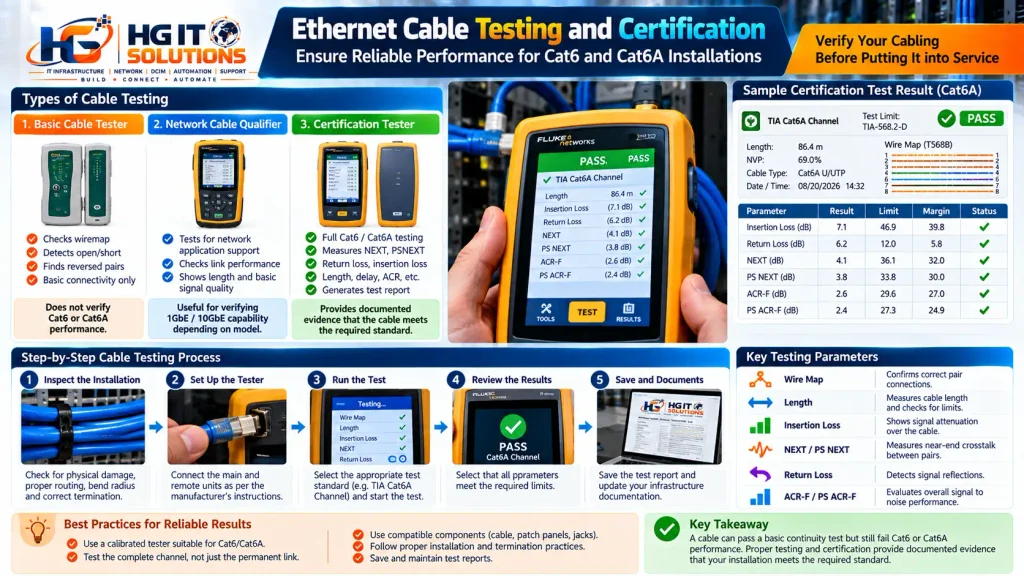
14. Cable Testing vs Cable Certification
A common mistake is treating a basic continuity test as proof that a cable meets its claimed category.
Different testing tools answer different questions.
Basic cable tester
A simple wiremap tester may identify:
- Open conductors
- Short circuits
- Reversed conductors
- Certain wiring errors
- Split pairs, if supported by the tester
However, basic wiremap testing does not demonstrate full Cat6 or Cat6A transmission performance.
Network cable qualifier
A qualifier may help determine whether an installed link can support selected network applications or operating speeds.
Its capabilities depend on the specific instrument.
Cable certification tester
A suitable field certification tester measures cabling performance against defined category or class limits.
Depending on the selected test standard and configuration, measurements can include:
- Wiremap
- Length
- Insertion loss
- NEXT and power-sum NEXT
- Return loss
- ACR-related parameters
- Propagation delay
- Delay skew
Alien crosstalk testing or assessment may also be relevant for certain 10GBASE-T qualification requirements.
Why certification matters
A cable can pass a basic continuity test and still fail high-frequency performance requirements.
Certification provides documented evidence that an installed permanent link or channel meets the selected cabling test limits.
For enterprise installations, retaining test reports alongside the cabling documentation can simplify acceptance, warranty discussions, and future troubleshooting.
15. Common Installation Mistakes
The following mistakes are worth avoiding.
Using cable category as the only purchasing criterion: A higher category label does not guarantee better installation quality.
Ignoring conductor material: Low-quality or unsuitable conductors can create reliability and PoE concerns.
Using indoor cable outdoors: Environmental exposure may damage cable not designed for the conditions.
Overtightening cable ties: Excessive compression can deform cable geometry.
Mixing incompatible components: The complete channel must meet the intended performance requirements.
Skipping certification: Connectivity alone does not establish compliance with a cabling category.
Failing to document cable routes: Missing records increase troubleshooting time.
Assuming every wireless problem is a cable problem: Power, firmware, radio configuration, and upstream networking also require investigation.
16. How to Choose Between Cat6 and Cat6A
Before selecting cable, answer five practical questions.
What Ethernet speed is required?
If the project requires only 1GbE over standard channel distances, a compliant Cat6 system may be sufficient.
If the requirement is 10GBASE-T across the full 100-meter channel, specify an appropriate Cat6A system.
How long are the cable runs?
Measure the intended permanent link and account for patch cords and the complete channel design.
Avoid designing to the maximum distance without considering the relevant installation conditions.
Will the cable carry PoE?
Determine the actual PoE type, current, conductor specifications, bundle arrangement, and operating temperature.
Do not assume all cables within a category have identical electrical or thermal characteristics.
What is the installation environment?
Indoor offices, industrial spaces, ceilings, outdoor pathways, and data centers can have different environmental and regulatory requirements.
What are the future upgrade plans?
If infrastructure is expected to remain in service through several generations of network equipment, evaluate the likely future Ethernet requirements and the difficulty of replacing installed cabling.
Future planning should be based on realistic equipment and application needs rather than assuming every endpoint will eventually require 10Gbps.
17. Practical Cabling Installation Checklist
Use this checklist before accepting a new installation.
- Confirm required Ethernet speeds and channel distances.
- Select the appropriate cable category.
- Verify conductor material and cable specifications.
- Check environmental and fire-rating requirements.
- Confirm PoE power and thermal requirements.
- Select compatible connectors, outlets, and patch panels.
- Verify pathway capacity and cable routing.
- Follow bend-radius and pulling-tension limits.
- Avoid cable compression and physical damage.
- Label both ends of each installed cable.
- Perform the required field certification tests.
- Save test results and update infrastructure documentation.
18. Frequently Asked Questions
Is Cat6A faster than Cat6?
Cat6A supports a higher specified frequency range and provides standardized 10GBASE-T capability over a compliant 100-meter channel. However, actual network speed depends on the connected equipment and negotiated Ethernet link speed.
Can Cat6 support 10Gbps?
Yes, under suitable conditions and typically over shorter distances. Existing Cat6 links intended for 10GBASE-T should be assessed against the relevant requirements rather than assumed to support a fixed maximum distance.
Does Cat6A require shielded cable?
No. Cat6A cabling systems can be unshielded or shielded. The selection depends on the cabling system design, environment, and installation requirements.
Is Cat6A necessary for Wi-Fi 6 access points?
Not automatically. The appropriate cable depends on the access point’s Ethernet interface, PoE requirements, channel distance, existing cabling performance, and future network design.
Is Cat6 suitable for PoE++?
Properly specified Cat6 cabling can support IEEE 802.3bt applications, subject to conductor characteristics, installation conditions, thermal considerations, and relevant standards.
Can I use Cat6A cable with a Cat6 patch panel?
Physical compatibility does not guarantee Category 6A channel performance. The complete cabling channel should use suitable components and be tested against the intended performance requirements.
Is a 100-meter Cat6A cable guaranteed to work at 10Gbps?
A compliant Cat6A channel is specified for 10GBASE-T up to 100 meters. Actual installations still require compatible equipment, correct termination, and appropriate testing.
Should damaged outdoor Ethernet cable be repaired or replaced?
When the cable jacket is compromised, replacement with a suitable outdoor-rated cable is generally the more reliable approach. The complete installation should also be inspected for moisture, mechanical damage, and other environmental problems.
Conclusion
The Cat6 vs Cat6A Ethernet Cable decision should be based on network requirements, not simply the assumption that a higher category is always necessary.
Cat6 remains relevant for many enterprise LAN applications, including compliant 1GbE connections and certain shorter-distance 10GBASE-T deployments.
Cat6A provides enhanced transmission performance and standardized support for 10GBASE-T across a 100-meter channel, making it relevant for installations where that capability is required.
However, cable category is only one part of a reliable network connection.
Conductor quality, termination workmanship, cable routing, environmental protection, PoE design, testing, and documentation all contribute to long-term performance.
At HG IT Solutions, the objective of practical infrastructure documentation is to connect technical standards with the installation and troubleshooting decisions engineers encounter in real environments.
A reliable network starts with properly designed, installed, tested, and documented infrastructure.
HG IT Solutions — Build • Connect • Automate
Technical reference links
- Fluke Networks — 10GBASE-T Field Testing Requirements: Cat6 distance limitations aur alien crosstalk.
- Ethernet Alliance — Cabling System Design for PoE: PoE current, conductor gauge, temperature aur bundling.
- Belden — Cat6A Indoor/Outdoor Cable Specifications: Outdoor-rated cable construction aur 500 MHz specifications.

Pingback: Cat6A U/UTP vs F/UTP vs S/FTP: Shielding Guide